
Renderosity Forums / Poser Beginners Hub
Welcome to the Poser Beginners Hub Forum
Forum Moderators: Anim8dtoon, wheatpenny, RedPhantom
Poser Beginners Hub F.A.Q (Last Updated: 2026 Mar 20 5:24 am)
New to Poser? Ask questions here for expert help!

Subject: Flash Poser 9


Unfortunately, the library needed Flash to run. Without it, you can't use the library. You might look in your preferences and see if you have the option for the external library. That runs on Adobe Air. But I don't know if that option is available in your version or if Air is still available. Your other options would be to try to find a version of Flash, but be careful of that to make sure it's a safe version. The other option would be to be a 3rd party library. I don't know of any so I can't recommend any
Available on Amazon for the Kindle E-Reader Monster of the North and The Shimmering Mage
Today I break my own personal record for the number of days for being alive.
Check out my store here or my free stuff here
I use Poser 13 and win 10

You can try using a browser like Firefox and open http://127.0.0.1:11530/nonVirtualAssets/ContentLibrary-1.9.11/release-1.9.11/ContentLibrary/ContentLibrary.html while Poser is up and running. It should work with any external browser if it's going to work at all.
That might open the library in the external browser. I use that set up all the time with P13 and P14. It worked for P11 and P12 also. I don't remember when I started doing this but it was before P11. You used to have to go into the Poser .ini file and make a change to use an external runtime library but I haven't had to do that for the more modern versions of Poser.
Every time I upgrade I'm afraid I'll lose this option... >.<
Final caveat: I don't know what system you are using; I use Windows and this little hack works in both Windows 10 and 11 for me and used to work fine in previous versions of Windows, too.
Teh Mollz
I've used Molly's suggestion in the past, too. You can use your Poser 7 content in Poser 13. Where you had trouble with Poser 11, you might try the free trial before paying for 13.
Available on Amazon for the Kindle E-Reader Monster of the North and The Shimmering Mage
Today I break my own personal record for the number of days for being alive.
Check out my store here or my free stuff here
I use Poser 13 and win 10
You can copy your Poser 7 content if you want, or you can just add that library to your current one.
In your Poser 13 library click this button
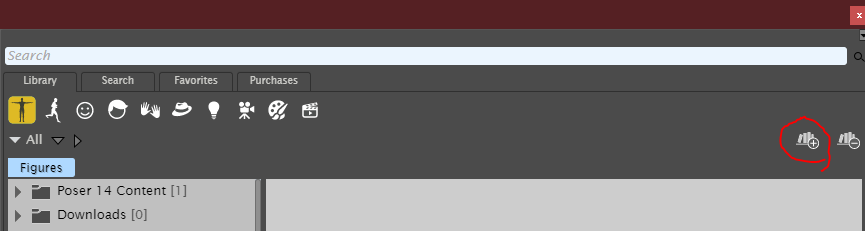
Navigate to your library where it says runtime. (Used Poser 12 since I don't have a runtime called Poser 7) Click on the folder that contains the runtime.
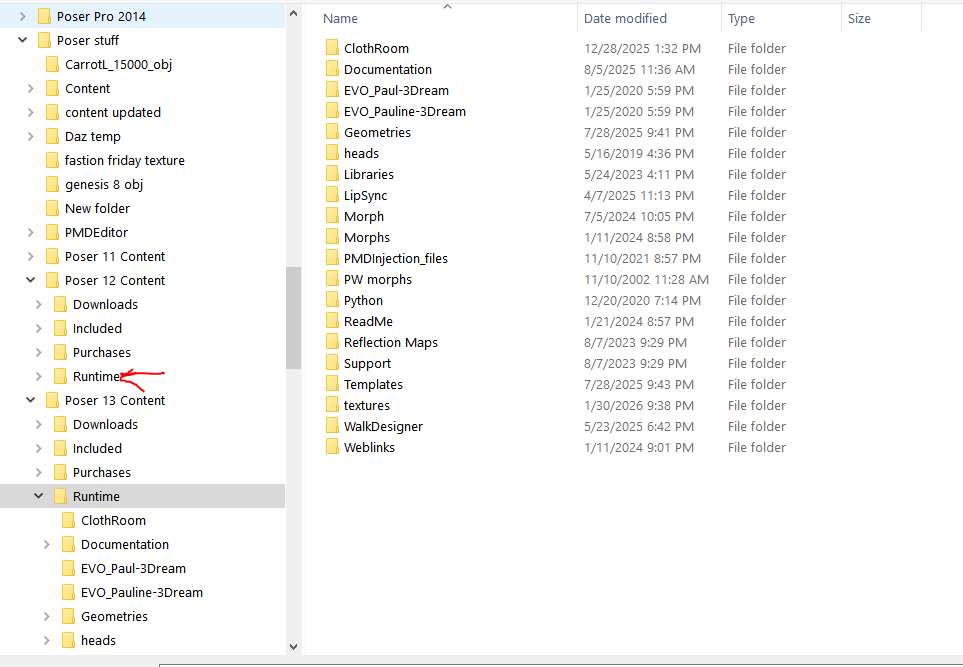
Hit select folder. Give Poser a moment or 2 to work. That might take a little time depending on your hardware and the size of the runtime.
Available on Amazon for the Kindle E-Reader Monster of the North and The Shimmering Mage
Today I break my own personal record for the number of days for being alive.
Check out my store here or my free stuff here
I use Poser 13 and win 10

Yeah, that’s the old Flash-based library biting you.Thanks to Flash, I can't find a library in Poser 9.
Instead, I get a window telling me I can't use Flash anymore. Any way I can remove that window so I can find a library? I like Poser 9. Sadly, I can't use it.
Poser 9 relied on Flash for parts of the UI, and since Flash is gone, that window just blocks access.

Privacy Notice
This site uses cookies to deliver the best experience. Our own cookies make user accounts and other features possible. Third-party cookies are used to display relevant ads and to analyze how Renderosity is used. By using our site, you acknowledge that you have read and understood our Terms of Service, including our Cookie Policy and our Privacy Policy.
Thanks to Flash, I can't find a library in Poser 9.
Instead, I get a window telling me I can't use Flash anymore. Any way I can remove that window so I can find a library? I like Poser 9. Sadly, I can't use it.