
Renderosity Forums / La Femme 2
Welcome to the La Femme 2 Forum
Forum Moderators: Kalypso, msansing Forum Coordinators: Anim8dtoon, Digitell
(Last Updated: 2026 May 21 9:27 am)

Subject: Problem with INJ REM created for La Femme2 morph


In both the INJ and REM files, look in the targetGeom section for your MAIN dial (in other words, if it's named myCharacterFBM, there will be a target geometry section named that). The following shows an example of the Mizz Li morph that you should have in your included files: Notice the five lines immediately after trackingScale 0.004, starting with keys and ending with a closing bracket. You need to add those five lines into BOTH your INJ and REM files.
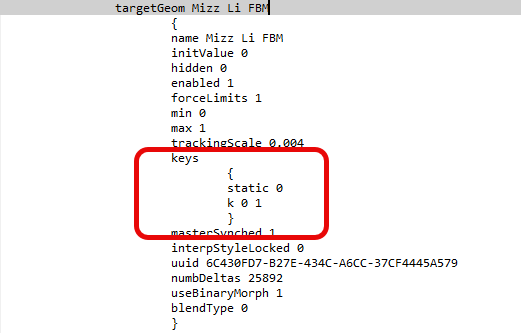
keys
{
static 0
k 0 1
}
If you want to look at the original INJ and REM files, you will find full body, head, and body versions in Poser 13 Content > Included > Libraries > pose > La Femme > INJ-REM Character > Mizz Li folder.
You said "When you click on the REMs it deletes the wheels (normal until then) but when you reload the morph again with the INJ and put the wheel on 1 the morph is doubled, you have to put it at 0.5 for it to be correct."
Did you add those five lines to the REM files as well? Using the REM should completely remove the parameter dial that you injected (one REM each for the number of injections you added). Then it wouldn't double up if you inject it again.

Privacy Notice
This site uses cookies to deliver the best experience. Our own cookies make user accounts and other features possible. Third-party cookies are used to display relevant ads and to analyze how Renderosity is used. By using our site, you acknowledge that you have read and understood our Terms of Service, including our Cookie Policy and our Privacy Policy.
Hi,
I have problems saving a morph for La Femme2, I use poser 13 and windows 10.
I created the morph and then created an INJ and a REM in Poser for the head and one for the body. It works well except for 2 problems.
1st problem:
The morph wheels load at zero and you have to go and position them on 1 to get the morph.
2nd more annoying problem:
When you click on the REMs it deletes the wheels (normal until then) but when you reload the morph again with the INJ and put the wheel on 1 the morph is doubled, you have to put it at 0.5 for it to be correct.
I contacted Poser technical support, the technician explained to me that Poser creates dependencies that can only be deleted by saving the scene and reopening it. The problem is that it is a morph with textures that I want to sell and it does not seem right to me to sell it like that.
I have morphs for La Femme2 that I bought and they do not have either of these two problems. So it is possible but how? I rummaged through the codes but without result.
Does anyone have the solution ?
Thanks in advance