
Tipol opened this issue on Feb 21, 2025 · 6 posts
DeeceyArt posted Fri, 21 February 2025 at 4:25 PM
In both the INJ and REM files, look in the targetGeom section for your MAIN dial (in other words, if it's named myCharacterFBM, there will be a target geometry section named that). The following shows an example of the Mizz Li morph that you should have in your included files: Notice the five lines immediately after trackingScale 0.004, starting with keys and ending with a closing bracket. You need to add those five lines into BOTH your INJ and REM files.
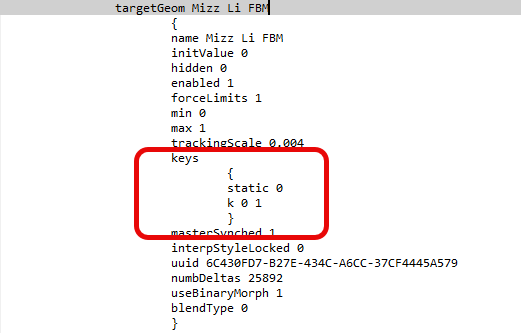
keys
{
static 0
k 0 1
}
If you want to look at the original INJ and REM files, you will find full body, head, and body versions in Poser 13 Content > Included > Libraries > pose > La Femme > INJ-REM Character > Mizz Li folder.