
Renderosity Forums / Poser 11
Welcome to the Poser 11 Forum
Forum Moderators: nerd Forum Coordinators: Anim8dtoon, Digitell
Poser 11 F.A.Q (Last Updated: 2026 Jun 17 1:11 am)

Welcome to the Poser Forums! Need help with these versions, advice on upgrading? Etc...you've arrived at the right place!
Looking for Poser Tutorials? Find those HERE

Subject: Need to know how to properly save a pose in Poser


To avoid having that problem uncheck this box

It should show up after the dialog box asking for the name
Available on Amazon for the Kindle E-Reader Monster of the North and The Shimmering Mage
Today I break my own personal record for the number of days for being alive.
Check out my store here or my free stuff here
I use Poser 13 and win 10
Got it figured out. Thanks so much for your help!
---Wolff On The Prowl---

I find it unusual that you couldn't find an instruction manual for the script. D3D was always meticulous about including a PDF instruction manual with his products. In the meantime, RedPhantom has given you the right information if you save through Poser's protocol. The same may apply in D3D's script.
I'm back. Old man brain once again not remembering. I have floating going on when posing my saved out poses. I tried unchecking and checking Scales since that seems to be checked off by default in Poser 11 but to no avail. If it's Transformations that needs to be checked wouldn't that undo what was explained above by placing the figure back to center? There's only three options and I don't want morphs applied so that seems not the correct way either. Any help getting my figure to follow where it's placed for each pose, what I mean is if it's elevated off of the ground and then the next pose has it kneeling ON the ground..... I hope that makes sense.
Thanks so much
Richard
---Wolff On The Prowl---

Won't work. Either you apply a pose and the figure stays where it is, or you apply a pose and have it move to a location. From standing to kneeling is two different locations in the Y Axis. But Saving the Y also saves the X and Z. Once you apply the pose you will have to move the figure to where you want it.
Poser 5, 6, 7, 8, Poser Pro 9 (2012), 10 (2014), 11, 12, 13, 14
Oh come on man. There has to be a way. I set a figure's pose, floating, hip translations up to like .15. Save it out. Mirror it, save that out. Both apply fine. Then I create a new pose with the figure kneeling, Meaning the HIP translations are set to -.17 save it out and then create the mirror. Then test. Works fine but if I try to click the floating pose and then the kneeling pose it gets messy. I just checked and yes, if the translations are checked off the figure lands were it's supposed to POSE WISE but it will move the figure back to the center of the scene. I had my pose pack for LaFemme 'failed' and ended up giving it away in the freebie section because this crap.
If there is no direct way to fix this via Poser directly is there a way to fix this in an Edit Pad by setting a specific line therein and then saving it back out?
Thanks
Richard
---Wolff On The Prowl---
The problem is that you have two poses, one at .15 and the other at -.17 and it sounds like it should be easy to make the hip drop down by .32. However, that would only work if the two poses are applied back to back. How do you account for a third pose that may have moved the hip to say .04? Or what happens when I put the figure on a box that moves the hip up by say .80? Where does the kneeling pose move to? The top of the box or the ground putting it inside the box. Either you set the pose to move back to a set location normally 0.0.0 Or you let it float as it is in space. Trying to make it so that you don't have to move the figure afterwards means that it locks it to a very specific set of conditions and it would be pointless to most people. Your first poses that returned the figure to the center of the scene is an example of that. A pose is suppose to move a figure into a set position, after that then it has to be set by the user to face forward backwards or tilted or any other set of combinations you cannot even begin to hope to think of.
Poser 5, 6, 7, 8, Poser Pro 9 (2012), 10 (2014), 11, 12, 13, 14
That was my thinking as well when making my pose pack for LaFemme 2 but you can look in my freebie area because it was failed and I gave it all away. Why, because of that very issue. Clicking on a pose, any pose, back to back should place the figure's hip in the correct translation without moving it back to the center of the scene but that's what happens when the Translation box is checked when saving out the new pose. Without checking off that box when saving the figure's hip will translate properly and stay where you put it but upon clicking another pose if the figure was meant to float (superhero stuff) or kneel then they will either be too high or too low in the scene because there was no instruction written to place it where it should be. In DAZ Studio, when saving out a pose there are allot of areas, sure, every figure has them but there are controls that you click. Like for the rotations, there is a script that's run to only check the rotations but then you go in to the hip, expand that and you can find all the translations to check to keep the figure from being recentered in the scene while honoring the Y either + or - with no issue. Poser dearly needs that sort of minute control to have a proper mixed pose pack, which is what I like making. If I had a "flight" pack it wouldn't matter or a kneeling pack, same, no issue but when your offering a mixed pack you get messed up because if these controls are there but hidden or no controls written into the code then your fooked. So hours and hours of my time spent on LaFemme 2's mixed pose pack had to be given away for free because I didn't have the proper controls. With figures like Dawn and Dusk from Hivewire, I could make the pose pack in DAZ Studio with all those extra controls and then save them out to PZ2 files from there and have everything work as needed. Can't do that with LH or LF because they are Poser native only!
---Wolff On The Prowl---
I had my pose pack for LaFemme 'failed' and ended up giving it away in the freebie section [...]
I had a look at your pose pack, and I can see that it includes body transformations, which is probably why it failed. It also includes scale information, which would upset anyone who had used scaling during the creation of their character.
I think the confusion arises because Poser has two ways of moving a figure around the stage - by moving the body, and by moving the hip (or whatever the base of the hierarchy is). I haven't seen this stated anywhere, but the convention for pose files seems to be that you can leave hip translations in (there's no way to stop Poser doing that except by using a Python script, or editing the pose afterwards). Hip Y translations are how you'd make a figure jump in the air, lay on the ground or sit on a chair. Again by convention you'd zero the hip x and z translations before saving, if any had crept in. This is how other commercial pose packs seem to be made, but I don't buy them often.
In other words, in Poser 11 you uncheck the Body transformation and scales boxes when saving a pose, and of course don't use body transformation while creating your poses. I see you have a pose pack in the marketplace, so you must have hit on the magic formula if only by accident. :)
The exception to this is if you're making 'go-to' poses which deliberately place a figure within a large scene, and in that case I'd expect to see body transformations included in the pose. The user could then apply another general purpose pose but leave the figure in its new position.
This issue with the whole mess was that my pack failed (I didn't realize I had included Scales, I think I was just so frustrated at that point I wasn't paying attention) but according to the in house testers is that if the figure is placed in a scene and the pose is applied and translations are checked off it will not sink or dip into the scene so that's honored but it will be returned to the center of the scene pissing off the end user.
In DAZ Studio there are allot of options when saving out poses, it can be a bit overwhelming to newbies, been there, but once you understand it all these save-outs works exactly as you expect. Move your figure where you want, apply the pose and then apply another pose and another pose and they figure stays where it's supposed to stay and the hip translations will have it where you intended it to be and will not be whisked back to the center of the scene.
In Poser it's not wonder there are no mixed pose packs like I usually do. They are usually all on the ground or standing or flying because that's going to pass testing without any red flags but when you offer a mixed pose pack and have the limitations to how things are saved out, esp in the hip translations, the figure either ends up dipping or too high in the scene when translations are not checked off but those hip translations will be honored if it is checked off when saving out BUT will end up centered in the scene, frustrating the end user!
---Wolff On The Prowl---
No, I'm talking about a figure that your applying poses to one after the other. In DS you can do that and it works with the extra controls included when saving out a pose but in Poser these extra controls are hidden. I've submitted a report to GIT and hopefully, fingers crossed, Tim and CO are looking at my report and will give us those extra controls in time. For now I won't do pose packs unless it's for Dusk and Dawn as poses for them can be done in DS and then saves as PZ2 files too from DS. Dawn 2 I could do those as well but without a Dusk 2 it seems like a moot point as I mostly only support male figures.
---Wolff On The Prowl---

You could remove that data from the pz2 files after the fact. I use Aanascent's Cleanpose but it seems to have vanished off the internet. It looks like https://www.daz3d.com/poserepair does the same thing though.

Over time, I've bought many pose sets, often to have ideas. Some of them are including rotations and translations for the BODY part, which moves the character where it shouldn't.
There are a few solutions for already recorded poses. That includes using either text editors (PSPad, Notepad++ and the likes) or a specific gem: PoserEd.
Example:
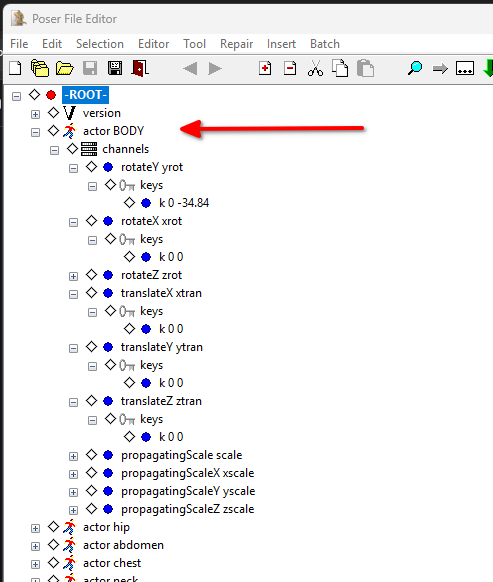
Here, the actor BODY contains rotateX, ...Y or ...Z blocks, as well as translate items.
Simply remove them. Here I have removed the whole channels block as I don't need it
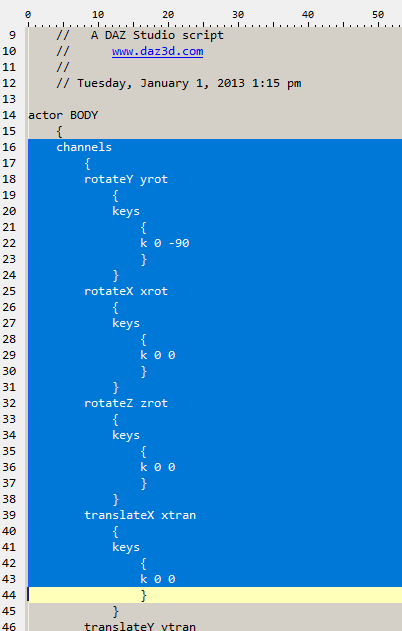
Text editor can do the same, it's just a little more tricky, as show in this excerpt, as the structure with {...} must be respected.
As often: first save as an alternate pose, to check it, than archive the original and replace it with your version.
𝒫𝒽𝓎𝓁
(っ◔◡◔)っ
👿 Win11 on i9-13900K@5GHz, 64GB, RoG Strix B760F Gaming, Asus Tuf Gaming RTX 4070 OC Edition, 1+2 TB SSD's, 6+4TB HD
👿 Mac Mini M2, Tahoe 26.5, 16GB, 500GB SSD
👿 Nas 10TB
👿 Poser 13 and 14 ❤️
So using a new AI to help me with this pose issue. It's called Claude. It fixed my issue. The issue with the poses being recentered in the scene upon applying a pose with the Translation boxes is that the Body is in the file and has a bunch of stuff written and that's what's causing this issue. So it gave me a very simple replacement script to replace all the body stuff:
actor BODY:1
{
channels
{
}
}
Now the figure lands where it's supposed to land but will stay where the end user places it in the scene. WOW. CoPilot couldn't seem to grasp that.
---Wolff On The Prowl---
I hope that the code monkeys for Poser 14 will finally give us a way to EXCLUDE the "body" part of the figure when saving out. This would solve all the issues esp for creators like myself that like to Mixed Pose packs.
---Wolff On The Prowl---
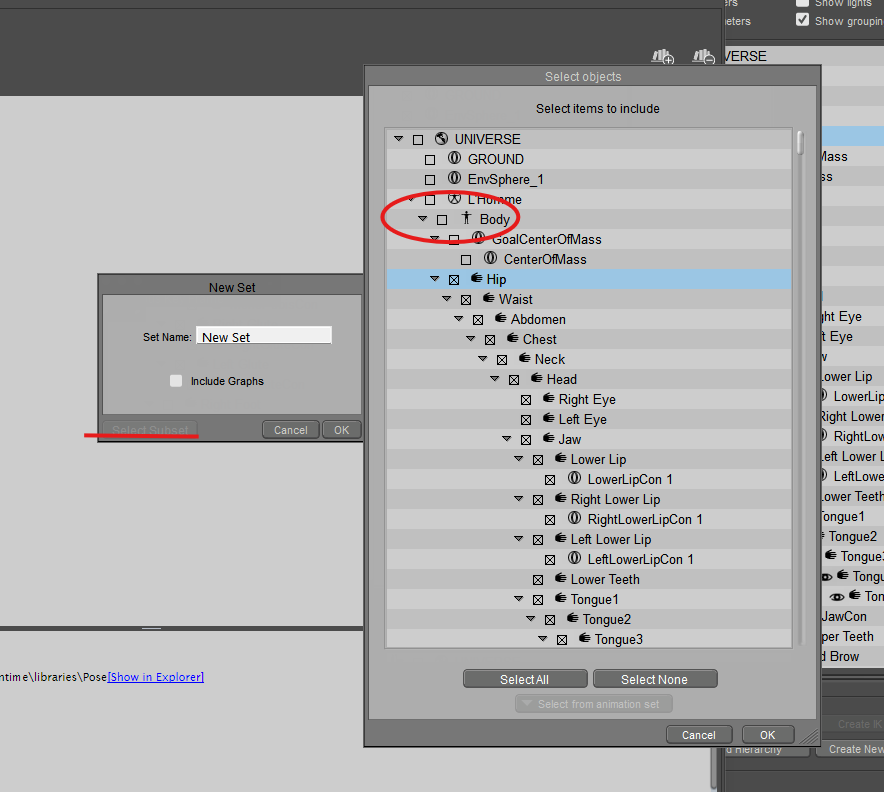
Maybe I don't understand what you're looking for. If you don't want to save the body, why don't you use the select subset? You can select all the body parts you want, but exclude the actual body.
Available on Amazon for the Kindle E-Reader Monster of the North and The Shimmering Mage
Today I break my own personal record for the number of days for being alive.
Check out my store here or my free stuff here
I use Poser 13 and win 10
I do own this but installing it for Poser keeps causing the exe to crash out. So that seems odd to me.You could remove that data from the pz2 files after the fact. I use Aanascent's Cleanpose but it seems to have vanished off the internet. It looks like https://www.daz3d.com/poserepair does the same thing though.
---Wolff On The Prowl---
Well that seems smart. Never thought of that before. Thanks!Maybe I don't understand what you're looking for. If you don't want to save the body, why don't you use the select subset? You can select all the body parts you want, but exclude the actual body.
---Wolff On The Prowl---

If you want further granularity. For example selecting specific dial to save in the PZ2 you can create an "Animation Set" in the animation palette. Animation sets is a really stupid name for that feature. Think of it as a predefined parameter group.
Create an animation set with dials and parts you want. Then use the option at the bottom of the body part chooser to load up that Animation Set.
ChromeStar posted at 9:17 PM Tue, 26 May 2026 - #4506746This program is a freestanding app, it doesn't shouldn't be connected to Poser in anyway except for an output.I do own this but installing it for Poser keeps causing the exe to crash out. So that seems odd to me.You could remove that data from the pz2 files after the fact. I use Aanascent's Cleanpose but it seems to have vanished off the internet. It looks like https://www.daz3d.com/poserepair does the same thing though.

Privacy Notice
This site uses cookies to deliver the best experience. Our own cookies make user accounts and other features possible. Third-party cookies are used to display relevant ads and to analyze how Renderosity is used. By using our site, you acknowledge that you have read and understood our Terms of Service, including our Cookie Policy and our Privacy Policy.
I'm kinda at my wits end. I'm getting feedback that my poses, when double clicked, are putting the figure back into the center of the scene. I need to know what boxes to check or uncheck in the save out dialog to make sure they stay where the end user wants them to stay.
Better yet, if there is a way for me to hack the files in a text editor that would work too.
I have Convert to Pose by Dimension3D but can't find any info on that out there and while the script looks like a "jack of all trades" I'm not sure what boxes to uncheck and check so that's good. I've searched high and low for a video to show me how to use this script to no avail so back to either saving out one by one from Poser or hacking the files in my text editor.
Thanks so much
Richard / RAMWorks / Wolffie
---Wolff On The Prowl---
My Store is HERE
My Freebies are HERE