
Renderosity Forums / Poser Python Scripting
Welcome to the Poser Python Scripting Forum
Forum Moderators: Lobo3433, Staff Forum Coordinators: Anim8dtoon
Poser Python Scripting F.A.Q (Last Updated: 2026 Aug 22 10:53 am)
Check out the new Poser Python Wish List thread. If you have an idea for a script, jot it down and maybe someone can write it. If you're looking to write a script, check out this thread for useful suggestions.
Also, check out the official Python site for interpreters, sample code, applications, cool links and debuggers. This is THE central site for Python.
You can now attach text files to your posts to pass around scripts. Just attach the script as a txt file like you would a jpg or gif. Since the forum will use a random name for the file in the link, you should give instructions on what the file name should be and where to install it. Its a good idea to usually put that info right in the script file as well.
Checkout the Renderosity MarketPlace - Your source for digital art content!

Subject: kValueOpTypeCodePYTHONCALLBACK doesn't seem to work

(This is related to adp001's suggestion to use a Python callback over there)
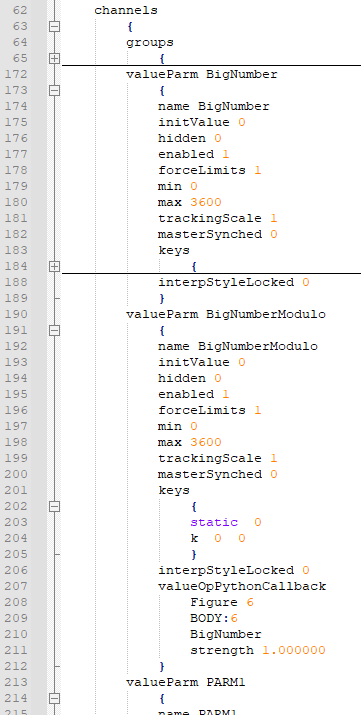
I've managed to manually add a callback valueOp to my CR2 and with adp001's sample code I've got things working, except that the callback doesn't affect the parameter I thought it would. Here's the bit of the CR2 - BigNumber can go above 360, and I'm trying to use a callback to set BigNumberModulo to be BigNumber reduced modulo 360:
and here's my hacked version of adp001's sample (yes, I'm a debug print fiend):
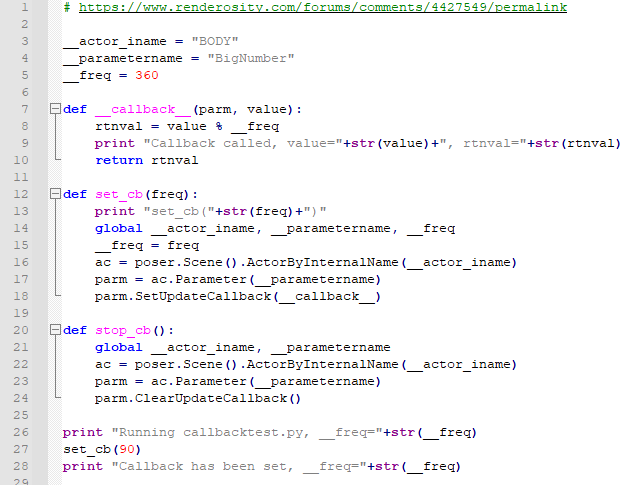
...ah ! I think I've just seen why it does what it does... :)
The 3Dcheapskate* occasionally posts sensible stuff. Usually by accident. And it usually uses Poser 11, with units set to inches. Except when it's using Poser 6 or PP2014, or when its units are set to PNU or something else.
*soon only to be available in two flavours - DAZ and Renderosity
I should say that the reason I was trying to call AddValueOperation(poser.kValueOpTypeCodePYTHONCALLBACK,...) was mainly to see what fields it added for a PythonCallback.
The 3Dcheapskate* occasionally posts sensible stuff. Usually by accident. And it usually uses Poser 11, with units set to inches. Except when it's using Poser 6 or PP2014, or when its units are set to PNU or something else.
*soon only to be available in two flavours - DAZ and Renderosity

My assumption is that "kValueOpTypeCodePYTHONCALLBACK" is just a placeholder. Without further parameters, because they are set by the Python code. But Poser knows that the missing arguments are not an error.
In any case, I find it very practical, especially since in a CR2 you can achieve the start of a script without the user's intervention and/or knowledge. Great for many things, also to plant viruses and trojans (by the way: to call Poser a "Security Nightmare" is almost a trivialization for this reason).
Ah, sorry - I've confused things by talking about a number of different, but related, problems in this thread.
1) I have two parameters, BigNumber and BigNumberModulo. I intend BigNumber to increase frame by frame with no limit (e.g. simply incrementing frame by frame 1, 2, 3, ... 359, 360, 361, ... 719, 720, 721, ... . I want BigNumberModulo to be (BigNumber % 360), i.e for the BigNumber sequence previously noted 1, 2, 3, ... 359, 360, 1, ... 359, 360, 1, ...
SetUpdateCallback() is called as a method of a specific parameter, in my case BigNumber, because I want to do the associated modulo calculation every time BigNumber changes. However, the return value of the callback appears to be set as the new value of BigNumber, so BigNumber itself is set to (BigNumber%360), whereas I wanted BigNumber to remain non-modulo and BigNumberModulo to be BigNumber%360.
This is NOT a real problem, it's just because of the arse-about-face I was thinking. :)
2) Completely separate from adp001s callback code, AddValueOperation() using kValueOpTypeCodePYTHONCALLBACK doesn't appear to do anything - if I simply run this piece of code (no callbacks or any of that stuff)...
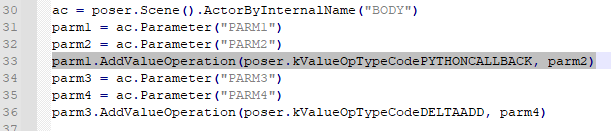
...save the figure, and then inspect the CR2, then the DeltaAdd has been correctly added, but there's no sign of the PythonCallback. So it appears that AddValueOperation(poser.kValueOpTypeCodePYTHONCALLBACK) does nothing.
3) So if AddValueOperation() using kValueOpTypeCodePYTHONCALLBACK does nothing, then just setting the callback itself via Python might add the valueOpPythonCallback to the CR2, yes ? If I use my hacked version of adp001's callback (slightly changed now)...
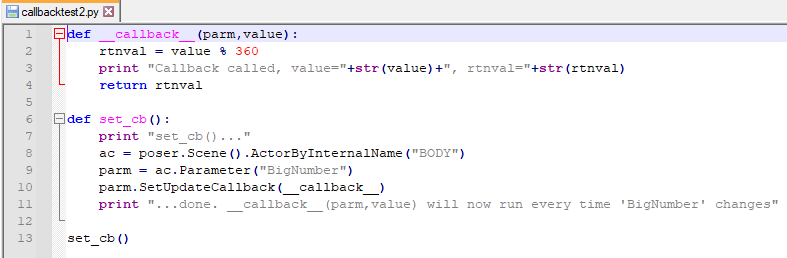
...I can twiddle/set the BigNumber dial to any value I want (hmm... except that negative values seem to lock up/crash Poser) and the adjusted value of BigNumber (the one above the dial) is modulo 360. So I save a new CR2 and then inspect it, expecting to see a valueOpPythonCallback in the BigNumber section - there isn't one.
4) Why is the callback function called not once, but 261 times, every time I change BigNumber ?
adp001 posted at 5:34 PM Wed, 22 September 2021 - #4427868
...Great for many things, also to plant viruses and trojans (by the way: to call Poser a "Security Nightmare" is almost a trivialization for this reason).
Yes indeed, that's always worried me :(
The 3Dcheapskate* occasionally posts sensible stuff. Usually by accident. And it usually uses Poser 11, with units set to inches. Except when it's using Poser 6 or PP2014, or when its units are set to PNU or something else.
*soon only to be available in two flavours - DAZ and Renderosity
I think that it makes no sense for Poser to write something in a CR2 file that is solved via a (separate) Python script. The content of the CR2 can't influence anything. The hint that it is a special attribute is enough. More data is not required at this point.
To your problem with the many calls of the callback: Throw out the print statement. Code in callbacks should be as short, efficient and fast as possible. The running program is interrupted by an event somewhere and the callback function is called (by the way, the interruption is done by wxPython and not the actual code of Poser). And Poser's code is not re-entrant. So it's possible that a print statement in a callback can lead to a crash. In your case the events might overtake each other.
If you follow the rules for callbacks, it works very reliably (which was not the case in older versions; and I'm talking about P11). I've had an MQTT connection running in Poser all the time for some time now, executing, deleting, and setting new callbacks (actor/prop syncronization via network). No problems so far, even after days of running. Sometimes I even forget that the connection is up :)
Maybe the following makes it more transparent to you:
def get_or_create(actor, parm_name):
"""Helper function to get or create a parameter"""
p = actor.Parameter(parm_name)
if not p:
p = actor.CreateValueParameter(parm_name)
return p
SCENE = poser.Scene()
def init(actorname, framenr_start=0, modulo_value=360):
def __callback__(parm, value):
actor = parm.Actor()
mod = actor.Parameter("Modulo Value").Value()
actor.Parameter("Result").SetValue(value % mod)
return value
actor = SCENE.Actor(actorname)
# Make sure the following parameters exist
get_or_create(actor, "Frame Counter").SetValue(framenr_start)
get_or_create(actor, "Modulo Value").SetValue(modulo_value)
get_or_create(actor, "Result")
# Set callback
actor.Parameter("Frame Counter").SetUpdateCallback(__callback__)
# For demo tart with the currently selected actor in this case.
init(SCENE.CurrentActor().Name())
The parameter with the callback shows whatever you return from the callbackfunction. But you may transfer computed results to other parameters.
But be careful: you shouldn't keep references to poser objects (actors, parameters). Poser can kill these references at any time! And as a result you get pretty much everything from weird behavior to crashes.
This is especially true for callback functions. A lot can happen between calls. Therefore it is highly advisable to always get the references "fresh". Even if this seems awkward at first glance: You are on the safe side this way.
3dcheapskate posted at 11:09 PM Wed, 22 September 2021 - #4427893
> ...I can twiddle/set the BigNumber dial to any value I want (hmm... except that negative values seem to lock up/crash Poser)
Negative numbers work great here. Your crashes are probably due to the print statements within the callback.
Thanks adp001, print statements causing problems in time-critical code rings a lot of bells ! :)
Having two parameters, 'BigNumber' and 'BigNumberModulo' was a hangover from doing maths with valueOps where it was necessary to split the maths across several separate parameters (like I did with my ERC opening book ). Totally unnecessary if I'm using a callback to do the modulo.
So I'll take out the prints, forget about both valueOpPythonCallback in the CR2 and AddValueOperation(poser.kValueOpTypeCodePYTHONCALLBACK,...), and just use the callback.
The 3Dcheapskate* occasionally posts sensible stuff. Usually by accident. And it usually uses Poser 11, with units set to inches. Except when it's using Poser 6 or PP2014, or when its units are set to PNU or something else.
*soon only to be available in two flavours - DAZ and Renderosity
P.S. I do wish that they'd correct the ValueOpCodes/AddValueOp stuff in the manual
The 3Dcheapskate* occasionally posts sensible stuff. Usually by accident. And it usually uses Poser 11, with units set to inches. Except when it's using Poser 6 or PP2014, or when its units are set to PNU or something else.
*soon only to be available in two flavours - DAZ and Renderosity

Privacy Notice
This site uses cookies to deliver the best experience. Our own cookies make user accounts and other features possible. Third-party cookies are used to display relevant ads and to analyze how Renderosity is used. By using our site, you acknowledge that you have read and understood our Terms of Service, including our Cookie Policy and our Privacy Policy.
parm1.AddValueOperation(poser.kValueOpTypeCodePYTHONCALLBACK, parm2) doesn't seem to do anything.
The PoserPython Manual specifies kValueOpTypeCodePYTHONCALLBACK...
...but it's not listed as one of the OpTypeCodes for 'AddValueOperation()'...
...which I'd assumed was an error in the manual: you'll notice there's an kValueOpCodeADD which doesn't exist - I'd assumed that it was meant to be kValueOpCodePYTHONCALLBACK).
I run the following test code...
...save the figure, and then inspect the CR2. The DeltaAdd has been correctly added, but there's no sign of the PythonCallback
The 3Dcheapskate* occasionally posts sensible stuff. Usually by accident. And it usually uses Poser 11, with units set to inches. Except when it's using Poser 6 or PP2014, or when its units are set to PNU or something else.
*soon only to be available in two flavours - DAZ and Renderosity