
Renderosity Forums / Poser - OFFICIAL
Welcome to the Poser - OFFICIAL Forum
Forum Moderators: RedPhantom Forum Coordinators: Anim8dtoon
Poser - OFFICIAL F.A.Q (Last Updated: 2026 May 07 11:24 am)

Subject: Can someone help me with this SSS glowing skin issue please?

Content Advisory! This message contains nudity, violence
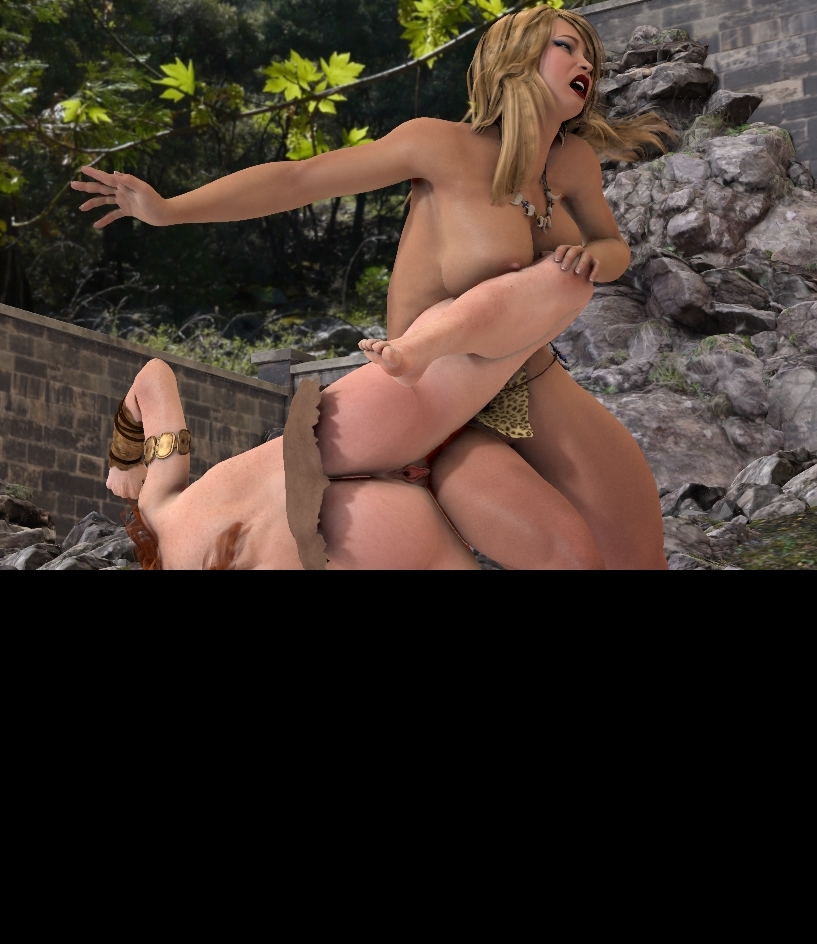
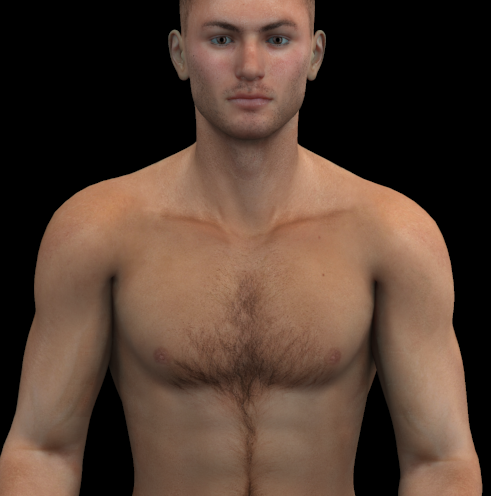
Okay this is a test render, see how there is glow all over them, and then how it looks between the buttocks..It's awful yet I have other renders that don't have this glow problem, it's like a random occurring issue that happens in some renders I do, and then sometimes it don't happen at all. There is also black particles in the hair too, and I've noticed that as well in some renders which forces me to stick to black hair most of the time because you can't see it on black hair. Also see where their thighs are touching where the left thigh is and it looks like a strip of white between them including between the other girls buttocks? I even get that from when their feet are touching the ground, or if they are sitting down it appears underneath them. There are problems all over the place in this render.

From what I understand from what you've written, you may have 2 issues.
- The depth and strength of the SSS is too high
- Many vendors use to "fake" SSS by using translucency, or ambience (that's when the "glow" is a little blue/green).
The higher strength of SSS is better for close-ups but seems to cause issues with full body and further scenes. The fake SSS is an issue in all cases. (I never cared for it even when used in earlier versions of Poser).
The general way to fix this, and easiest, is to use EZskin or EZskin3 (if you have P11/PP11) First you have EZskin redo the figure with just the maps, then apply superfly/firefly. IF the settings are too high at this point it is easier to tweak. This means rejecting the vendor's mat settings. If you like the settings otherwise you need to go to the mat room and adjust the SSS settings manually.
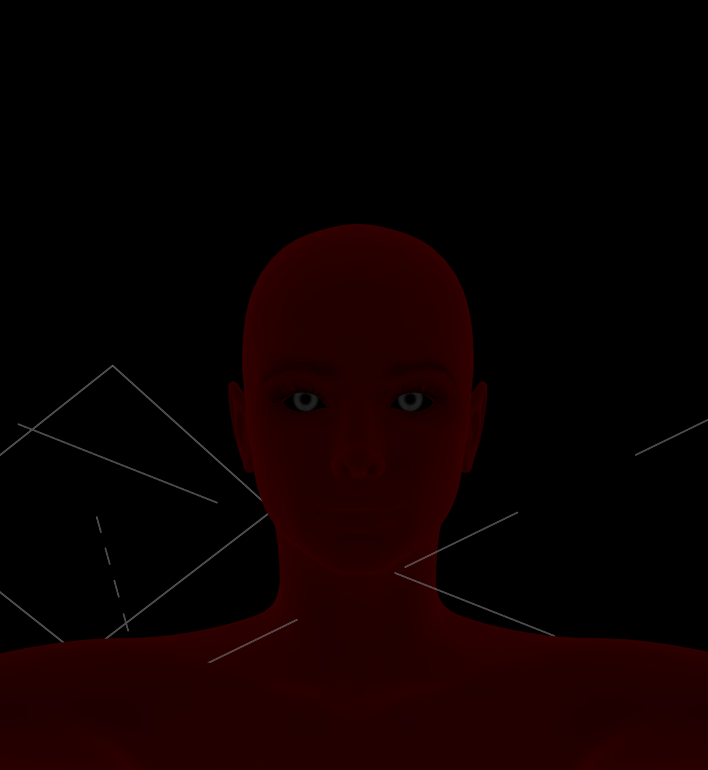
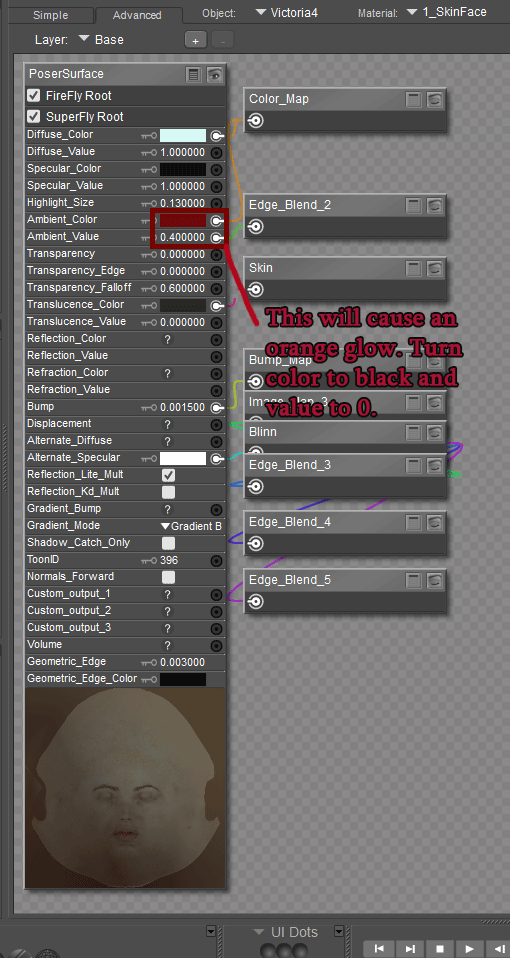
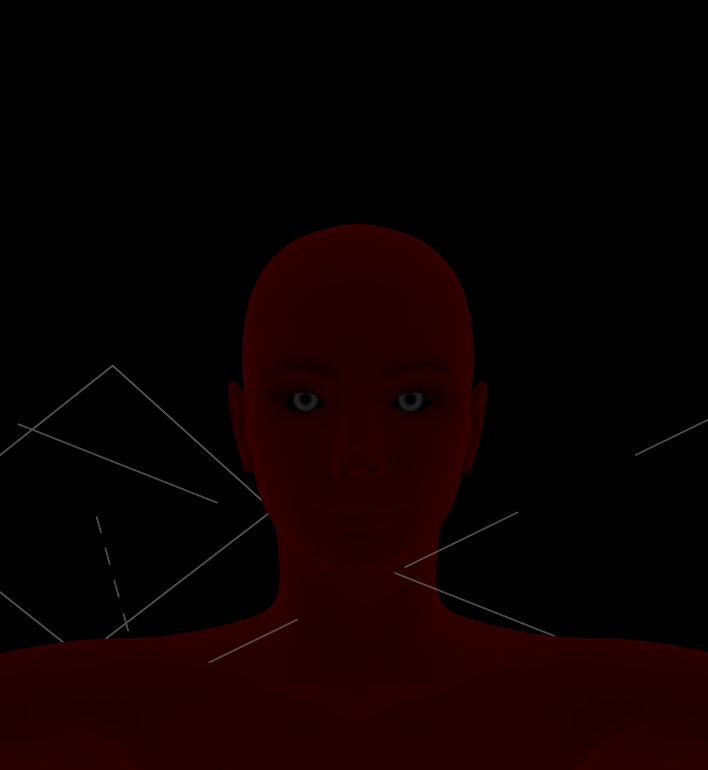
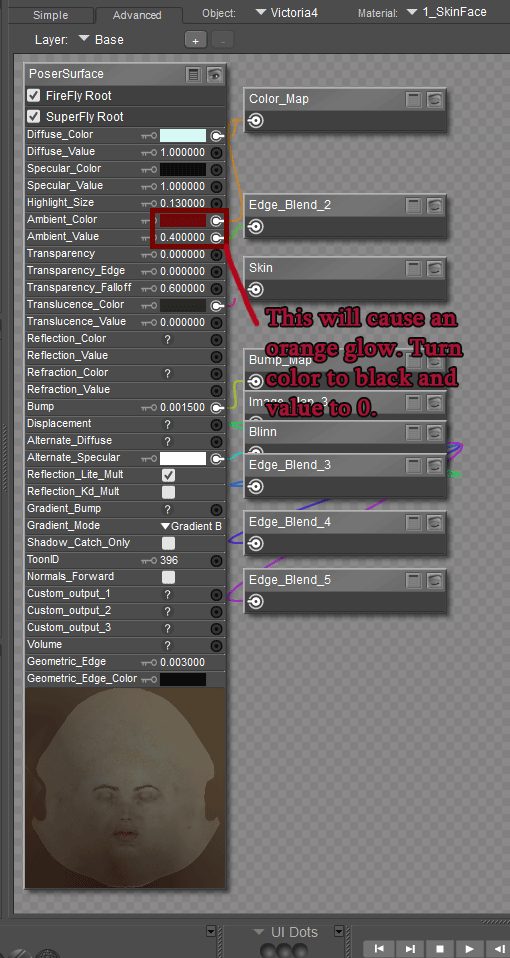
This vendor uses ambience to fake SSS, you can tell by turning off all the lights and still seeing a slight "glow" Here is the settings.
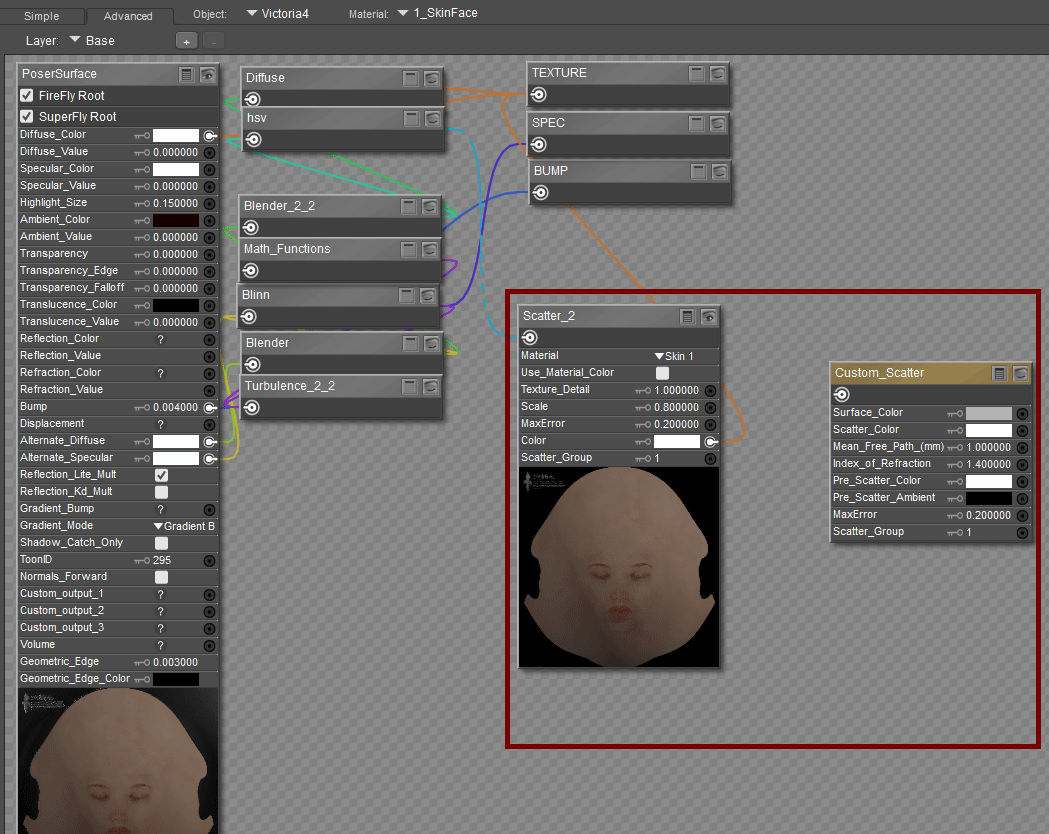
As for the SSS settings:
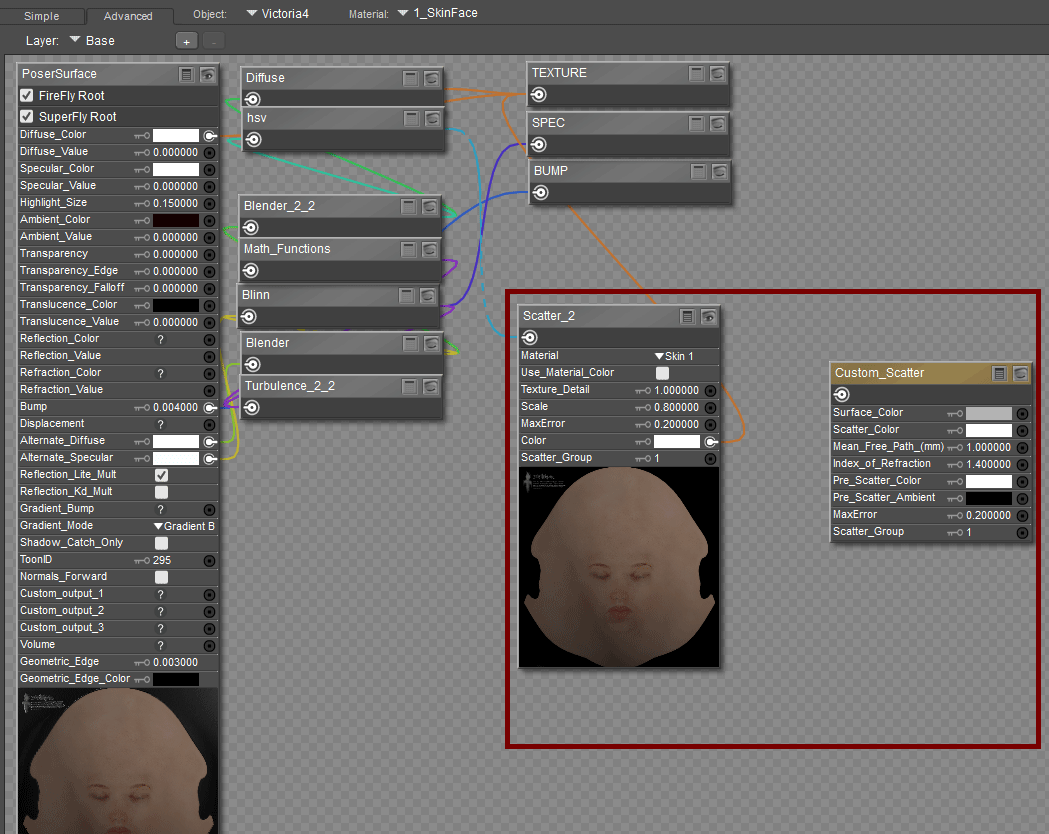
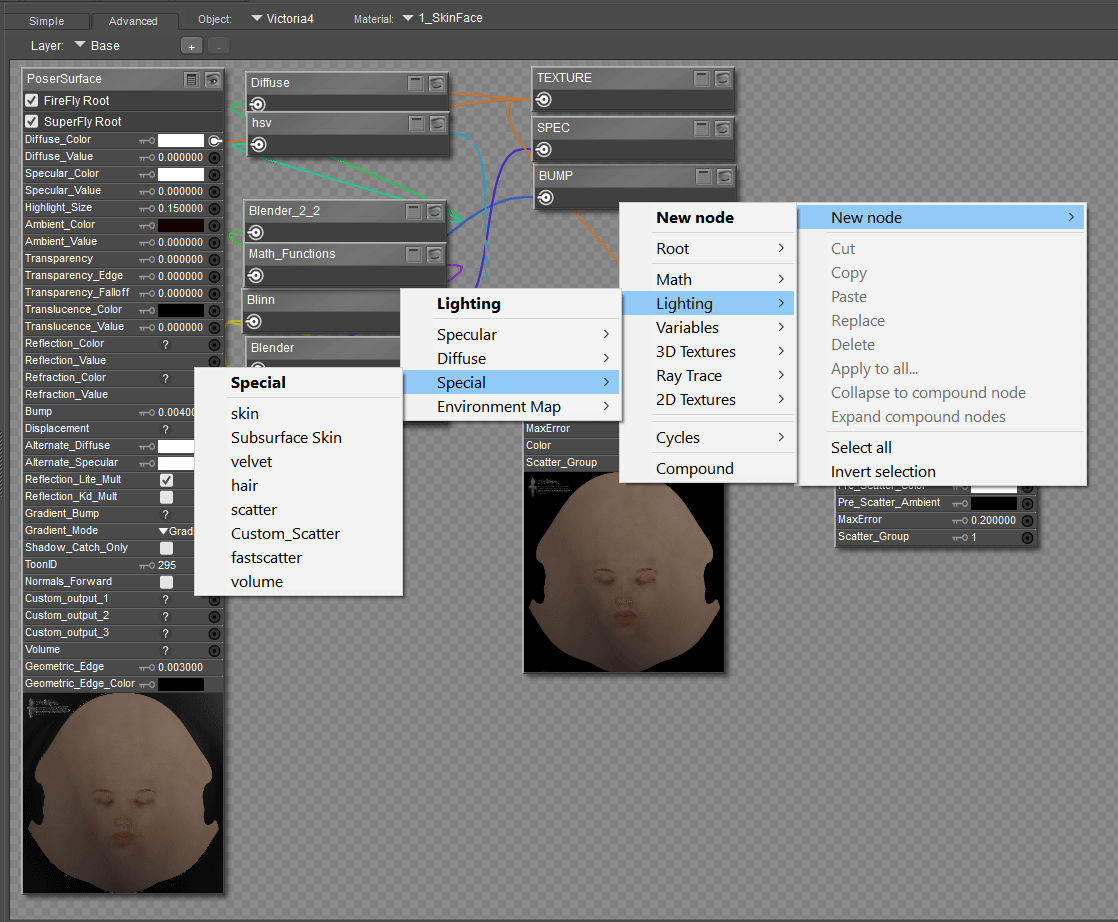
I can't find a vendor's character that does the SSS too high, I have searched my runtimes. If you could give some examples, I can show you how to tweak them in the meantime here are 2 adjustable SSS nodes (nodes>lighting>special) that can help you get the settings you want.
Keep in mind another setting that might effect (although I doubt it) is the gamma correction.
Boni
"Be Hero to Yourself" -- Peter Tork
I'm going to agree with Boni about EZSkin. I'm on PP2014 and use EZSkin2 exclusively. I always change the vendor's settings and also make sure to check on the bottom right of the 2nd tab the BBfix for the blue tints.
As for the orange glow, I've had that happen even with EZSkin and it's a matter of lighting and rendering. Are you using IDL? I find it minimizes glow whereas a simple FF render even with ambient occlusion will still leave a glow depending on the light. I really like Blackhearted's light setup that comes with his GND characters. Also, Bagginsbill's Envirosphere with an hdr and only one infinite light is perfect for outdoor lighting but you'll have to experiment.
If you're on P11 and use Superfly you can just disregard all the above :)
Kalypso posted at 4:39PM Thu, 17 August 2017 - #4312408
I'm going to agree with Boni about EZSkin. I'm on PP2014 and use EZSkin2 exclusively. I always change the vendor's settings and also make sure to check on the bottom right of the 2nd tab the BBfix for the blue tints.
As for the orange glow, I've had that happen even with EZSkin and it's a matter of lighting and rendering. Are you using IDL? I find it minimizes glow whereas a simple FF render even with ambient occlusion will still leave a glow depending on the light. I really like Blackhearted's light setup that comes with his GND characters. Also, Bagginsbill's Envirosphere with an hdr and only one infinite light is perfect for outdoor lighting but you'll have to experiment.If you're on P11 and use Superfly you can just disregard all the above :)
I use HDRI lights for outdoors mostly, sometimes I try indoors too but if often seem much harder that way. I don't have Poser Pro 2014, just Pro 2012 but was planning to go to DAZ since a lot of my friends that use it say they have way less issues with DAZ than they did with Poser. Not sure if I'll have the same experience though. IRAY is the only reason I want to try it. For now I'm still using Poser, and that's why I really need to fix the glow issue. Someone told me the culprit could be me using HDRI's
Boni posted at 4:55PM Thu, 17 August 2017 - #4312407
From what I understand from what you've written, you may have 2 issues.
- The depth and strength of the SSS is too high
- Many vendors use to "fake" SSS by using translucency, or ambience (that's when the "glow" is a little blue/green).
The higher strength of SSS is better for close-ups but seems to cause issues with full body and further scenes. The fake SSS is an issue in all cases. (I never cared for it even when used in earlier versions of Poser).
The general way to fix this, and easiest, is to use EZskin or EZskin3 (if you have P11/PP11) First you have EZskin redo the figure with just the maps, then apply superfly/firefly. IF the settings are too high at this point it is easier to tweak. This means rejecting the vendor's mat settings. If you like the settings otherwise you need to go to the mat room and adjust the SSS settings manually.
This vendor uses ambience to fake SSS, you can tell by turning off all the lights and still seeing a slight "glow" Here is the settings.
As for the SSS settings:
I can't find a vendor's character that does the SSS too high, I have searched my runtimes. If you could give some examples, I can show you how to tweak them in the meantime here are 2 adjustable SSS nodes (nodes>lighting>special) that can help you get the settings you want.
Keep in mind another setting that might effect (although I doubt it) is the gamma correction.
I hardly use Gamma Correction, you mentioned Special and Lighting, what are those? I don't see them.
Boni posted at 5:26PM Thu, 17 August 2017 - #4312413
Here you go ... right-click on the material window ... then follow the windows ...
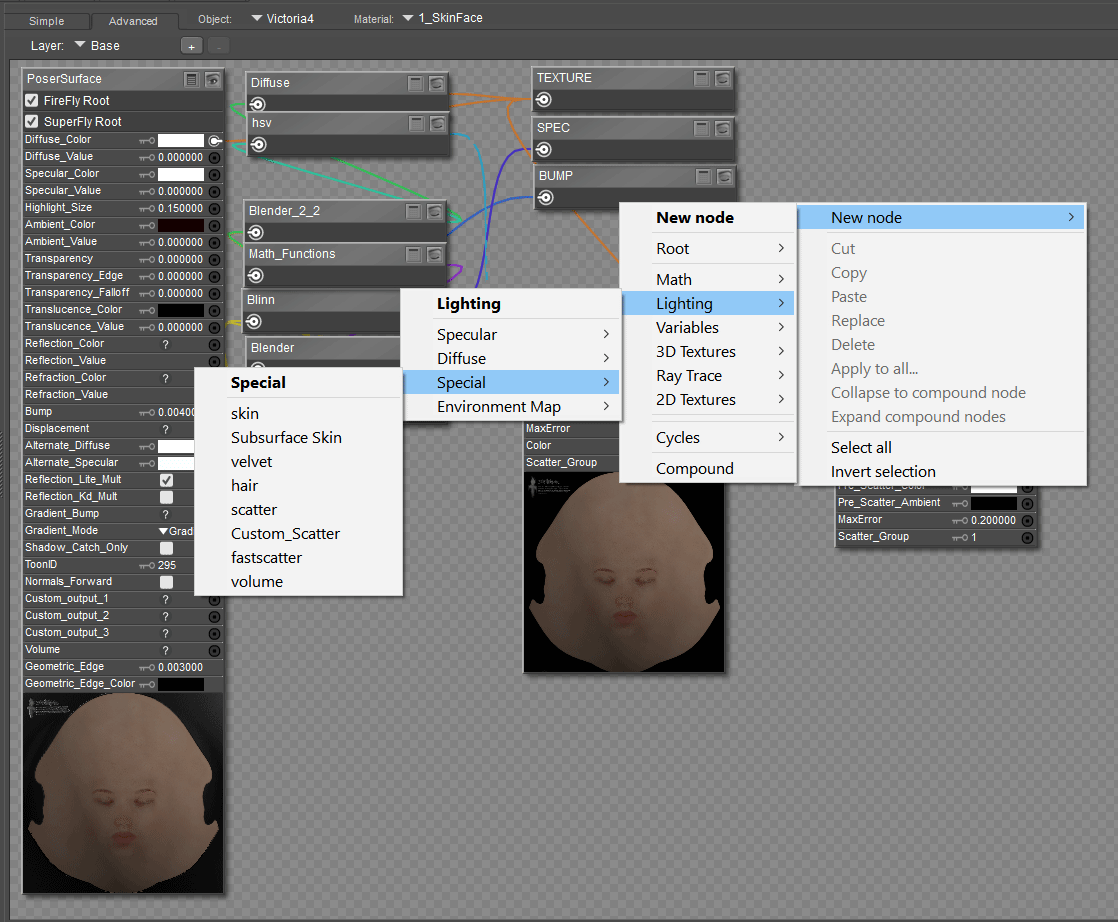
...I swear I've never saw that in Poser Pro 2012, lol just now seeing that special's bar. Sorry if I seemed novice, I just never fiddle around in the Material room to know much of these things. But I will test this and see what happens. Thank you.
Boni posted at 5:56PM Thu, 17 August 2017 - #4312413
Here you go ... right-click on the material window ... then follow the windows ...
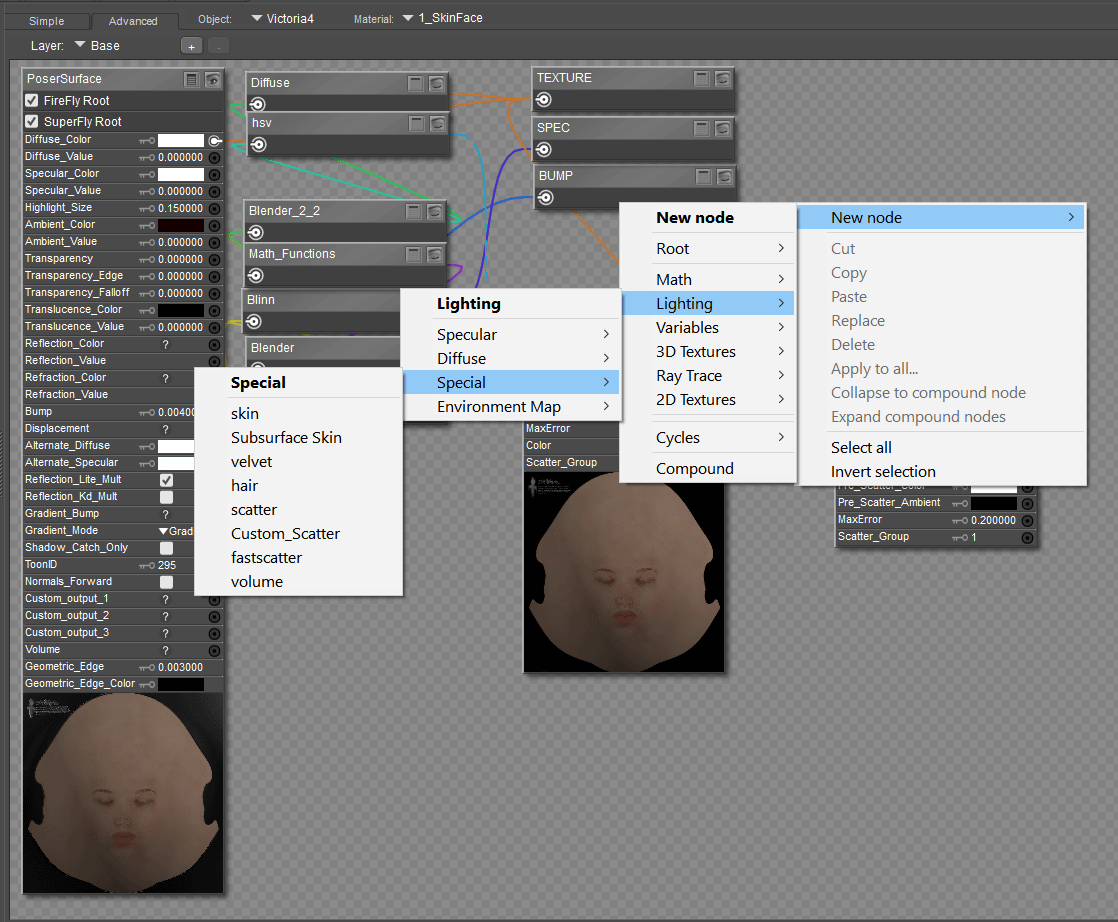
According to my material room the Ambience is always zero and set to black by default. I do have EzSkin but not Poser 11 or Pro 11, just Poser Pro 2012 I don't have EZSKin 3 either I remember in another forum they said to just delete all the nodes that are not necessary in higher versions of Poser that can be causing glow problems, but they never mentioned which nodes to remove or delete.
Boni posted at 9:26PM Thu, 17 August 2017 - #4312424
EZskin (the original) will work in PP 2012, you are set really. EZskin3 is for P11/PP11. You are fine.
Well are there any specific nodes in the material room that I should delete that shouldn't belong there? I mean what about math functions? Is it necessary to have that there?
The math functions work to adjust the values of 2 or more other node's effects on the material. If a vendor or EZskin has put those in they do have a purpose. For example they may just soften the effect of an SSS node ... or blend two bump effects for more natural looking skin. So, honestly, the math nodes are important. Your best bet is to go through, ask about various nodes here and we will help you sort it out. The Materials room is robust. It has a lot of important features all of which for PP 2012 helps firefly be as realistic as possible. Look up anything by bagginsbill. He is one of the masters of the nodes.
Boni
"Be Hero to Yourself" -- Peter Tork

Hi there
Are you using Raytraced shadows on yours lights or are you using Depth map shadows ? I would use Rytraced shadows as first and delete all AO nodes as well I think there is script fro that over here
https://www.renderosity.com/mod/freestuff/remove-scene-ao/70488
Then check lighting as well and I would use EZSkin 2 in earlier Poser version where should work,in Poser 2014 I using only EZSkin 2,in Poser 11 I use only EZSkin 3,then I would have look on EnvSphere
This hair looks like do have AO nodes and did you checked for hair Light emitter if its checked or not,try render with checked and unchecked there and other that that,render settings would help as well
Here are my render settings,i use mostly Dimension 3D - Render FireFly

Hope this helps
Thanks,Jura

Are you talking about the thin, bright area where the shadow should be deepest?
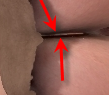
If you are, everybody (except Jura) is leading you astray as it has nothing to do with shaders (unless the shader has AO in it). I suspect you're using AO in the lighting with an incorrect bias, or perhaps just wrong bias in general.
It could also be you've encountered a bug in the renderer. I didn't read all of the above in detail so forgive me asking - are you caught up on service releases? They fixed many bugs over a long time.
Renderosity forum reply notifications are wonky. If I read a follow-up in a thread, but I don't myself reply, then notifications no longer happen AT ALL on that thread. So if I seem to be ignoring a question, that's why. (Updated September 23, 2019)
bagginsbill posted at 7:53AM Sat, 19 August 2017 - #4312513
Are you talking about the thin, bright area where the shadow should be deepest?
If you are, everybody (except Jura) is leading you astray as it has nothing to do with shaders (unless the shader has AO in it). I suspect you're using AO in the lighting with an incorrect bias, or perhaps just wrong bias in general.
It could also be you've encountered a bug in the renderer. I didn't read all of the above in detail so forgive me asking - are you caught up on service releases? They fixed many bugs over a long time.

I am a little late that part between the buttocks isn't the only part, it's doing that between arms, breast, legs, everywhere really. I don't know how to set the bias correctly, I never mess with that stuff. I only used one service release, but wasn't sure if they released another one.
bagginsbill posted at 8:37AM Sat, 19 August 2017 - #4312513
Are you talking about the thin, bright area where the shadow should be deepest?
If you are, everybody (except Jura) is leading you astray as it has nothing to do with shaders (unless the shader has AO in it). I suspect you're using AO in the lighting with an incorrect bias, or perhaps just wrong bias in general.
It could also be you've encountered a bug in the renderer. I didn't read all of the above in detail so forgive me asking - are you caught up on service releases? They fixed many bugs over a long time.

What would you suggest I do with the Bias? I must agree on this and say it is most liking a lighting issue and not really a skin texture problem. I've used SSS a lot of times and the same light settings on other renders and never got any glow or problems, then there are times when it just randomly happens, I did install their service release though unless there is a way I can uninstall it and reinstall again. I still don't know what the cause of the glow is, it happens mostly when I use IBL or HDRI lights.
I have been using the more modern settings so long I wasn't sure what to suggest, so I went back to using things the way we did 10 years ago, which I'm pretty sure is how you're using them. And there I found all the problems why we don't do things that way.
Here's a setup using an Image Based Light (IBL), Ambient Occlusion (AO) for shadowing, no gamma correction (GC), and no Indirect Diffuse Light (IDL).
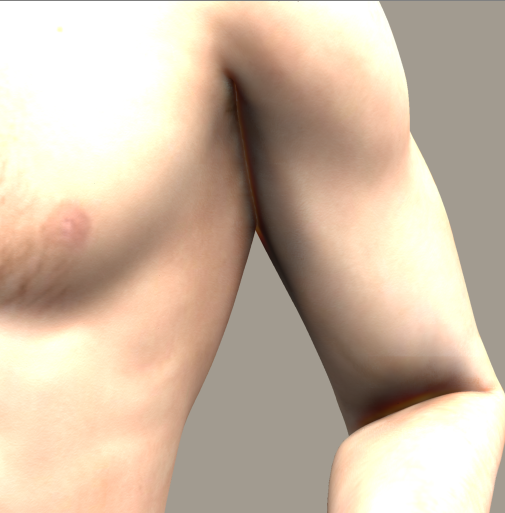
Observe the artifact in the armpit and elbow. This is not glow. It is a missing AO shadow. AO is not functioning correctly here. The skin is not brighter than other skin, but rather the SHADOW is not DARKER like it should be.
I could not find any value for the AO settings that corrected this. I'm not surprised. The AO function was written LONG before scatter was. I doubt SM even cared if scatter didn't work very well with AO. Anybody interested in realism enough to use scatter would also NOT be using AO.
Now - let's more forward in time. Instead of AO (which I turn off) I use IDL. And for the thousands time, IBL + IDL works great - nobody is permitted to suggest this is a bad combination. It is a good combination. We may prefer an EnvSphere instead of IBL but IBL in and of itself DOES WORK RIGHT with IDL.
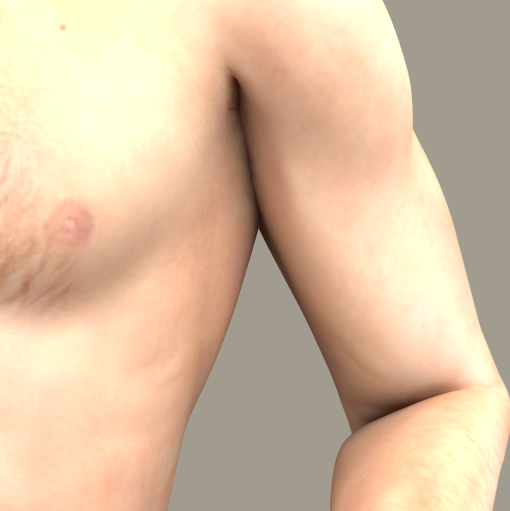
With this setup, the shadowing problems in crevices are completely gone. However, overall the lighting is incorrect because I'm not yet using GC. Let's add GC.
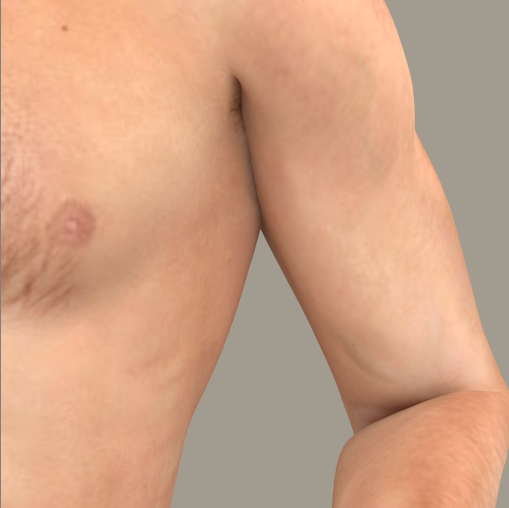
There - a proper result is achieved merely by clicking two checkboxes.
So - stop doing things the way we did in 2007. You have scatter, GC, and IDL, all of which were added specifically to FIX problems. So you should use them to fix those problems.
Renderosity forum reply notifications are wonky. If I read a follow-up in a thread, but I don't myself reply, then notifications no longer happen AT ALL on that thread. So if I seem to be ignoring a question, that's why. (Updated September 23, 2019)
For those who suggested Easy Skin, I used it. The crevice glow isn't mitigated by better shaders. It is strictly the result of incomplete AO shadows. The solution is simply this:
Do not use AO anymore.
Renderosity forum reply notifications are wonky. If I read a follow-up in a thread, but I don't myself reply, then notifications no longer happen AT ALL on that thread. So if I seem to be ignoring a question, that's why. (Updated September 23, 2019)
Hmmm. I found a setting that affects this, by going back a few years and opening a scene using AO. The AO Max distance defaults to 6. (I presume 6 inches but I'm not sure if Poser Display Unit affects this - anyway my PDU is inches so be aware.) I opened up an old Poser Pro 2012 scene where I was using AO and I found I had the AO Max Distance set to 90. In that scene, it rendered just fine without the crevice artifact. Of course the shadowed areas are much bigger but so be it.
AO Max Distance 6
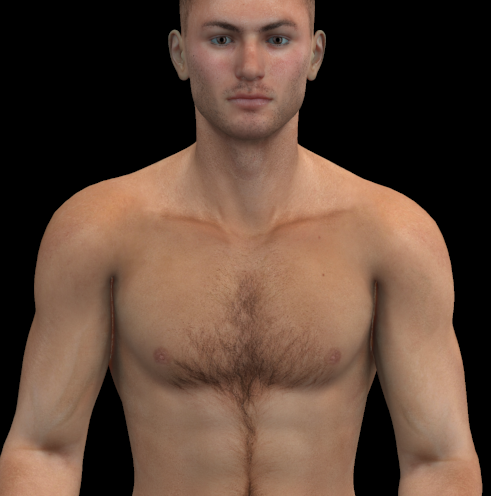
AO Max Distance 90
So if you feel you really have to use AO, there appears to be a way to make it work.
Renderosity forum reply notifications are wonky. If I read a follow-up in a thread, but I don't myself reply, then notifications no longer happen AT ALL on that thread. So if I seem to be ignoring a question, that's why. (Updated September 23, 2019)
bagginsbill posted at 10:39AM Mon, 21 August 2017 - #4312628
I have been using the more modern settings so long I wasn't sure what to suggest, so I went back to using things the way we did 10 years ago, which I'm pretty sure is how you're using them. And there I found all the problems why we don't do things that way.
Here's a setup using an Image Based Light (IBL), Ambient Occlusion (AO) for shadowing, no gamma correction (GC), and no Indirect Diffuse Light (IDL).
Observe the artifact in the armpit and elbow. This is not glow. It is a missing AO shadow. AO is not functioning correctly here. The skin is not brighter than other skin, but rather the SHADOW is not DARKER like it should be.
I could not find any value for the AO settings that corrected this. I'm not surprised. The AO function was written LONG before scatter was. I doubt SM even cared if scatter didn't work very well with AO. Anybody interested in realism enough to use scatter would also NOT be using AO.
Now - let's more forward in time. Instead of AO (which I turn off) I use IDL. And for the thousands time, IBL + IDL works great - nobody is permitted to suggest this is a bad combination. It is a good combination. We may prefer an EnvSphere instead of IBL but IBL in and of itself DOES WORK RIGHT with IDL.
With this setup, the shadowing problems in crevices are completely gone. However, overall the lighting is incorrect because I'm not yet using GC. Let's add GC.
There - a proper result is achieved merely by clicking two checkboxes.
So - stop doing things the way we did in 2007. You have scatter, GC, and IDL, all of which were added specifically to FIX problems. So you should use them to fix those problems.


While I do thank and appreciate you for helping me with this, I still haven't tried it yet because I haven't been on to render today but I'll try it in a few minutes. At any rate I appreciate the help but you made it sound like I was intentionally using a crappy feature when clearly I wasn't, that's why I've been asking everybody that still use poser if they knew what it was because everyone else switched to DAZ, and I don't know anyone using DAZ that ever had that issue. I kept assuming it was just Poser not being able to handle SSS properly because people kept telling me a lot of vendors used an outdated fake method with the nodes to get SSS to work in versions of Poser that didn't have it or something. Yet no one would tell me which nodes were causing it, I do remember you saying something like Fast Scatter will do it, but I never see FS in the material room or anything turned on in the Ambient boxes either. The only AO I see turned on is usually on the lights in the parameter box which is on mostly HDRI or IBL lights. ANy other way to shut off AO I wouldn't know anything about it besides it being checked on lights, usually lights labeled Sunlight or HDRI, or IBL.
I honestly had no idea or clue what was causing the problems with shadows. I call it a glow because that's what it looks like to me, a glow. Though I was quite sure people would have known what I was talking about because Iv'e seen other posts similar to mine on DAZ and elsewhere with people having the same issue refer to it as a glowing on skin error.
One person even admitted to following your instructions and they still saw the glowing problem in those areas or other areas. But I will have to see it for myself before I can make a judgement call on it. Someone once said that Shadow Bias was the cause of it, but I don't know there is no denying that you don't know what you are talking about because I've heard your name pop up in almost every single forum I've ever sought help on, so the legends about your knowledge on this stuff and beyond had to be all true. So thank you. I also never use Indirect Lighting, that sh*t is just too damn slow sometimes to pass, especially when I have a lot of figures in a scene, so I never bother to use it. Plus I rarely see much of a difference anyway with it and have gotten acceptable renders without it.
The only AO I see turned on is usually on the lights in the parameter box which is on mostly HDRI or IBL lights.
That's what I'm talking about though. Your statement seems to dismiss the relevance when it's the whole render I made - I used no other light.
Renderosity forum reply notifications are wonky. If I read a follow-up in a thread, but I don't myself reply, then notifications no longer happen AT ALL on that thread. So if I seem to be ignoring a question, that's why. (Updated September 23, 2019)
Content Advisory! This message contains nudity
bagginsbill posted at 12:08AM Tue, 22 August 2017 - #4312654
The only AO I see turned on is usually on the lights in the parameter box which is on mostly HDRI or IBL lights.
That's what I'm talking about though. Your statement seems to dismiss the relevance when it's the whole render I made - I used no other light.
Yeah, and that glow is still appearing too. Poser isn't cooperating for some reason. Because I did exactly what you said to do and that glow thing still appears anyway. 
See where her arm is flexing at? It's glowing, I turned off the AO on the lights both the HDRI light and the one that said Sunlight because it was on two different lights. And that glow still appeared there. I did use the EZskin this time but I never really tweak or mess around with anything in EZ skin. It's also glowing a little under her breast too or that one may not be a glow, but I do know the one on her left arm is because that's what it keeps doing.

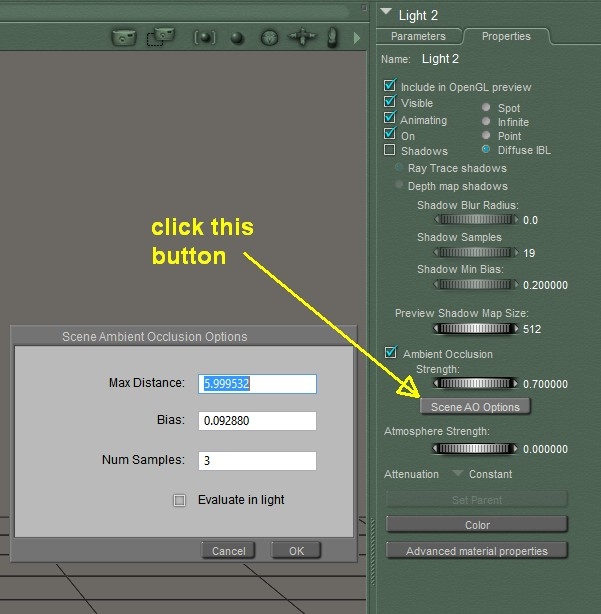
The problem I was addressing was the absence of an AO shadow in a crevice.
I suggested not using AO. Then I found you could increase the max distance.
You said you turned off AO and still had glow. But the AO wasn't making glow - it makes shadows.
If you have glow remaining, then I'd be investigating other things.
I suspect you have multiple artifacts (as I usually have in any rendering) and you can't look at them all as if they're just one thing.
The crevice artifact that I asked you to confirm was your primary concern is an AO artifact.
Inter-skin glow with IDL is not the same thing but does happen, especially when not using GC.
We're chasing multiple issues and you need to show the render settings, materials, and light settings of one issue at a time.
Renderosity forum reply notifications are wonky. If I read a follow-up in a thread, but I don't myself reply, then notifications no longer happen AT ALL on that thread. So if I seem to be ignoring a question, that's why. (Updated September 23, 2019)
Because I did exactly what you said to do and that glow thing still appears anyway.
Don't use vague phrases like "exactly what you said to do" because I said several things and I have no idea which you did.
One was stop using AO. The other was to increase AO max distance. I also said to use IDL and GC.
You need to slow down, address one artifact at a time, and be more explicit about your settings. You would not be the first person who implied one thing but actually did another thing.
Renderosity forum reply notifications are wonky. If I read a follow-up in a thread, but I don't myself reply, then notifications no longer happen AT ALL on that thread. So if I seem to be ignoring a question, that's why. (Updated September 23, 2019)
See where her arm is flexing at? It's glowing, I turned off the AO on the light ... And that glow still appeared there
AO doesn't make glow it makes shadows.
The artifact of the butt crack I first asked about was an AO problem and that was not glow it was shadow.
If you have glow it's not an AO problem. But you did have an AO shadow problem.
Give me a closeup of the inner elbow with the glow problem and show the shader, render settings, and light settings.
Renderosity forum reply notifications are wonky. If I read a follow-up in a thread, but I don't myself reply, then notifications no longer happen AT ALL on that thread. So if I seem to be ignoring a question, that's why. (Updated September 23, 2019)

Privacy Notice
This site uses cookies to deliver the best experience. Our own cookies make user accounts and other features possible. Third-party cookies are used to display relevant ads and to analyze how Renderosity is used. By using our site, you acknowledge that you have read and understood our Terms of Service, including our Cookie Policy and our Privacy Policy.
I know I asked for help on this before, and didn't get a straight answer. Plus I can't seem to find the original post about it so I decided to start a new one since I rarely post in the forums anyway. Okay I've realized that Sub Surface Scattering is irritating to use, for the most part this orange glowing whenever skin is too close or just glowing on skin in general is ruining a lot of my renders. I really need someone to help me figure out how to prevent this from happening. I checked the material room and I see nothing added to any nodes like the Ambient a lot of these nodes don't have anything connected in them. I tried turning off light emitter, and still I See this problem on my figures.
Then I would turn SSS off and render with it, the glow disappears and it's not there so clearly this is an issue with SSS. I tried reducing Shadow Bias, rendering without Indirect Lighting, still that glow keeps appearing. Sometimes it will appear in multiple places like under the arms, between fingers, thighs, underneath breast, etc. Other times it will appear just in one place like the arms, or breast area. Sometimes it doesn't show up at all, and sometimes it do depending on where I move the lights. It's like a random problem that happens automatically but then at times it don't occur at all. I never even bother to fool around in the material room because I hate dealing with all those damn nodes. The only time I tamper in the MR is when I am trying to apply gloss to skin for sweat or something but other than that, I don't mess with the MR.
I get similar issues sometimes with seeing a light faded green glow on skin too and I've never been able to figure out how to deal with the problem but would appreciate it someone could please help me on this matter, when I do commission art for people they come to me with large sets, like 30 or 40 renders and I always end up spending half of my time doing test renders because I cannot figure out if my life depended on it why the glow wont stop appearing. I already asked a few people who once posted questions about this issue if they got their problem resolved, but they never replied back to me. I will be real grateful for any help given me. Thank you.