
Renderosity Forums / Poser - OFFICIAL
Welcome to the Poser - OFFICIAL Forum
Forum Moderators: RedPhantom Forum Coordinators: Anim8dtoon
Poser - OFFICIAL F.A.Q (Last Updated: 2026 May 21 1:31 pm)

Subject: Dynamic hair -- P7 vs P8


This was with "opaque" enabled. I've tried it without, also. Didn't matter.
Something has apparently changed in the way Poser renders the hair, and I don't think it's for the better. Last night, I spent two hours tinkering with Firefly and material settings, and couldn't get anywhere near its original appearance.

It appears to me like the light is reacting differently with the fur.
♥ My Gallery Albums ♥ My YT ♥ Party in the CarrarArtists Forum ♪♪♪ 10 years of Carrara forum ♥ My FreeStuff

.......and both P7 and P8 have the same weird problem of adding a black bar, with "censored" on it, to the hair.
Hmmmmmm.......
______________________
"When you have to shoot ...
SHOOT.
Don't talk "
- Tuco
Santicor's Gallery:
http://www.renderosity.com/homepage.php?page=3&userid=580115
Quote - I think the root width and tip width of the hairs has been changed.
Does it make any difference if you change that?
That appears to help with the sparseness. Thanks for the tip.
Quote - .......and both P7 and P8 have the same weird problem of adding a black bar, with "censored" on it, to the hair.
Hmmmmmm.......
That goes away when you enable raytracing.

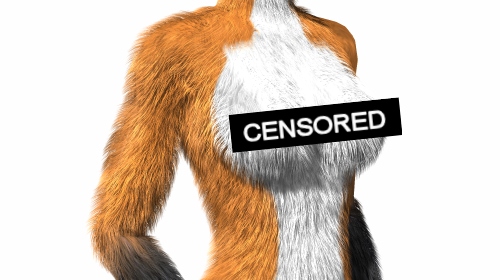
It's the texture-filtering option. P8's texture filtering goes absolutely insane on image maps plugged into dynamic hair. The results may vary with different maps, but the only solution I can think of is to disable texture filtering completely on those.
Here's the same #@$&% scene file in P8 again, this time with filtering disabled on the hair maps.


Privacy Notice
This site uses cookies to deliver the best experience. Our own cookies make user accounts and other features possible. Third-party cookies are used to display relevant ads and to analyze how Renderosity is used. By using our site, you acknowledge that you have read and understood our Terms of Service, including our Cookie Policy and our Privacy Policy.
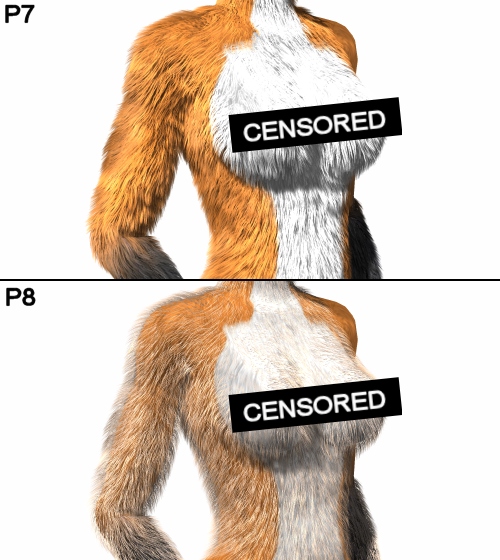
I get decent results out of P7, but the same dynamic hair comes out horribly wrong in P8, even with identical settings. The hair density seems sparser, and the diffuse colours are washed out.Anyone have any suggestions?