
Renderosity Forums / Poser - OFFICIAL
Welcome to the Poser - OFFICIAL Forum
Forum Moderators: RedPhantom Forum Coordinators: Anim8dtoon
Poser - OFFICIAL F.A.Q (Last Updated: 2026 Oct 23 3:18 am)

Subject: Antonia - Opinions?


Quote - > Quote - > Quote - ...Maybe you can guess the general "theme" I was going for? :laugh:
Nude?
LMAO ;o).
Laurie
Sure! Why Not? Vicki has always done it. Of course it would have to be in a ruin of some sort and we would have to really morph out her breasts and add a lot of muscle and include high heel shoes and of course the wild and messy big hair prop to set it all off! LOLOL
Joking aside i love this face morph!
Don't forget the sword ;o). Gotta have the sword.
Laurie

HAHAH
I don't think even the new and improved Vicki 4 can shoot a bow ride a horse fight on hi heels and wield a sword usually shown bigger than herself in the same battle scene. No Way! :)
Well....maybe even a battle hardened (Oh! Please...no pun intended!) barbarian Hun might stand
still long enough to laugh his fool head off wondering what she was about before deciding what his calling truly is! ;)

Yep, Mongolia and Siberia/East Russia are in Asia. As are, technically, Turkey (except for Istanbul), Israel, and Saudi Ariabia. :laugh:
I made three new morphs: one to move the brow ridges back, one for an epicanthic (sp?) fold, and one to flatten the nose. The latter two I made some refinements to after rendering the images above. The character in my latest gallery image uses those refined versions, and also has a smaller mouth.
In addition to those new ones I made, I used a whole bunch of LaurieA's morphs.
-- I'm not mad at you, just Westphalian.

Quote - Yep, Mongolia and Siberia/East Russia are in Asia. As are, technically, Turkey (except for Istanbul), Israel, and Saudi Ariabia.
Turkey is in what used to be called Asia - as in, Asia Minor. Israel or Saudi Arabia are not in Asia by either definition, although they were originally considered "oriental" countries by Westerners, as "orient" has to do with the "rising" (of the sun), hence the East.
______________
Hardware: AMD Ryzen 9 3900X/MSI MAG570 Tomahawk X570/Zotac Geforce GTX 1650 Super 4GB/32GB OLOy RAM
Software: Windows 10 Professional/Poser Pro 11/Photoshop/Postworkshop 3
Lol. I prefer a reputable source.
Seriously, though: You're right - if we subsume every country in the world under a "continent," the Middle East would belong in Asia. But does anyone in the Middle East consider themselves a part of Asia? Do western Russians? (The traditional divide is the Caucasus (hence "Asians" and "Caucasians.") If you called any of these peoples "Asian," they'd look at you pretty funny.
______________
Hardware: AMD Ryzen 9 3900X/MSI MAG570 Tomahawk X570/Zotac Geforce GTX 1650 Super 4GB/32GB OLOy RAM
Software: Windows 10 Professional/Poser Pro 11/Photoshop/Postworkshop 3

I learned in American schools that S.A. and israel are in Asia. What's the big deal? Egypt is in Africa and western Russia (west of the Ural moutains) is in Europe. I always thought it was foolish in the extreme to split Eurasia at the Ural mountains, since no other contiental mass is split due to ancient politcal folklore. Going by technical definitions of what a continient is, Earth has SIX, not seven.
Most people want to split the planet into smaller and smaller chunks instead of remembering we all live on it. :laugh:
[EDIT] I thought it was the Urals, not the Caucaus mountains. It's all arbitrary anyway. :lol:
I cannot save the world. Only my little piece of it. If we all act
together, we can save the world.--Nelson Mandela
An inconsistent hobgoblin is
the fool of little minds
Taking "Just do it" to a whole new level!
Quote - Lol. I prefer a reputable source.
Seriously, though: You're right - if we subsume every country in the world under a "continent," the Middle East would belong in Asia. But does anyone in the Middle East consider themselves a part of Asia? Do western Russians? (The traditional divide is the Caucasus (hence "Asians" and "Caucasians.") If you called any of these peoples "Asian," they'd look at you pretty funny.
That's why I wrote that technically they were part of Asia.  Someone else pointed out that, technically, East Russia was part of Asia, and I was just trying to stress the point that when we talk about ethnic backgrounds and "typical" looks, geographic technicalities are somewhat beside the point.
*Would anyone in the Middle East consider themselves part of Asia?
*That depends on which countries you consider part of the Middle East. I don't know for sure, but I'd imagine Iranians, and more so people in Afghanistan and Pakistan would think of themselves as inhabitants of Asia.
Enough of that topic, okay?
-- I'm not mad at you, just Westphalian.
Quote - I still think she looks like a beautiful Mongol woman!
Close enough for now. If she looks Mongolian, it's not too implausible that she could be from Northern China and maybe even Japan. I'm approaching this slowly since I want to add to the collection of morphs that Laurie and others have started building. So I'll add more for shaping various parts of the face later, and we'll have more variety.
I guess my main interest here was to see whether I could give her a distinctly different, but still very believable look. Epicanthic folds have been brought up a few times in the forums recently, so I decided I'd give them a try.
PS: For those who'd like to play, I've uploaded my new morphs to the developers site under "Head Shaping Morphs".
-- I'm not mad at you, just Westphalian.

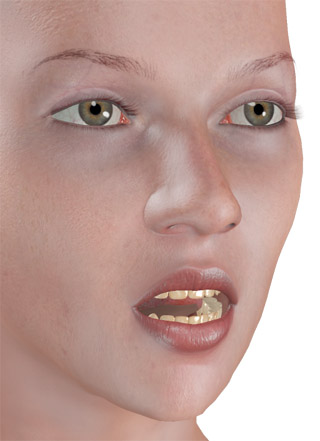
It pretty much just opens the mouth and doesn't do anything fancy with surrounding muscles. It's part of an entire face rig I built to make it easier for me to make more, and more varied mouth and phoneme morphs, but I'm uploading it in case anyone wants to mess around with it, use it for further morphing, anything like that.
The advantage to this is it doesn't include the head-bobbing effect. ;-)
Well because I wanted to make a FBM out of it to only have to turn one dial.
Yes, I think you can slave the lower jaw rotation to the head morph, but then again I don't know how to do that. ;-)
And I think I would have had stretching problems where the inner mouth attaches to the lips if the rotation didn't correspond exactly to the morph.
But of course I'm always open to suggestions for better ways to do things. :-)
And I have my Lightwave face rig that I set up that can pretty much do anything, which can be used to export any altered parts for morph targets. So I don't have to morph the jaws at the same time.
Quote - Well because I wanted to make a FBM out of it to only have to turn one dial.
Yes, I think you can slave the lower jaw rotation to the head morph, but then again I don't know how to do that. ;-)
Fair enough! Eventually I will set it up like that in the main figure, anyway, so whatever works best for testing...
-- I'm not mad at you, just Westphalian.

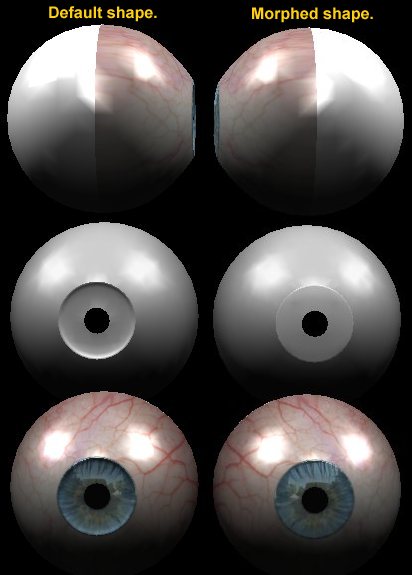
The default Antonia-114 iris has what to my mind is a strange shape, being sharply dished in near where it meets the sclera. I find that this can give strange shadows and highlights near the rim, and also hides the iris from view when viewed at 90° from the plain of the iris (95° yRot). In my opinion the morph not only corrects these problems, but is also closer to being anatomically correct. The morphs should not be set at a strength above 1.0, as doing so may cause the iris to protrude past the cornea.
I think you might be on to something there Les, and it looks good.
I've been looking at eye pictures though and I'm still not sure about that.
I think the reason that you can see the iris from the side in a real eye better is due to refraction through the cornea and not because the iris is convex.
Still though, you have to do what you have to do to make software show it as you want it, and this will make Poser display it better in a render.
Attached Link: Dance with me, Henry.
hi; I just posted another image with Toni. Pop over and have a look. :)
Let me introduce you to my multiple personalities. :)
BluEcho...Faery_Light...Faery_Souls.

A lovely render, but given the transparency of that dress, I hope she's wearing panties...
----------------------------------------------------------------------------------------
The Wisdom of bagginsbill:
"Oh - the manual says that? I have never read the manual - this must be why."“I could buy better software, but then I'd have to be an artist and what's the point of that?"
"The [R'osity Forum Search] 'Default' label should actually say 'Don't Find What I'm Looking For'".
bagginsbill's Free Stuff... https://web.archive.org/web/20201010171535/https://sites.google.com/site/bagginsbill/Home
odf > Quote - Looks good so far. But why would you make a morph to move the jaw? It's a body part, just rotate it.
MikeJ > Quote - Well because I wanted to make a FBM out of it to only have to turn one dial. Yes, I think you can slave the lower jaw rotation to the head morph, but then again I don't know how to do that. ;-)
I don't think stretching would be a problem as only the very bottom of the jaw would stretch, where it would be well out of sight, and the stretching would be very mimimal. Below is the text of a pz2 that will slave the xrot of the jaw to the morph. To work, either the internal or dial name of the morph must be exactly "MouthOpen_03_Head". Of course if you want to use a diffrent name, you can edit the pz2. The slaving should work irrespective of whether the morph is expressed directly from the head, or via a FBM.
{
//MouthOpen_03_Slave-MJ.pz2
//For this file to work the morph needs to be named EXACTLY "MouthOpen_03_Head" (either internal or dial name).
version
        {
        number 3
        }

actor jawLower
        {
        channels
                {
                rotateX xrot
                        {
                        valueOpDeltaAdd
                                Figure
                                head
                                MouthOpen_03_Head
                        deltaAddDelta 9.000000
                        }
                }
        }
}
@ MikeJ,
Quote - I think the reason that you can see the iris from the side in a real eye better is due to refraction through the cornea and not because the iris is convex.
Possibly , but I still think a real iris is slightly convex, plus I'm no good at material nodes, and I'm not sure whether refraction would cure the highlight/shadows problem. A morph was a much simpler solution for me, but I'd also be interested to see what the node nerds can come up with.
Thank you Les, thank you very much!
As for the node nerds (haha), it would have to require refraction and I think it would also have to use internal reflections, maybe requiring something else inside to help with the refraction.
That would of course require raytracing too, and I think some people would prefer to be able to render it without raytracing as well and have it look good. So your morph will most definitely be very useful.

Quote -
Possibly , but I still think a real iris is slightly convex, plus I'm no good at material nodes, and I'm not sure whether refraction would cure the highlight/shadows problem.
that's incorrect. look up diagrams of the eye, the iris inset from the rest of eye. and while the rim might not catch the light, if you notice, almost all art including photos, shows the irs having shadows and being darker beneath highlights and lighter opposing the light (concave shading) when showing eyes that have depth. personally, i've observed this every time i've looked in mirrors with lighting from above (as opposed to very ambient lighting). it's a subtle effect, and easily overwhelmed by ambient or frontal lighting, but it definitely helps determine the appearance of "deep" vs. "flat" or "doll" eyes.
http://www.intrepid.com.au/wp-content/uploads/the-human-eye.jpg
http://www.nyrealestatelawblog.com/j0406700.jpg
http://topouest.com/wp-content/uploads/2009/01/b1eye01.jpg
http://www.meb.uni-bonn.de/cancer.gov/Media/CDR0000543553.jpg
http://www.terrapinphoto.com/jmdavis/eye%20NS8K.jpg
http://acclaimimages.com/photos/aa.jpg
http://www.eyedesignbook.com/ch3/fig3-57bBG.jpg
That last link is the clincher!
The iris is slightly concave BUT is set back due the Anterior Chamber Angle by several millimeters from where you might think it is! The refraction of the cornea causes it to look different from what it is by a slight amout, giving a slight error in knowing what the actual shape IS.
If the first eye in Les' post had a bigger iris set back behind the schlera with a cornea with glass or water refraction, it would look like a real eye, I do believe.
Having suffered blindness in the 90's, the structure of the eye is one of my passions.
([ Is what we have in Les's morphed eye, but what we NEED is something more like a ( ] ,if you get my drift., with the ] part being bigger to prevent loss of texture at the edges and no gaps in the mesh.
(=cornea, and [ or ] =the iris
I cannot save the world. Only my little piece of it. If we all act
together, we can save the world.--Nelson Mandela
An inconsistent hobgoblin is
the fool of little minds
Taking "Just do it" to a whole new level!
Quote - That last link is the clincher!... The iris is slightly concave...
If the last link is to be believed (it's only an artists impression), then it certainly is a clincher. In that image the iris is clearly and most definitely convex!
Also see this diagram http://www.waylandoptometric.com/WayOptCopy/eyeanat.gif. Or this one http://eyemakeart.files.wordpress.com/2009/05/human-eye-anatomy-diagram.jpg
Where I will grant you that there is a problem with my morph, is that although the iris has an overall convex shape, it does dip in towards the pupil. Perhaps the best analogy to the shape, though not quite exact, is a section from the front of a torus, rather than a section of a sphere.
Even before I saw these posts, I was feeling unsatisfied with my new iris morph, and have started working on a new version that is more toroidal in shape. I hope to post the new morph to the Developers site as "Iris-NewShape-LB.zip" in within the next hour or two. I will leave the old morph on the site over night for any one who wants it, and delete it some time tommorow.

Maybe this very large image is helpful - but all the parts are named in german, sorry. The Iris is the "Regenbogenhaut" (Regenbogen = Rainbow = Iris, the greek goddess of the rainbow).
The "Hornhaut" is the cornea.
http://www.augenarzthilden.de/anatomie.htm
I found it on an oculist's homepage so I think that it's believable.
I'm not always right, but my mistakes are more interesting!
And I am not strange, I am Limited Edition!
Are you ready for Antonia? Get her textures here:
The Home Of The Living Dolls
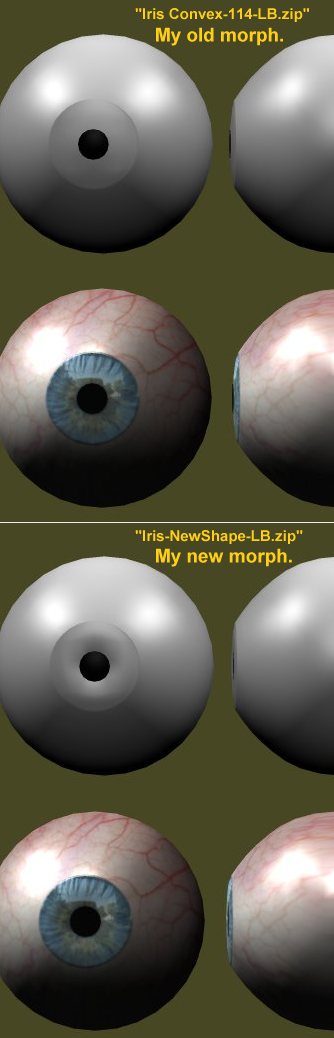


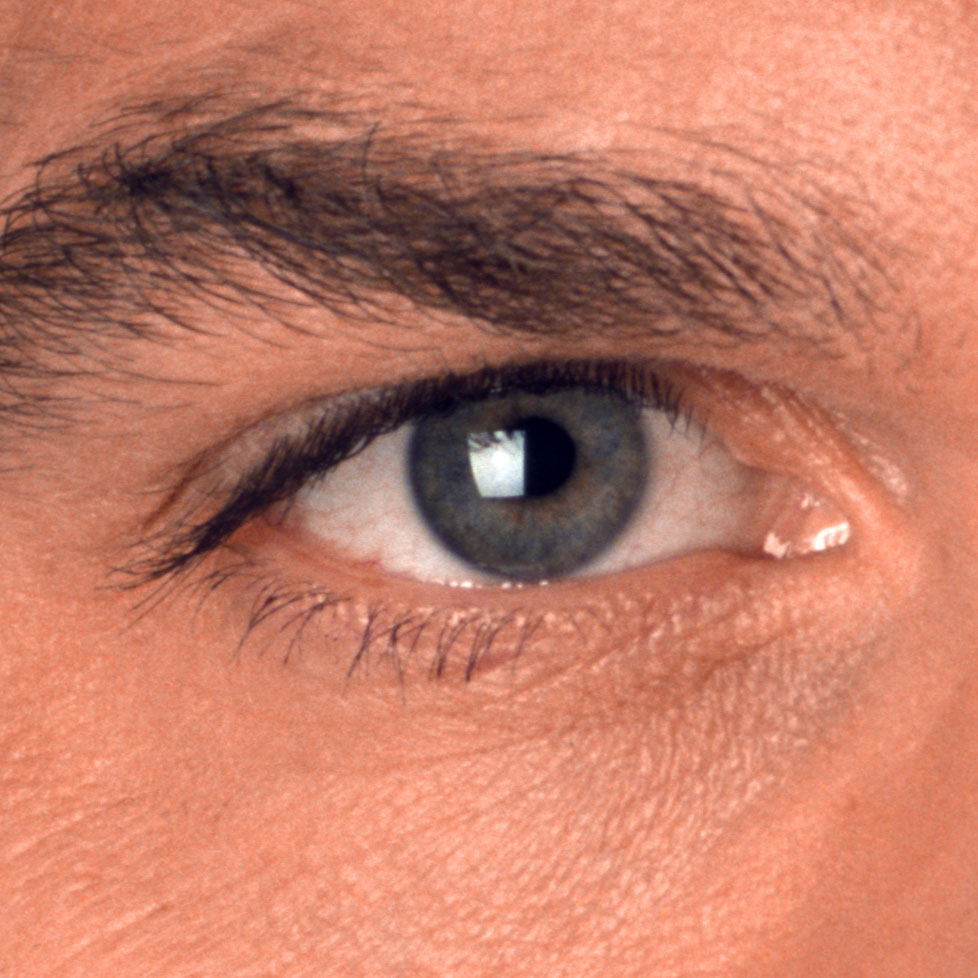

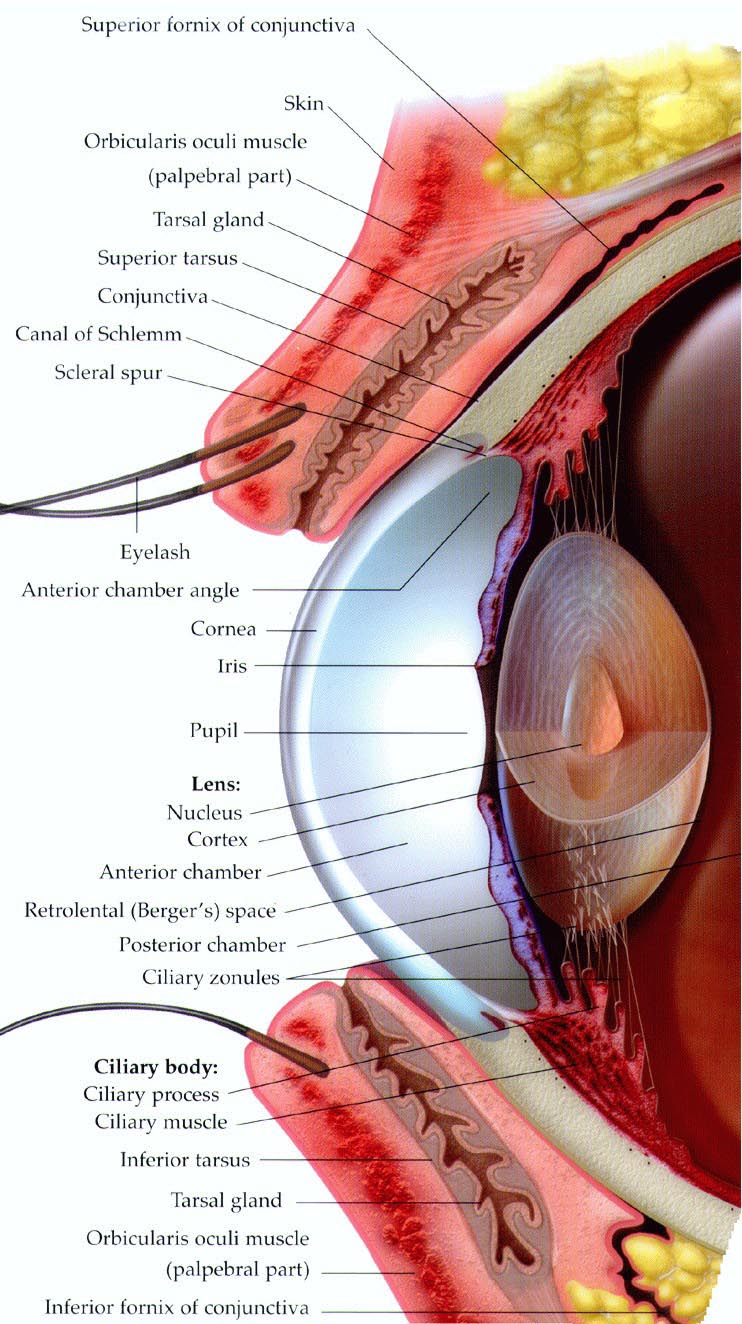


I meant convex. Looking good, Les. It might need to be inset into the eye a couple of millimeters,though,IMO. The opaque layer of the Schlera is on the surface of it, so it shows a slight gap between it and the iris in all the eyes I've ever seen.
I cannot save the world. Only my little piece of it. If we all act
together, we can save the world.--Nelson Mandela
An inconsistent hobgoblin is
the fool of little minds
Taking "Just do it" to a whole new level!
I had an idea for modeling a new eye entirely that would include a few more surfaces and layers.
Specifically, an inner and outer iris surface and an inner and outer pupil surface, an inner surface of the back of the eye to imitate a retina, and an actual lens.
The inner surfaces of the iris and pupil could be separate objects, not physically attached to anything and could have trans maps applied to them to eliminate that unrealistic hard edge look.
Similarly, the iris and pupil could be single objects, but with higher resolution to be able to be dilated without texture stretching.
I'm also thinking about maybe two layers of iris, to give more depth and to allow for more effects.
The inside of a pupil really isn't solid at all, obviously, and the only reason it appears black is because the retina absorbs all light... and I think light can't pass back through the lens the opposite direction due to refraction.
The inner eye surface would be facing inward, against the back of the sclera, and would be there so it could be textured black and/or made 0% diffuse to simulate the black pupil, in the event the inner pupil were made completely transparent and someone wanted to get the effect without using raytracing, while also avoiding specular highlights on the pupil itself.
Or it could all be used with correct refraction values, and the lens would help with that effect, by refracting the light and making the pupil appear dark.
That's what was in that render I posted many pages back when the eye discussion began. In that render, the pupil is completely transparent, but the lens behind it and the refraction I used made it appear black, like it would for real.
Quote - @ MikeJ,
Sounds like you have some very ambitious plans there. I'll be interested to see what you come up with.
I'm working on it right now, actually. I doubt I'll finish it tonight or even tomorrow since I have things to do, but it's been on my to-do list, so I'll get something made soon enough.
It sounds really interesting. A transparent pupil with some kind of retinae object behind it sounds really cool. As far as the retinae absorbing the light, I think photographers everywhere would want to beat you up for THAT statment! They have a term "Eliminating red-eye" to get rid of the retinae shown through the pupil. :laugh: The retinae is orange-red and when light hits it just right, you can see it in certain photos. Mostly from amatuers who don't know how to photo without showing it.
It is to photographers what nostril glow is to Poser users!
With your new eye, WE CAN COMBINE THEM ALL! NYAHAHAHAHAHAHAH:lol: OMG, people would burn other people for that!:laugh:
I cannot save the world. Only my little piece of it. If we all act
together, we can save the world.--Nelson Mandela
An inconsistent hobgoblin is
the fool of little minds
Taking "Just do it" to a whole new level!
I've stared at my colleagues' eyes over lunch, and I think unless we can get actual refraction of the light entering the cornea - does Poser do that? I'm clueless - we'll need to make the iris somewhat concave to mimic the way it catches the light. Not dish-shaped like they are now, but uniformly concave. Without diffraction, a convex shape is definitely not going to produce the correct image.
Also, like cobaltdream said, the iris needs to be set back a little to catch a shadow at the edges.
My $0.02,
-- I'm not mad at you, just Westphalian.
Quote -
It sounds really interesting. A transparent pupil with some kind of retinae object behind it sounds really cool. As far as the retinae absorbing the light, I think photographers everywhere would want to beat you up for THAT statment!
Well, that's what I read about it. You don't see redeye in normal situations and that's what I meant - not photos, but looking at someone. I imagine a flash from a camera happens so fast that the pupil doesn't have time to close.
I didn't know that though about redeye... actually I never thought about it before.
Quote - I've stared at my colleagues' eyes over lunch, and I think unless we can get actual refraction of the light entering the cornea - does Poser do that? I'm clueless - we'll need to make the iris somewhat concave to mimic the way it catches the light. Not dish-shaped like they are now, but uniformly concave. Without diffraction, a convex shape is definitely not going to produce the correct image.
Also, like cobaltdream said, the iris needs to be set back a little to catch a shadow at the edges.
My $0.02,
To be honest, I'm not sure what would be best for Poser. The eye I used in that render I posted was yours, from Antonia, and the only thing I did to it was subpatch it to make it smoother. I think the iris turned out the best of all, and that was with the shape you designed. It had a healthy dose of bump and some SSS and refraction working on it though.
For my part, I'm not in this to try to design a new eye for Antonia, but just for the technical challenge to see if my ideas work.
I'll leave it up to you guys to argue about what works best for Antonia and Poser. ;-)

My problem with Poser eyes is usually the iris is too concave which makes it look very bad from an oblique angle... people make them that way so they will have better "catch light" I guess. I think it is better to have good eye geometry and post-work or even use a prop to simulate the catch light! http://en.wikipedia.org/wiki/Catch_light
Also the way the materials and mapping are set up usually the transition from eyewhite to iris is too abrupt... seems to me most people have a dark transluscant transition whaterver eye color they have.
I must admit I use faked eyelid shadows on the eye texture though and usually fake reflections.
The best effect I get is from Dimension3D's free unimesh UVs eye prop used with the textures and bump maps set by Preditron3D which has good eyewhite detail and the choice of fake eyelid shadow and fake or real reflection... I resort to fake reflection most often because I don't want to set up a whole scene facing the figure just for the reflections.
@ odf,
Quote - A convex shape is definitely not going to produce the correct image.
I find I must disagree with that statement.
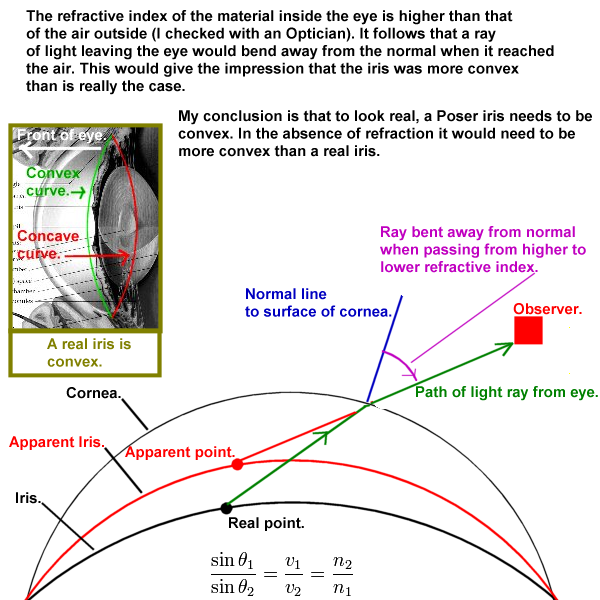
I will grant that refraction must play an important part in the appearance of a real eye. As air has a very low refractive index (1.0003), and I have been told by an optician that the refractive index of an eye is higher. This would serve to make the iris look more convex that it actually is.
A real iris is convex (see insert in diagram above), so I assume that refraction makes it look more convex. With that in mind I am mystified as to how making a poser iris concave would make it look more real. If one could implement a realistic refraction in Poser, the same as a in real eye, the the iris would need a real convex curve, the same as a real eye.
Without refraction the iris would need to be more convex to compensate for the lack or refraction. At least this is how the logic appears to me, and looking at Poser images seems to reinforce this. **I can't imagine any way that a concave iris could look convincingly real, as it seems diametrically opposed to the real situation.
Links:
Ray Optics, Light Refraction.
Wikipedia; Refraction.
**

I'm confused by the occasional phrase of the form "If one could implement a realistic refraction in Poser".
I did that with Antonia's eye a few pages back, and showed how you can see the iris even though it is concave, when viewed from the side, with real refraction applied.
The problem isn't that we don't have refraction. Keep reading from there. The problem is we can't get the iris properly lit behind the refractive cornea. Poser doesn't allow lighting to pass through a refractive surface. I don't need it to bend, ala caustics, I just need it to get through!
I have an experimental shader that combines transparency (to allow light through) and refraction (to bend what we see) and a negative luminance refraction (to remove the unbent image of the iris we see because of the transparency). But this shader is damn tricky to tune.
Renderosity forum reply notifications are wonky. If I read a follow-up in a thread, but I don't myself reply, then notifications no longer happen AT ALL on that thread. So if I seem to be ignoring a question, that's why. (Updated September 23, 2019)
On the bottom of page 120 and the top of page 121 of this thread, BB has renders of her eye with reflection and refraction, so it can be done in Poser....
----------------------------------------------------------------------------------------
The Wisdom of bagginsbill:
"Oh - the manual says that? I have never read the manual - this must be why."“I could buy better software, but then I'd have to be an artist and what's the point of that?"
"The [R'osity Forum Search] 'Default' label should actually say 'Don't Find What I'm Looking For'".
bagginsbill's Free Stuff... https://web.archive.org/web/20201010171535/https://sites.google.com/site/bagginsbill/Home

That's one thing I love about DAZ Studio. You can load up a different set of UV's in the Surfaces tab and not have to reload the figure!!
---Wolff On The Prowl---
@ bagginsbill,
Quote - I'm confused by the occasional phrase of the form "If one could implement a realistic refraction in Poser".
I did not mean to suggest that refraction is not possible in Poser. I was referring to the specific difficulties of implementing it in the case at hand. As you yourself pointed out, the problem is to combine refraction with transparency and this can be "damn tricky to tune".
Whilst I applaud your efforts to implement refraction in this situation, I can't help thinking that a more usable solution in every day situations, for node novices like me, might revolve around shaping the iris.
Would you agree that a real iris is convex, and that refraction serves to make it look even more convex than it really is?
Do you think that a concave iris is preferable to a convex one, or vice versa?

Privacy Notice
This site uses cookies to deliver the best experience. Our own cookies make user accounts and other features possible. Third-party cookies are used to display relevant ads and to analyze how Renderosity is used. By using our site, you acknowledge that you have read and understood our Terms of Service, including our Cookie Policy and our Privacy Policy.
To be fair, in truth, eastern Russia is technically "Asia."
______________
Hardware: AMD Ryzen 9 3900X/MSI MAG570 Tomahawk X570/Zotac Geforce GTX 1650 Super 4GB/32GB OLOy RAM
Software: Windows 10 Professional/Poser Pro 11/Photoshop/Postworkshop 3