
Renderosity Forums / Poser - OFFICIAL
Welcome to the Poser - OFFICIAL Forum
Forum Moderators: RedPhantom Forum Coordinators: Anim8dtoon
Poser - OFFICIAL F.A.Q (Last Updated: 2026 Oct 22 8:39 am)

Subject: Antonia - Opinions?


I've heard Mucinex helps.. migth be worth asking about. I take one every night to clear my nose enough to sleep.. I'm very sensitive to just about everything so it might help a bit without side effects other than easier breathing durring hay feaver season. =) (I don't know if it's true.. heard it from a tertiary friend that has it, don't know where she got the info.. but can't hurt to ask)
Quote - Okay, this is going somewhere. There is a problem with the multiple JCMs being applied wrongly but if I can get this I'm pretty sure I can clean it up.
If Morphing Clothes doesn't apply the limits as in the figure, then there are bound to be strange effects with multiple JCMs controlled by the same rotation.
But if that's the only problem, we can probably whip up a small pose file that simply sets the limits for all the JCMs correctly and that one can apply from within Poser or D|S once the morphs are transferred. If necessary, that pose file could even contain the proper ERC setups (I think), so just as long Morphing Clothes transfers the morphs correctly and with predictable names, we should be fine.
-- I'm not mad at you, just Westphalian.

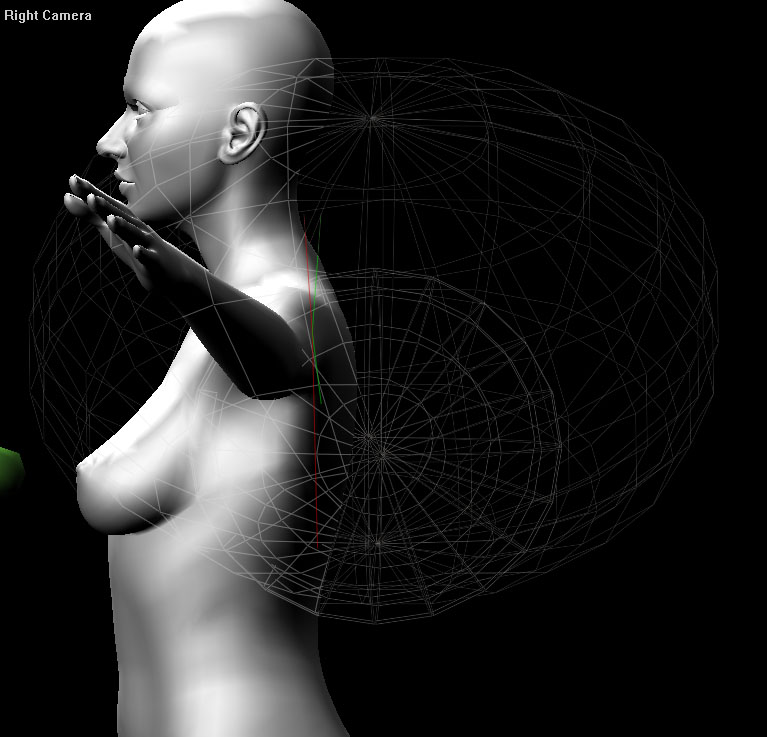
I've seen this before with other figures that have this bug in them (DAZ SP3's feet and conforming shoes e.g.). I don't have any advice for you on this other than to push Poser's support team to actually fix this bug, it's been around for years. I don't know how serious the effect will be with your figure in particular, but it is very bad in the way it manifests in SP3.
edit: no, Figure->Symmetry does not fix this.
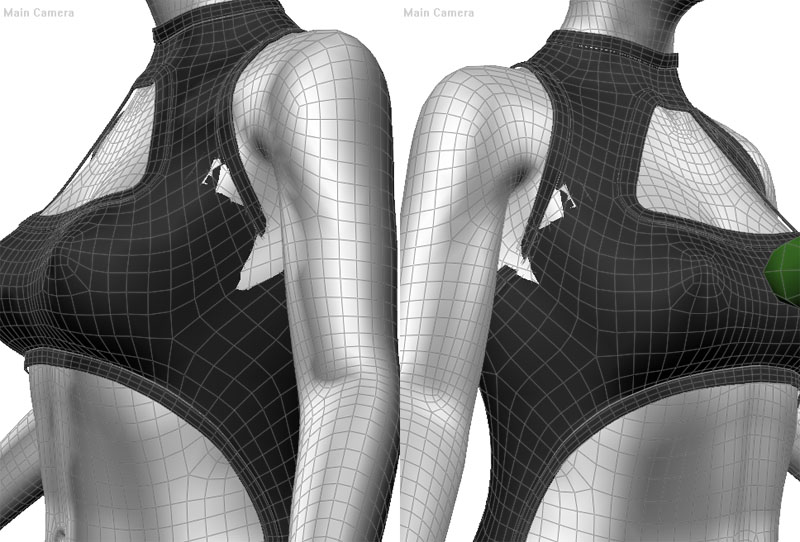
edit: hmm, the polygon grouping is symmetrical, but I still get asymmetrical deformation in DAZ|Studio, which surprises me. I will check to see if something is not alligned the same, whether it's the clothing model or rig or what.
Hmm, that looks more like the "Poser shifts meshes around randomly" bug to me. Are you absolutely sure you are using your original mesh here, or could it be an .obj file that Poser created from it?
But I'll go check the falloffs for the collars and shoulders and make sure they are symmetrical.
-- I'm not mad at you, just Westphalian.
I see one problem in your CR2 for Antonia101 in that the BODY actor's origin and endpoint X values are not zero (very small, but not zero). Several other center line bones also. Really all bones along the symmetry line must have zero X values for origin and endpoint as far as I understand (please someone correct me if I'm wrong). It may be a simple matter of just setting these values to zero but I think the branched bones will not be placed quite properly after that (figure->symmetry again).
You see where I'm going with that right? If your mesh is symmetrical and at zero X (which it seems to be) but the center line bones are not, then you won't get symmetrical deformation as far as I can understand.
Quote - I see one problem in your CR2 for Antonia101 in that the BODY actor's origin and endpoint X values are not zero (very small, but not zero). Several other center line bones also. Really all bones along the symmetry line must have zero X values for origin and endpoint as far as I understand (please someone correct me if I'm wrong). It may be a simple matter of just setting these values to zero but I think the branched bones will not be placed quite properly after that (figure->symmetry again).
Yep, that doesn't sound too good. I'll go check that.
curses at Poser
-- I'm not mad at you, just Westphalian.
Content Advisory! This message contains profanity
Please note (I think you understand this but just in case): This is nothing against your or Mike's rigging job, it's superb, it's the shitty rigging tools and very old bugs that have never been fixed that are to blame here. The Poser joint editor only shows three decimal points for example. And also this problem would likely never be noticeable if nobody made conforming clothing, it just manifests most severely there.


Aw, Jeez. Asymmetrical set-up? Well fooey. Then again, this is still in the Alpha set-up phase, so set-backs are inevitable. It's a helluva lot better to find the flaws at this early state than later. AT least there aren't loads of clothes already done, that need to be fixed,too.
More eyes can spot problems like this. It's frustrating, but not devastating.
I cannot save the world. Only my little piece of it. If we all act
together, we can save the world.--Nelson Mandela
An inconsistent hobgoblin is
the fool of little minds
Taking "Just do it" to a whole new level!
You know, I hate to pile bad news on top of other bad news, but: I am reasonably sure this will cause your existing JCMs to be asymmetrical, once you fix the rig. I guess pick one side that looks right after the rig is corrected and mirror to the other side again, for each JCM.
Quote - You know, I hate to pile bad news on top of other bad news, but: I am reasonably sure this will cause your existing JCMs to be asymmetrical, once you fix the rig. I guess pick one side that looks right after the rig is corrected and mirror to the other side again, for each JCM.
Don't worry, that's the easy part.
-- I'm not mad at you, just Westphalian.
I inspected the rig in D|S and could confirm the asymmetries. Fortunately, D|S has a mirror tool in the joint editor, which hopefully works better than its Poser equivalent. I am now halfway through re-applying the JCMs. When I'm done, I'll copy the rig to the bathing suit and see if the symmetry problems are gone. I might also have another go at Clothing Morphs, trying to copy the morphs and then reestablish the limits.
I am kind of confused about blank CR2s now since pjz99 told me that many 'blank' CR2s for commercial figures still have morph deltas in them. So how blank is blank really? Or how blank does it need to be, anyway?
-- I'm not mad at you, just Westphalian.


@odf: I'm thinking that the "blank" should have basic movement JCM deltas at the absolute most (depending on who made the blank, and what figure it's made for).
{oddball example: if you move the toes downward past n degrees, the foot starts swinging/curling downwards... things like that. The shoulder JCM's would be a perfect example as well.}
I can see those in place for movement reasons, and I doubt that anyone would complain at their presence.
(...been too $#@! long since I had to worry about stuff like that. :) )

Blank should be blank! If you use the cr2 as spender for the bones, the JCM's will be transferred but without funktion. They use other polys then the dresses. Blank usually should also be without unneeded bodyparst such as head or all those little bits for fingers, except for gloves or the feet, except for footwear.
Ulli
"Never argue with an idiot. They drag you down to their level and beat you with experience!"
TZORG, the problem is that Posersometimes makes joint falloff zones apply different deformation to left and right sides, meaning that they don't bend the same way. This can be seen e.g. on SP3's feet and conforming shoes, if you look in the Front camera. As to why it's impossible to fix, even if you type in values that are mathematically symmetrical when editing the CR2 by hand, the still don't apply a symmetrical deformation. It seems to be a matter of luck where this bug will appear, but there is some pattern that I don't understand because once it's there, it's there to stay. Note this is a different issue (I think) from the other problem that the center line bones in this case were not quite centered.
How can I obtain direct evidence for that phenomenon you describe, pjz99?
I symmetrized the rig in D|S and still get those slightly asymmetric poke-through patterns as in the pictures you posted earlier. But it's hard to tell where exactly those are coming from. We're looking at intersections of nearly parallel faces here, which will be very sensitive to all kinds of round-off errors.
Let me know if you find out anything definitive. In the meantime, I'll concentrate on beating Morphing Clothes into submission...
(Will upload the adjusted rig for Antonia later today.)
-- I'm not mad at you, just Westphalian.
Make a version of your CR2 with no JCMs to be certain it isn't those, and set up some kind of reference prop that is not rigged, so it won't be deformed in any way. In your modeler make some kind of geometry that you are absolutely sure is 100% symmetrical, something with minimum poly count and simple (a pair of boxes maybe). Place the reference prop on both sides of the figure and check the joints and see if the deformation really is symmetrical, it's hard to be sure just eyeballing it.
The asymmetrical falloff zone orientation problem can be seen in Poser (this doesn't happen in DAZ|Studio as far as I know) in any humanoid figure I've looked at, although it manifests in different places. I don't know if this is the same as what you're seeing since you've adjusted the rig and fixed the X orientation of the center line bones though.
As to Morphing Clothes, after thinking about it some more, I think it actually will be simpler to use two reference CR2s to take the JCMs from, with one direction of bend for each - rather than pick through the clothing CR2 to try to decide which JCM is the correct one, just do it in two passes and remove any decision making.
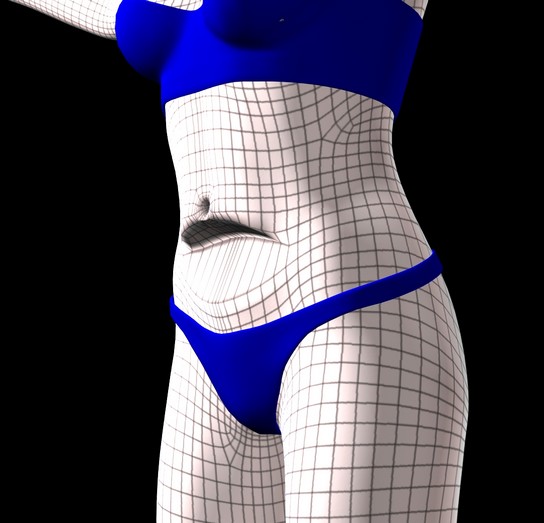
Not trying to rush you but whenever you get a new CR2 uploaded I'll start a second swimwear piece, a bikini (I'm on sort of a swimwear binge lately).
Quote - Not trying to rush you but whenever you get a new CR2 uploaded I'll start a second swimwear piece, a bikini (I'm on sort of a swimwear binge lately).
Swimwear is good. We can show off her body while staying "family-friendly".
I'll upload the fixed CR2 tonight (Australian time).
-- I'm not mad at you, just Westphalian.


Very nice modeling, and nice to see a wingnut really making something cool :)
I havent read the last 4 pages of this thread (sorry)
My biggest impressions looking at the straight mesh:
Her breasts are going to be a dickens to make flat. that sharp undercurve definition is very hard to get rid of. It looks very good and very natural, but the main reason v4's breasts lack sharp definition is to making morphing them easier. Same thing on the nipples.
About the gens while we're at it ... there are times (like with skinsuits aka bodygloves) where having that bit nice and flat will be handy. I miss the Spandex morphs V3 had... some of that on this figure would be very handy for superhero images. So you should keep on eye on being able to make such an option possible. And please dont do the daft p2/p5 genital switch thing .. that was horrible to morph around.
The arm proportions bug me. The arms down straight shows she is within human variation, but I keep thinking her fore arms are kinda short. As we all know, scaling bodyparts in poser doesn't work so great once the figure is dressed, so thats something to think about now.
You have very nice topo over most of the figure, I do agree that perhaps a little more density at the elbow might be useful, but thats always a tossup and really a careful hand with the rigging makes it unneeded
And last .. the eyebrows. Do they really need hard modeled geometry like that? to change the shape it will take a lot of precisely tuned micro morphs and fiddling about. Though if they are separate geom with their own material people who'd rather do texture brows can just turn 'em off
The hiprigging looks fascinating .. is that being done via bodyhandles? can that be matched on the shoulders? how much of a bear is that going to be to incorporate into a conforming clothing item? Please remember no matter what setup you end up with (jcms or not) that a useful developers base with a rig clothing makers can use makes support a lot simpler all round. Something I wish bloody DAZ would remember.... the v4 one is nearly useless without ripping it apart and yanking out half the lines first. And dont even get me started on the JCMs and the bloody built in deformers mutter they work nicely but BOY do they make me cuss anythimg I make v4 pants.
I didn't read through the whole bit on the uvmapping ... but I do use UVlayout so if you need things adjusted after your trial runs out, just let me know. :) I do like that UVL defaults to all-parts-the-same-ratio and like many I move and expand parts I need via uvmapper.
As lovely as Bills work is, remember ..not everybody renders in Poser all the time. So supporting regular imagemaps as well is a good idea for Bryce, Vue, Carrara and C4d users (to name a few)
I'd say concentrate on the expression morphs, that will give a good base and shaping morphs tend to be easier.
I wouldnt mind making a quicksuit base mesh resource for people to chop up into their own clothing items. She is a very nice figure and deserves some support :) I certainly find her more aesthetically appealing out of the box than Efrontiers last couple figures lol
Lyrra


Attached Link: Stacy London
Hi; Remember when I said there was a hair care commercial with a gal that strongly resembles Antonia? Well here is a link to a site with her photos... http://www.tvguide.com/celebrities/stacy-london/197099This gal has a nose like Antonia's too. :)
Let me introduce you to my multiple personalities. :)
BluEcho...Faery_Light...Faery_Souls.

Whew! I didn't know about Antonia until I came across Saintfox's image in her gallery (which she kindly provided a link to this thread as well) and I basically sat down to read the 85 pages since yesterday (yes yes, I had some sleep between then and now :D) ... and wow - I have to say - she's one lovely figure and this is a great community project ... I love seeing what the contributors are making for her!
At this stage I'm not sure what I can contribute to this fantastic project but I would love to when the opportunity arises. I only have some experience (little at that thou) with some texturing for clothes so perhaps I can help out with that.
Keep up the great work guys ... and what an interesting and amazing journey!
~Tina
Quote - odf: found a problem when you xrotate the hip, you need to fine tune the Dynamic B Angle of the jointx (nice to have the DAZ setup tools)
Actually no! The hip should not have any bend relations with its parent (which is 'hipHandle') at all. This looks like a bug I've fixed a long time ago has crept back. I suspect working on a rig in D|S and then exporting to Poser does that, but I'll have to investigate further. If my suspicion is correct, then we'll have to live with this problem - and a few others - for a while, because I'm not ready to edit half a dozen positions in the CR2 by hand every time I export the rig.
PS: Using hipHandle instead of hip to rotate the figure should work until the problem is solved.
-- I'm not mad at you, just Westphalian.
You may want to just lock rotation values for hip (min/max of zero and forcelimits 1) and force all rotations to be done with hipHandle, and leave that way for good.
Quote - You may want to just lock rotation values for hip (min/max of zero and forcelimits 1) and force all rotations to be done with hipHandle, and leave that way for good.
Excellent idea! Since that's something I can definitely set up in D|S and get exported correctly, I'll do that for now.
I'm not sure though if I should leave it like that forever. Having an extra handle for positioning the figure as a whole, though confusing to the user, might come in handy in some situations.
-- I'm not mad at you, just Westphalian.
I can't see for what, you already have the BODY actor for that if needed (total of three).
For a "blank" CR2 I propose this:
Remove:
- Eyes
- Hands and children
- Instep and children
- IK chains
- Materials
- JCM deltas (a bit tedious that but I think I can automate it and leave the channels in, although I want to point out again that the DAZ figures' blanks still contain deltas there so it may be overkill)
Something in the current CR2 that concerns me, there is no Min Shading Rate value for any of the actors. This may not matter for DAZ|Studio, which only uses min shading rate for the entire scene I believe, but it can matter for Poser which uses it per actor (in this case bodypart). It is not a big deal to set this value in a CR2 editor even if the DAZ tools are not writing it out for you, and I recommend you do that (0.2 is the Poser default, and I recommend something like 0.05).
Quote - I can't see for what, you already have the BODY actor for that if needed (total of three).
For a "blank" CR2 I propose this:
Remove:
- Eyes
- Hands and children
- Instep and children
- IK chains
- Materials
- JCM deltas (a bit tedious that but I think I can automate it and leave the channels in, although I want to point out again that the DAZ figures' blanks still contain deltas there so it may be overkill)
Sounds good. I think I might leave the hands in and just remove the fingers, though. I'm currently wearing a sweater with pretty long sleeves and I like it.  There's also two jaw and two tongue actors that won't be of any use in clothing.
I think I might make one with the complete JCM rig removed as well, because I'd like to just change the name and geometry reference in the CR2 to create a clothing rig instead of laboriously having to import everything into Poser and saving it out again. But in that case the JCMs would stay in and confuse Morphing Clothes big time.
-- I'm not mad at you, just Westphalian.
Quote - Something in the current CR2 that concerns me, there is no Min Shading Rate value for any of the actors. This may not matter for DAZ|Studio, which only uses min shading rate for the entire scene I believe, but it can matter for Poser which uses it per actor (in this case bodypart). It is not a big deal to set this value in a CR2 editor even if the DAZ tools are not writing it out for you, and I recommend you do that (0.2 is the Poser default, and I recommend something like 0.05).
Sounds good. But as with the things mentioned earlier, unless I can set that up from within D|S, it'll have to wait until I'm done fiddling with the JCMs.
-- I'm not mad at you, just Westphalian.

Multiple donor CR2s would probably be best, although I'm finding cutting the JCM data out by hand to be tedious if it isn't strictly necessary. For conforming shoes I have seen a couple of approaches:
Each shoe has its own rig starting from the hip
Both shoes together have a single rig, starting from the hip
There may be other ways to set up a shoe rig but I don't know if I'd recommend them (I've only rigged shoes 2-3 times).
Quote - I think I might make one with the complete JCM rig removed as well, because I'd like to just change the name and geometry reference in the CR2 to create a clothing rig instead of laboriously having to import everything into Poser and saving it out again. But in that case the JCMs would stay in and confuse Morphing Clothes big time.
You're probably getting tired of picking up Poser utilities onesy-twosey but I highly, highly recommend Dimension3D's Poser File editor. It has been the single most useful content creation utility I've used throughout all the Poser junk I've modeled/rigged/morphed/what have you. You don't have to fix this in Poser (and in fact I could fix it for you in 10 seconds of editing if you want) but it's a low priority issue and you likely don't need to worry about it until you're done, if at all.
So a couple of assorted blank rigs that seem to be useful:
- Shoe rig, from hip to thighs and all children, all else deleted
- Top rig, from hip to head, and from chest to hands (delete hand children, head children, thighs and children)
- Skirt rig, from hip to abdomen (?) and hip to feet, delete others and children
- Bodysuit rig, just deleting chidren of hands, feet and head
Sound OK?
Oh good - mass-setting stuff like min shading rate is extremely easy, actor editor -> select actors -> Set, something like that takes about 20 seconds.
Occurs to me that I left out my own swimsuit project in the blank CR2s I was suggesting, so one more: swimsuit rig, with extremities deleted past thighs, shoulders and head. I'll have these hacked up in 15 minutes or so and put a zip of them on your developer site, and then I'll get back to the swimsuit project at hand :)

Privacy Notice
This site uses cookies to deliver the best experience. Our own cookies make user accounts and other features possible. Third-party cookies are used to display relevant ads and to analyze how Renderosity is used. By using our site, you acknowledge that you have read and understood our Terms of Service, including our Cookie Policy and our Privacy Policy.
That looks better than a lot of comercial outfits as is.. just a little work and it'll be perfect. =)