
-
Marketplace
-
Free Stuff
-
Galleries
-
Community
Forums General
- News
- Deals
- Poser
- Contact
Renderosity Forums / Poser - OFFICIAL
Welcome to the Poser - OFFICIAL Forum
Forum Moderators: RedPhantom Forum Coordinators: Anim8dtoon
Poser - OFFICIAL F.A.Q (Last Updated: 2026 Mar 10 6:08 pm)

Subject: Replace G2Head with new HeadProp

Report Post

Why not export the mesh as an MT, and save the painted texture as a map to apply to the morphed character? Seems to make more sense to me to do it this way, rather than using an external prop to replace the head. A prop replacement won't inherirt the bends and jiont parameters of the original body part (I believe), so posing this new figure will cause problems at the neckline: bringing in an MT for the head and retexturing it in the materials room, though, allows everything to be posed as usual.
JonTheCelt
Thanks JonthCelt for your reply,
The MT-option that you mention is the normal way to do things in Poser, I know. But I was trying to make a workaround for a bug in ZBrush3 which makes it up till now impossible to load a MT in the good place.
But the creation of the HeadProp and Replacing the HeadBodyPart with this Prop keeps the rigging intact, so there won't be problems in the neckline though.
The Replacing-manner has some advantages especially if you want to break the polygonial count law. So you can add geometry which you can not do that easy with a MT. Or you could apply local subdivision to bring in some new details without the need for the more difficult (and in my opinion unreliable) displacementmapping.
I have already discovered a way to reimport the HeadObject without the need to manually resize and place the Object-to-be-replacing. Just export the Head as MT. Change the mesh in ZBrush3 and retexture the HeadUV. Then export the new Headtexture and export the mesh.
Finally import the mesh just like an object with nothing checked (so not load as MT). But Poser places this Object right on top of the old Head, ready for replacing so to say.
Greetings, EddyL
-
- Renderosity Page
- Renderosity Communities
- Blender 3D
- iClone
- Poser Users
- Poser Software
- Become an Affiliate
- Memorials
-
About
- About Us
- Contact Us
- Team
- Policies
- Terms of Service
- Copyright Policy
- Refund Policy
- Licenses
- Standard License
- Extended License

Privacy Notice
This site uses cookies to deliver the best experience. Our own cookies make user accounts and other features possible. Third-party cookies are used to display relevant ads and to analyze how Renderosity is used. By using our site, you acknowledge that you have read and understood our Terms of Service, including our Cookie Policy and our Privacy Policy.
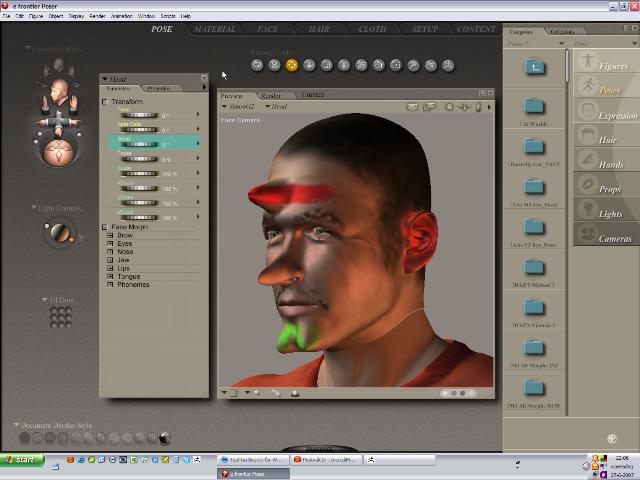
I wanted to change some formes of the head of G2. Normally I do that by exporting as MorphTarget and importing in ZBrush, then after deforming export again and load as MT in P7. But I also wanted to change the texture of the (morphed) Head. So I started to create one in ZBrush3 too. You can use as they call it Polypainting. Very userfriendly (with some bugs that should be fixed very soon) Now, doing this I realized that I could also export the Head from Poser not as a MT, but simply making a new object from it, sculpt and paint in ZB3 at the same time. And than export the new form as an .obj (with paired up texturefile; this is the case if you do not export as MT) from ZB3.Then I imported the new HeadObj as a prop in Poser (ca 15% of PoserFigure). Carefully placed it on the real (old)HeadBodypart.
Finally, I selected the old Head, Object>ReplaceBodyPartWithProp and Hopla! A beatifully, fully functioning and newly textured replacement of the olg 'ugly' head.
(BTW You will notice in the picture that the texture has some flaws; but that will be fixed in ZB3's service release)
BUT, as you can see the new Head does not fit exactly onto the old Neck. This is because I had to resize and place the imported Headprop by hand.
MY QUESTION: Is there an other, more simple and precise manner to resize and place the imported prop, so I can try this interesting new way to make changes in the look of my Posercharacters in a very straightforward way through the beautiful ZBrush app?