
Renderosity Forums / Carrara
Welcome to the Carrara Forum
Forum Coordinators: Kalypso, Anim8dtoon
Carrara F.A.Q (Last Updated: 2026 Sep 09 4:39 am)
Visit the Carrara Gallery here.

Subject: irradiance map bug?


Well guess I better read the manual again. If I turn of f caustics and just use the map...it doesn't apply caustics and it actually seems to be taking longer than the original render. So caustics must be seperate and at the moment not compatible with IM. Anybody else using Irradiance Maps?
No need to think outside the box....
Just make it
invisible.

Irradiance maps only contain Global Illumination information. You're right, caustics is not part of GI. There's no reason not to use caustics with an irradiance map, but I'd probably render my irradiance map without caustics first and save it. let us know how it turns out. The manual says to even try rendering your map without textures first. Yeah, the glittering refections are from caustics.
That's what I am doing. I rendered with no textures. I am assuming that means turn items off, cause that makes sense. I am not going to remove textures from the file. I basically rendered nothing and now seeing if it speeds up rendering with same results. Because before it was also taking longer. Have to pay attention to the irradiance map options tho remember what to check and uncheck and doing the map the way the manual said.
No need to think outside the box....
Just make it
invisible.
ok, It rendered fine using the procedure in manual. I had skylight, and some indirect and caustics. It went from about 58 minutes to just under 40 minutes. So about 31% gain...cool. The manual refers to noise when rendering with textures. I guess they were not kidding. Easier to render nothing anyway.
No need to think outside the box....
Just make it
invisible.

while on the subject of maps, is there a way to take a map, and export the parts that
are on one of my objects? like export a texture file thats just the light information
so i can use the light values created from GI to control parts of materials
i've seen plugins that fake this in the texture room, but GI, and shadows, dont get
calculate, which means not good enough :) plus if i can export a textuire file, i can
use that in paint programs to help create the textures to begin with
It doesn't .Sorry just went back and read the post better. Little unclear to me. The I maps sounds closest for the lighting, information, but if you want to export it as a texture map you need to use something that outputs textures. Could use baker to output the texture or use gbuffers for some things. If you use a plugin, maybe some of the SSS plugins you can generate an interaction for a texture. However, creating something that can use the imap might be your best bet. I have just started using them myself. The part that is unclear to me is when you say control a material. Are you talking some kind of special effect? That can't be used in say photoshop most likely. As a texture it can.
No need to think outside the box....
Just make it
invisible.
what i'm trying to get is once GI is calculated, each object in my scene knows the amount
of light hitting it. and i the end result i want is to take that lighting value, and have it
control parts of materials, which i used to do tons in poser6, wether it be plugin or tex file
an example, is a light meter, you would feed the value into a gradient of a rainbow
then the more light hitting the object (balls work good, round :P) and it changes from
say blue (too low of light) to red (too much), poser 6 had a diffuse node for this
i've seen plugins that can do part of it, they only work with direct light, and ignore shadows
and most of my work at the moment is using GI, as trying to have realism :)
some objects in the world respond differently to the amount of light on them
skin for example is one of them
if someone wrote a plugin to read and use I maps in the texture room, that be great
outputting a value 0% to 1000% or so, easily usable :)
Sounded like you were going in that direction. I would contact Mark or Eric and suggest this. Maybe Mark first because it could possibly used with some of his other plugins like lit or proximity. I don't think Julien will have the time. Sounds like a good tool.
No need to think outside the box....
Just make it
invisible.

Privacy Notice
This site uses cookies to deliver the best experience. Our own cookies make user accounts and other features possible. Third-party cookies are used to display relevant ads and to analyze how Renderosity is used. By using our site, you acknowledge that you have read and understood our Terms of Service, including our Cookie Policy and our Privacy Policy.
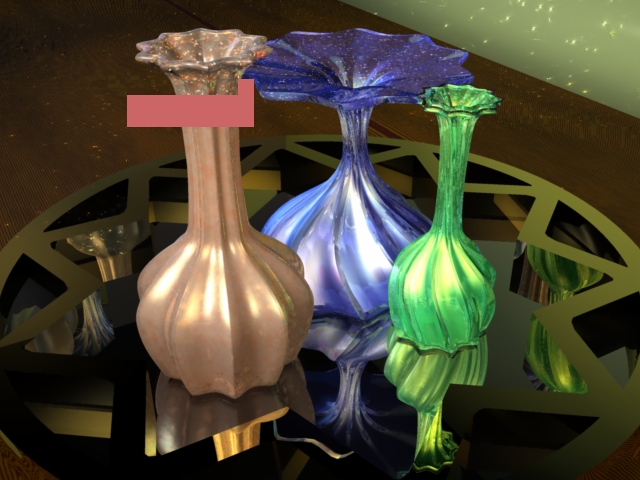
I am doing some testing with irradiance mapping. Haven't used it enough to know if there is a bug so am asking if others have seen simular issues. I rendered a little test scene to save a map with static settings, no interpolation...skylight and caustics. It rendered fine, but when I went to use the save mapped this is what I got. It could be a caustics thing...Just started using it so still pursuing.No need to think outside the box....
Just make it invisible.