
Renderosity Forums / Carrara
Welcome to the Carrara Forum
Forum Coordinators: Kalypso, Anim8dtoon
Carrara F.A.Q (Last Updated: 2026 Sep 09 4:39 am)
Visit the Carrara Gallery here.

Subject: material question


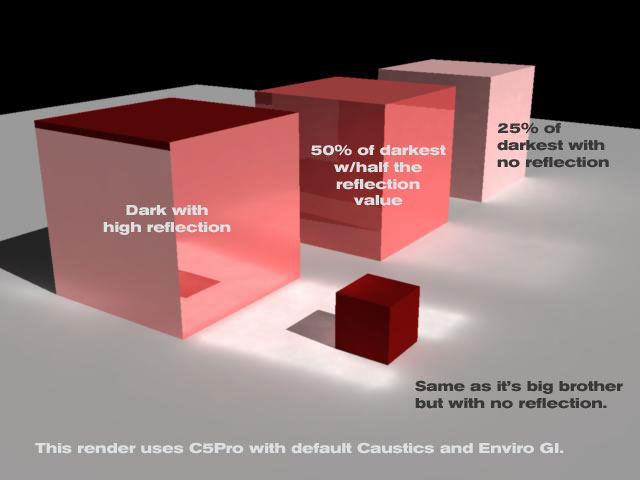
unless i'm mistaken, caustics is the reflected light onto the floor, in the above pic?
and the wavy light at the bottom of a pool, etc?
what i'm after, is the reflection of the object, the part you see in the larger cube
easiest thing to do, is after the reflection map gets rendered, is multiply that times itself
think of a wood floor, you can see a reflection is newly polished ones
the light on an object bounces off the floor and into your eye
a brightly lit object has a nice bright reflection, the wood absorbs a small percent
now as that object gets dimmer, and less light bounces to the floor then yout eye
the amount of light absorbed by the wood is a higher percent
get it?:)

You can also tell the light to only fall on the object (cube in this case) just FYI. However, did you try using a percentage in reflection or using refraction and index of refraction. Caustics is usually related to something with a curve shape for reflection or refraction....or so I thought.
No need to think outside the box....
Just make it
invisible.
And, actually, I think you will find reflections a strictly linear relationship. The reason why it appears reflected light appears to drop off more quickly on a darker object has to do, I believe, with the non-linear response of the human eye, and with perceptual cues of surroundings and contrast. 3d is currently a bit hampered by the way caustics and global illumination are treated separately -- this both for historic reasons, and for the simple reason that machines are not yet fast enough for a true physical optics solution. Global illumination/radiosity solutions are generally heat-transfer models, with or without occlusion. Caustics are generated specifically on reflective surfaces within direct view of a light source. And of course in true physical optics, Subsurface Scattering, fog/haze diffusion, "visible" light cones, and glow are all interrelated aspects of one single system. In 3d, we are still trying to ape the real optics with various simulations. In some places, there are no optimal work-arounds (for instance, the prism effect which is in large part responsible for the look of cut crystal and many gemstones).
meh i give up on this lol
but btw nomuse, the prism effect did have a solution, quite a good one accually
there was a thread in the poser forums for it, somewhere around 12 months ago
was during the time i worked on gem mats, and now you got my mind thinking of
pretty gems again and not my work :) damn you lol
not sure if i still have the saved material, but i remember the angle the light went in
along with a refraction node doing something, caused the colors of the material to
change to different colors of the rainbow, looked great
with better raytracing of carrara, i'm tempted to look into it again
but poser had a diffuse node, allowing the amount of "energy" from lights to be a
variable used, and i know that node was also part of it, so might not work in carrara -_-
as for a simple workaround mentioned to me at work, but never tested for myself
render 3 images, 1 with red value of your lights only, 1 blue, 1 green, each time
changing the refraction index, then assemble again in a paint program
i was told it gets good results as well, but too busy to try :(
oh well back to work, might look into gems later
Heh. It's the latter I was thinking of. Render thrice, comp in an outside application. Actually, does seem possible to write a shader tool that would apply a color gradient depending on AOI... might need to get into the SDK to get it running, tho. But if fake fresnel effects can be written, then it would seem a color gradient could, too.

A better test would be with a gray background instead of black.
www.youtube.com/user/ShawnDriscollCG

Privacy Notice
This site uses cookies to deliver the best experience. Our own cookies make user accounts and other features possible. Third-party cookies are used to display relevant ads and to analyze how Renderosity is used. By using our site, you acknowledge that you have read and understood our Terms of Service, including our Cookie Policy and our Privacy Policy.
trying to play around with reflections a bit
with some materials in real life, the brightness of an object being reflected
will effect how much gets reflected.....ok that doesnt sound right
some objects reflect say 10% of light hitting it, coming from a "fully lit" object
but when that lit object gets less light, say 1/2 as much, then the reflective
material only reflects say 5% of the light, so theres accually a curve, where
the brightness of the lit object controls the reflective value of the other
the reflective material is accually absorbing a small amount of light
in poser, i could simply take a reflect node, multiply the output times itself
(or more indepth depending the effect i am going for)
but in carrara, i cant seem to do this? if i choose multiply in the reflect menu
then reflection doesnt appear for the next branch, and cant do :(
help?