
Renderosity Forums / DAZ|Studio
Welcome to the DAZ|Studio Forum
Forum Moderators: wheatpenny Forum Coordinators: Lobo3433
DAZ|Studio F.A.Q (Last Updated: 2026 Jul 29 11:29 am)


Subject: Curled Toes


Oh dear, that looks painful :(
Wild assumption: morphs going rogue on you? Of course this doesn't help you one bit. Did you do anything here? "it doesn't work" is a question no one can answer without more info.
But ... ugh... that looks nasty. So, let's try to find a solution before anyone gets really hurt here! 👀
OP => Select a foot. Right click on the scene tab (pane entry?) and use: "Select => "Select children".
Step one completed.
Right click on the "Parameters" tab, use: "Zero => Zero selected items".
(pre-re-reading: I mean hover your mouse over the first option, see the menu show up, then use the option).
Save the scene (or sub-scene).. what happens?
OP is asking the same question on multiple places at once. You may want to keep this in mind before responding, because as far as you know the issue could already have been resolved...
Not a fan. At least give people time to respond.
Different people read / use different forums, BTW.
"Oh dear, that looks painful :(
Wild assumption: morphs going rogue on you? Of course this doesn't help you one bit. Did you do anything here? "it doesn't work" is a question no one can answer without more info.
But ... ugh... that looks nasty. So, let's try to find a solution before anyone gets really hurt here! 👀
OP => Select a foot. Right click on the scene tab (pane entry?) and use: "Select => "Select children".
Step one completed.
Right click on the "Parameters" tab, use: "Zero => Zero selected items".
(pre-re-reading: I mean hover your mouse over the first option, see the menu show up, then use the option).
Save the scene (or sub-scene).. what happens?"
Nothing. It doesn't change the curling. I have tried zero pose - doesn't work. If I zero figure, it restores to the base Genesis 3 Female, but that's no different than just starting with a new Genesis 3 female figure.

After posting on reddit, I received a note that the post had been deleted because of low karma. That's when I posted here.May I ask, by chance, did you have a morph for a shoe/boot by chance used on it?
Different people read / use different forums, BTW.
"Oh dear, that looks painful :(Wild assumption: morphs going rogue on you? Of course this doesn't help you one bit. Did you do anything here? "it doesn't work" is a question no one can answer without more info.
But ... ugh... that looks nasty. So, let's try to find a solution before anyone gets really hurt here! 👀
OP => Select a foot. Right click on the scene tab (pane entry?) and use: "Select => "Select children".
Step one completed.
Right click on the "Parameters" tab, use: "Zero => Zero selected items".
(pre-re-reading: I mean hover your mouse over the first option, see the menu show up, then use the option).
Save the scene (or sub-scene).. what happens?"
Nothing. It doesn't change the curling. I have tried zero pose - doesn't work. If I zero figure, it restores to the base Genesis 3 Female, but that's no different than just starting with a new Genesis 3 female figure.
https://www.darkelegance.co.uk/
Commission Open
littlehank posted at 6:18 PM Tue, 29 July 2025 - #4498301
Please try to use the quote option (the 'quote' icon at the left of the option icons), because it makes it very difficult to see what's going on otherwise.Nothing. It doesn't change the curling. I have tried zero pose - doesn't work. If I zero figure, it restores to the base Genesis 3 Female, but that's no different than just starting with a new Genesis 3 female figure.
Anyway, if that doesn't work then I can only assume that some morphs got locked somehow. Do note that this isn't something that "just" happens, so something else is going on here and you'd better find out what.
Your best bet for now is to load in that saved figure (curls and all), click on the options icon of the Parameters pane (the icon with the small triangle and the lines) and then select/enable: "Preferences => Show hidden properties" just to be safe. In the Parameters pane itself you select "Currently used".
Then use the scene pane (or the Parameters selection option) to go over each toe node. Select the toe ("Left small toe 1") to check, then the child node ("Left small toe 1_2") and keep an eye out for used morphs. Something is bending that node, and this is a sure way to find out what.

Privacy Notice
This site uses cookies to deliver the best experience. Our own cookies make user accounts and other features possible. Third-party cookies are used to display relevant ads and to analyze how Renderosity is used. By using our site, you acknowledge that you have read and understood our Terms of Service, including our Cookie Policy and our Privacy Policy.
This happens sometimes after saving a figure. The toes become curled. Nothing I can think of will fix it - zero figure pose, for example. The toes have no bends - they're curled like that.
Can anyone think of a fix? Figur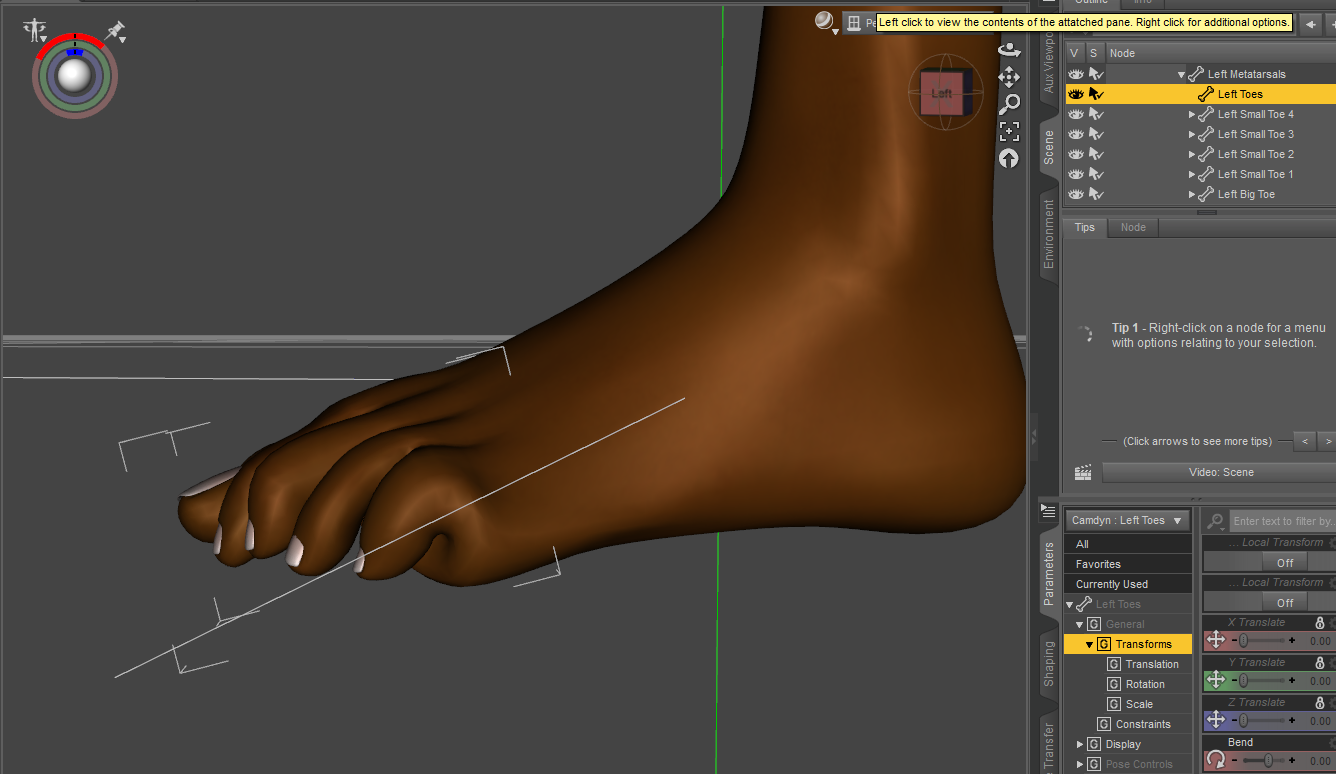 es look like some sort of odd humanoid alien with the toes like this.