
Renderosity Forums / Carrara
Welcome to the Carrara Forum
Forum Coordinators: Kalypso, Anim8dtoon
Carrara F.A.Q (Last Updated: 2026 Jun 30 12:55 pm)
Visit the Carrara Gallery here.

Subject: Curious Question


Hi Joseallen17
The major hair that you see here and at other stores are polygonal hair, you need to model them first and create a CR2 file to work in DS or Poser. So run for polygonal hair modeling, dont need to be for your modeler, but in any software, since that you know your tools you can easily transfer the idea to your model software.
Dynamic hair isnt transferable between softwares, so Poser and Carrara dynamics hair only works inside them. All softwares use propietary file formats, so yes theres a proprietary shader for everything you use, but you can exchage and sell them.
You can see ZBrush now that it has something like dynamic hair but that can be exported and used in Poser or DS too.
For clothing model theres some tutorials from LadyLittleFox that you can buy and learn a lot with her, that is a great modeler and seller for Poser stuff.
Follow me at euQfiz Digital
Thanks GKDantas! Thats great info. What you said about polygonal hair modeling kind of confused me though. Can you clarify the first two sentences? What program would be ideal to create hair and clothes on?
I understand what you mean now about the Dynamic hair. It makes sense why it wouldnt be transferable.
I have lots of questions that I want to ask I hope you dont mind. Zbrush can be used to create just about anything. but how does lets say for example. You create a shirt off of a V4 model using an extrude function, then save the object. How does that object go to be able to be easily snapped on to a V4 model in DS/Poser/Carrara as well as morphed according to the figure?
How do texture maps get created?
I have access to lynda.com (video learning site) and they have a Zbrush and Carrara essentials. Ive spent many hours going through the Carrara essentials video so I'm now somewhat comfortable in Carrara, but still feel like I've barely scratched the surface on the possibilities.
Theres a guy on here who's renders simply blow me away. Id love to create stuff like that. Blackhearted, the guy who does the Girl Next Door product. His renders are absolutely amazing. Does he sculpt the model, rig it, add morphs and map it? Or is that created using a base model through morphs available on Poser? Sorry if I'm overloading you with questions. So much to learn, so little time. Thanks again
-J
The ideal software is the one that you like. I use Carrara and Hexaxon here, but I also have Lightwave 9.6
The users that can afford like Modo, and I will point it as the best modeler out there, but you dont need a lot of tools to work in cloths and things like that, so Carrara is OK.
ZBrush and 3D Coat count as fine detail software, but yes you can model right in both also. Its your choice. Try them to see what is better and more confortable to you.
Even the free Wings3D can do the job, but you need to know all the tools from any of them to start.
This is only for modeling things, dont matter what is, cloth, hair, propers.
Time to port to Poser or Daz Studio, here we will need a set of other tools and knowledge. Here at Renderosity you can find a lot fo tutorials about creating your first shirt, skirt and other things.
But here are some tutorials that will help you a lot to star:
http://www.runtimedna.com/Modeling-with-Littlefox-Part-Collection1.html
http://www.daz3d.com/shop/utilities-resources/tutorials/classic-bikini/
http://www.daz3d.com/shop/utilities-resources/tutorials/genesis-starter-kit/
Lady LittleFox is a great creator but show things using Modo, and the other two are more easy to follow and use Hexagon.
You also can use more easy tools like CCT from DazStudio to transfer things in a very easy way to Poser, creating almost realtime cloth in Daz Studio:
http://www.youtube.com/watch?v=7abESLvn0yg
Blackhearted use ZBrush to create morphs. Morphs are the same mesh from Victoria or another character that you load at ZBrush or other modeler and change its shape, them save again to create a new character. The rig is already done, you can paint the maps (textures and other things to it)...
Some morphs sold here and other stores are created using the dials only.
Follow me at euQfiz Digital
Ok so I have a next set of questions now. I followed your advice and started learning Hexagon using videos and tutorials. And I made a simple coffee mug that I'm quite proud of. I also learned how to make morphs for the characters on Carrara, but I once again reach a grey area with a new set of challenges and questions.
- How does a characters geometry get changed to adapt for a situation
ex: character leaning up against a wall, skin on the arm flattens, or
a perhaps a bra squeezing and pushing up the breast geometry? Or something like a character sitting on a pillow cushion. Pillow cushion flattens to conform to the character's shape/weight. Is that done through morphs? This video below seems to illustrate what I'm asking somewhat. Theres a part where around second 40 where she grabs her boobs they conform to her hands as well as move with them. A character collision of sorts.
http://www.youtube.com/watch?v=KwZOZvEOdcs
-
"This is only for modeling things, dont matter what is, cloth, hair, propers."
What are "propers"? -
How can I rotate the production frame in Carrara, from Landscape to Portrait? I made do by just rotating the camera 90 degrees on its side. But by default my renders are now sideways lol. So i have to correct them manually in photoshop, not a big deal but i saw someone in a video have a portrait oriented production frame. So it would be good to know.
-
Dynamic hair in Carrara is giving me a strange error. When trying to change the length of the hair it gives me an error saying: "An error has occurred". Descriptive i know. To make sure it wasn’t the model at fault. I started a new scene, plopped down a primitive sphere. With symmetry enabled I painted an area selection and made the hair a few feet. Medium thickness (following that dynamic hair tutorial on youtube) most other settings default. Hair is there, it can moved around and simulated. But I cannot for the life of me use the “Hair length tool”. Google has been mostly unhelpful for all hick ups I've had related to Daz lol. (Not to mention the old forum archive was down for like a week lol).
-
Lastly, since you mentioned that Zbrush can be used to edit a base model's geometry and used as a morph can you point me towards how to do that or perhaps give me a rundown? Because I can understand using the morph system in Carrara to alter an already existing model, however, exporting a model to Zbrush in (I would imagine obj format) would make it stiff and all together a whole new model. How would a new model imported from Zbrush be used as a morph to a base model? Thanks again for your time, to all who can help. I feel as though my noob questions will be helpful to people in the future.
-J
1 - In Poser or DazStudio almost every change in the geometry is done by morphs. Only some dynamic things cna be done like cloth (using plugins, but you can model your cloth in DS only in Poser).
Carrara have a simple jiggle plugin that can be used to move breats and other body parts, you can also create dynamic cloths using proxy objects (low resolution meshes), but all this take a lot of time to get a good work done and sometimes a morph can be more easy to control.
I think this video use Maya or another 3D software to get a very good jiggle effect in the body, but dont think its easy as pose and the animation is done, theres a lot of adjustments to the dynamic generation of the movement and a lot of maps to be painted to control all this thing. Also note that the bra its a texture painted in the breat already.
I think that the new Genesis have bones for the breasts too now, that cam help a lot to create this kind of movement. Here at renderosity theres a plugin that can add this bones to V4 too, dont remeber the name of the plugin or vender now.
2- Propers are non boned objects (almost non boned), like plats, glasses, cars, or even some dynamic dress.
3 - Production frame can be changed in Render Room in Camera Settings, just change the size of width and height of your final image render as you want.
4 - Error has occurred is someting that happens to all Carrara users, check if you are usint the lastest version. Youtube have a lot of basic tutorials about hair.
5 - Carrara have a GoZ plugin that create the bridge between Carrara and ZBrush, and its very easy to use. Here at Renderosity have a set of tutorials about how to import models from any software to ZBrush and paint ans create morphs. The real point is that the morphs need to have the same amount of points that the original mesh to work, and follow the same order too.
Some tutorials to you:
Search for Poser2ZBrush set of tutorials from http://www.darkedgedesign.com/
GoZ for DazStudio (already exist for Carrara) http://www.youtube.com/watch?v=mFRUVZHW_hw
Carrara to ZB http://vimeo.com/19598352
DazStudio morphs in ZBrush http://www.4colorgrafix.net/blog/2010/09/10/learning-zbrush-4-morphs/
DazStudio to ZBrush PDF: (yes its a long URL)
http://www.google.com.br/url?sa=t&rct=j&q=&esrc=s&source=web&cd=7&ved=0CHAQFjAG&url=http%3A%2F%2Fweb.me.com%2Fmarcgebhart1%2FNew_Site_Under_Constuction%2FDaztoZBrush_files%2FDAZtoZB.pdf&ei=p9oFULy8PJOY8gTFzOnwBw&usg=AFQjCNG1uvAHrOR2fSP-ZwtFb4UF52WR_g&sig2=CzGNtobE_f7Pj6OplMnTCQ
Follow me at euQfiz Digital
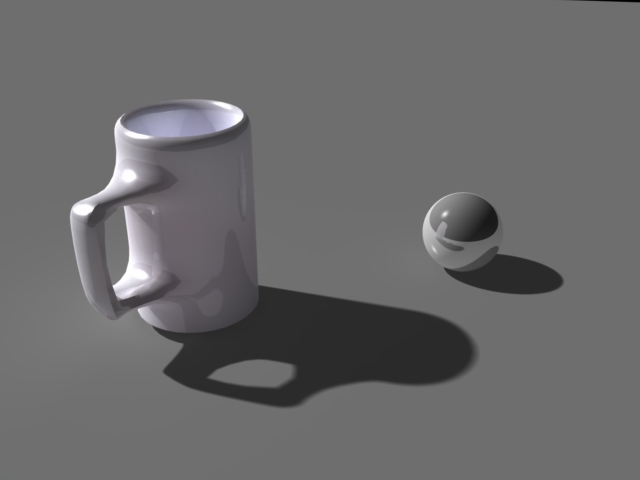
As for the first question I'm still a little confused. Putting the video aside I was just using as an example, is there such thing as the character having some sort of self collision? I guess the best example I can come up with is if for example you with your finger poke your calf or thigh, you'd sink the down to conform around that area. So my question is, is that done through morphs indiviudally and situationally to meet the requirements of the image your trying to create?
Once again thanks for the answers, they've been lighting up a very very dark path of not knowing anything a week ago, to actually having a clue about how things work.
-J
ps. Image is the mug I made in Hex, and rendered in Carrrara lol. :D Getting somewhere.
HI, no self collision for that, you need to setup it by hand posing the hand, and if you need a morph to adjust the fleash being bended by the mug, you will need to create it. But in truth you will only need this "touch" morph when you work in closeups.
Follow me at euQfiz Digital
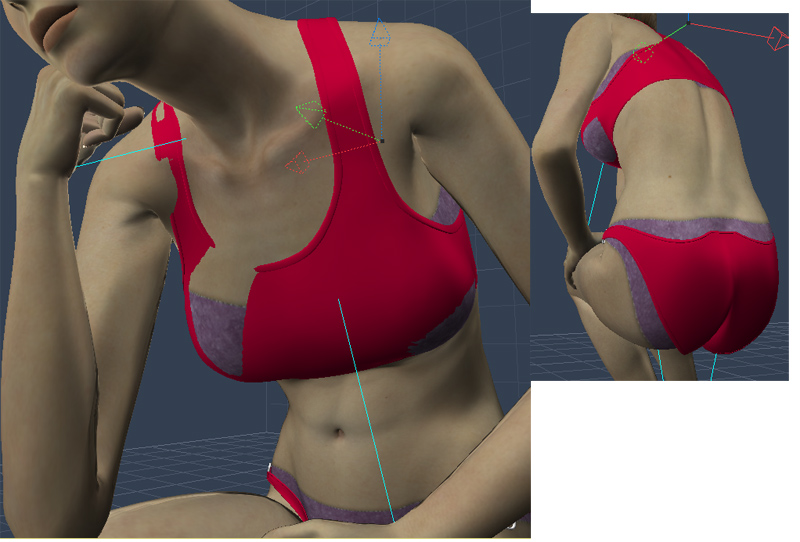
The question I had about situational uses for the morph is kind of being related in a way now to a problem I just noticed. Picture above kind of explains itself. Loaded up V4, with stock red clothing, on one of the general poses and instantly bam. Skin is popping through the Clothes. To fix it ideally I'd enter model mode and pull vertices until the cloth conforms better to the pose. However, in model mode I can only see one model at a time, which makes it so much harder than I think it should be. If I could see both models then I could adjust specific vertices until its right. But instead I'm having to guess which vertices are popping through. In edit mode, or switch to animation mode to see the item in that pose, but it only lets me select the vertices. Then I have to go back in to modeling mode.
Is there any way to show both models so that they can be edited appropriately (maybe even in that exact pose)? I would imagine this is a common problem. As always, thanks again.
-J
No way... only if the CR2 was only one... here the big deal is to create new morphs for the cloths in the Modeler room.
Follow me at euQfiz Digital

Privacy Notice
This site uses cookies to deliver the best experience. Our own cookies make user accounts and other features possible. Third-party cookies are used to display relevant ads and to analyze how Renderosity is used. By using our site, you acknowledge that you have read and understood our Terms of Service, including our Cookie Policy and our Privacy Policy.
Hello everyone, I'm curious as to how one goes about making hair that works for Poser and Daz characters. I've been doing alot of reading on the various 3D programs and I cant seem to figure it out. Carrara has a Dynamic hair thing that allows hair creation for use in Carrara from what I understand, but I'm not sure it can be sent to another program, and there seems to be issues with only being useful with proprietary shaders. Id love to be able to break in to the 3D world, but I'm kind of overwhelmed that there really isnt very much documentation available, tutorials, videos etc (short of paying for training and what not). Id love to be able to make clothes as well. Can anyone point me in the right direction? Thanks for your time.