
Renderosity Forums / Cinema 4D
Welcome to the Cinema 4D Forum
Forum Moderators: CHMedia Forum Coordinators: Kalypso
Cinema 4D F.A.Q (Last Updated: 2024 Aug 27 11:07 am)

| C4D Gallery | Speed Modeling Sessions | C4D Freestuff |

Subject: Riptide Pro - v1.7 Update


Quote - Hi Spanki, here to bug you again. ;)
A suggestion for the next rev. or maybe its already in the Pro, don't know, but..
On .mtl files, use a separator with paragraph justify left. On obj export.
It's to hard to go in and tweak the file with notepad.
Sorry, I'm afraid that I'm not following you. Here is the contents of an example .mtl file (apparently created by the free version of Riptide, but the Pro version creates similar files)...
---------------------- S N I P ----------------------------
#========================================================================
# Wavefront Material file
# Exported by Red-i Production's "Riptide"
# (a Cinema 4D v7 & v8 Plugin)
#
# Red-i Productions
# http://www.skinprops.com
# spanki@cablenet-va.com
#
#======================================================================== newmtl default
Ns 0.000000
d 1.000000
illum 2
Ka 0.000000 0.000000 0.000000
Kd 0.000000 0.000000 0.000000
Ks 0.000000 0.000000 0.000000
newmtl Sides
Ns 50.781250
d 1.000000
illum 2
Ka 0.000000 0.000000 0.000000
Kd 0.401569 0.000000 0.401569
Ks 0.000000 0.000000 0.000000
newmtl Top
Ns 50.781250
d 1.000000
illum 2
Ka 0.000000 0.000000 0.000000
Kd 0.401569 0.000000 0.000000
Ks 0.000000 0.000000 0.000000
newmtl Bottom
Ns 50.781250
d 1.000000
illum 2
Ka 0.000000 0.000000 0.000000
Kd 0.401569 0.401569 0.000000
Ks 0.000000 0.000000 0.000000
---------------------- S N I P ----------------------------
...are you suggesting that that format is dificult to edit in a text-editor? What changes are you suggesting?
Thanks.
Cinema4D Plugins (Home of Riptide, Riptide Pro, Undertow, Morph Mill, KyamaSlide and I/Ogre plugins) Poser products Freelance Modelling, Poser Rigging, UV-mapping work for hire.
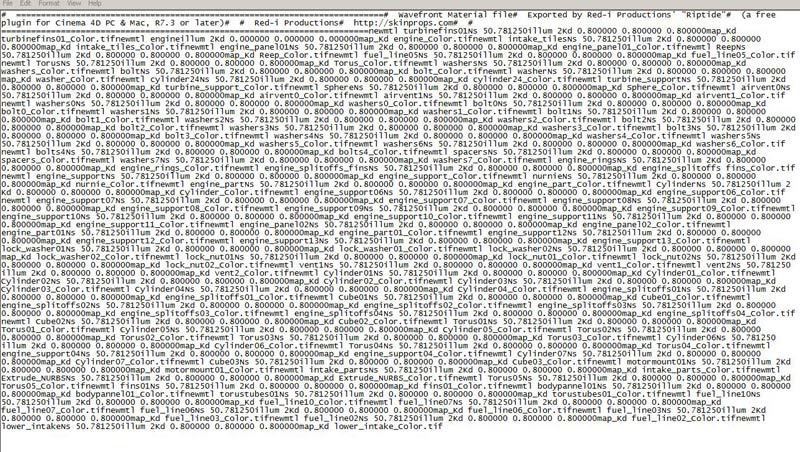
Ahh - I see the problem. The plugin currently ends each line with a 'n' character (line-feed), but PC files typically end with 'rn' (carriage-return + line-feed).
Some simple text-editors (like Notepad) don't know how to deal with that.
I'll look into changing it at some point, but in the meantime, if you use a better text-editor (like TextPad - www.textpad.com or Crimson Editor or.. many others), it should be easy to work with those files.
Cinema4D Plugins (Home of Riptide, Riptide Pro, Undertow, Morph Mill, KyamaSlide and I/Ogre plugins) Poser products Freelance Modelling, Poser Rigging, UV-mapping work for hire.

Privacy Notice
This site uses cookies to deliver the best experience. Our own cookies make user accounts and other features possible. Third-party cookies are used to display relevant ads and to analyze how Renderosity is used. By using our site, you acknowledge that you have read and understood our Terms of Service, including our Cookie Policy and our Privacy Policy.
Riptide Pro - v1.7 is Now Available.
By PropShop Admin on Monday 10 May 2010 - 04:04:55
Riptide Pro v1.7 is now available in the downloads area of my site. This update adds .mdd file Import/Export along with some other changes..
v1.7- New Feature: MDD File Import...
** A new option will allow you to Import Mesh Deformation Data (.mdd) files, converting them to mesh Point Level Animation (PLA). [ NOTE: The .mdd Import plugin is only available in the R11 or later version of Riptide Pro.]
A new option will allow you to export Mesh Animation as Mesh Deformation Data (.mdd) files.
It wasn't actually doing anything anymore.
** This will make the files smaller and is still plenty of precision for >99,9999 pixel dimension bitmaps.
This will produce smaller file sizes.
...this is a free update for all licensed users. As usual, a 30-day free-trial is available to everyone else.
Cinema4D Plugins (Home of Riptide, Riptide Pro, Undertow, Morph Mill, KyamaSlide and I/Ogre plugins) Poser products Freelance Modelling, Poser Rigging, UV-mapping work for hire.