
Renderosity Forums / Carrara
Welcome to the Carrara Forum
Forum Coordinators: Kalypso, Anim8dtoon
Carrara F.A.Q (Last Updated: 2026 Jul 11 2:50 am)
Visit the Carrara Gallery here.

Subject: Lighting question

I imagine that will work best with no ambient light, (scene settings), no skylight (render settings), and lots of indirect light. Of course, with the light emerging from the TV. This might be perfect for a dim spotlight as your light source, emerging from the tv screen.
As putting HDRI or other texture on the light slows down the render time (by a lot!). I suggest building the scene with only a dim blue light until you are close to satisfied with the composition, then add the image base to the light (IBL).

Quote - I'm trying to make a room look as if its being lit only by the light from a TV. I have a feeling that this could probably be accomplished by using HDMI, IBL, BFD, MOUSE,... or some other acronym that I know very little about. ;)
Any help along these lines would be greatly appreciated.
If the TV is made up of separate parts, the best way would be to use an anything glows on the screen, then turn ambient light off under scene in the instances panel and remove or turn off light one (the default light Carrara creates when you open a scene.) Then make sure that indirect lighting is on in the render settings panel.
If the TV is one piece, cleate a fully transparent spline object in the shape of the screen and place it directly in front of the screen, touching it if possible. Then just use an anything glows on that object as above.

If the screen tv will not be viewed in the final render (something like only seeing the light) you can use a spot light with cone light turned on too... lots of ideas here.
Follow me at euQfiz Digital

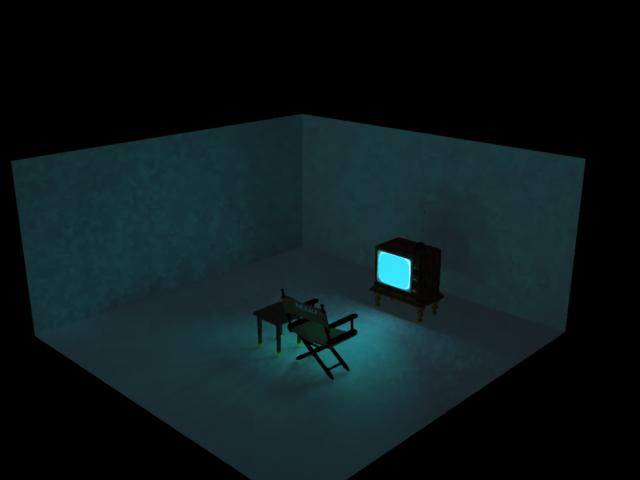
I then added a blue spot (45 degree spread) slightly above the TV, pointing at the chairs with soft shadows turned on and a 100% falloff setting.
This scene was built PDQ with the stock objects that come with Carrara.
This looks nice, but if you want to get it as realistic as possible, the TV should be a bit brighter. The only other thing I can think of as a problem is the contrast behind the TV is not high enough. If you ever watch a TV in a dark room at night, you see it is almost black behind the TV. Take a look at the infamous TV screen scene from Poltergeist the movie. Just an opinion...
Quote - It's pretty fast to do. The above suggestions are good too. Of course, everything in 3D is fake and the real goal is to make people "think" things that aren't true. :D
The easiest way is to add a color to the TV screen's glow channel, turn on Indirect Lighting and bump up the strength to 500%. In my fast little scene above, I also changed the Ambient light to Sky since it is preset for a natural blue-ish cast.I then added a blue spot (45 degree spread) slightly above the TV, pointing at the chairs with soft shadows turned on and a 100% falloff setting.
This scene was built PDQ with the stock objects that come with Carrara.
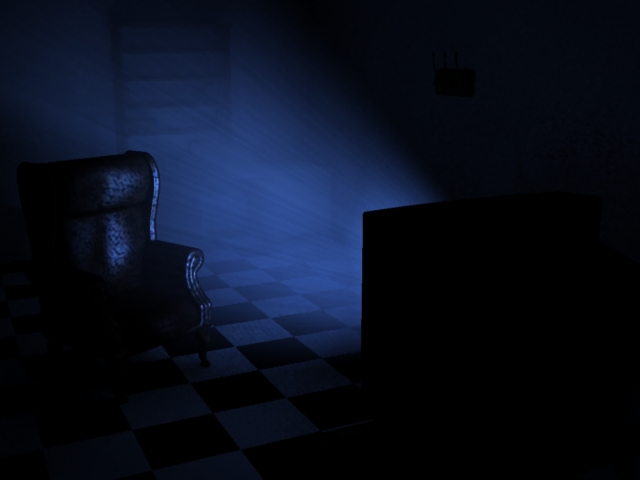

Both look good to me... the darker being scarier. Depends on what the artist personally wants in this instance. Myself, I see light on a wall behind the TV in a darkened room... light bouncing back from the opposite wall and the ceiling, floor and whatever else is in the room bouncing back light. Just tried it in "real life." ;)

If you were doing an animation, you could probably make a gaussian blurred low-res version of whatever's on the screen and use that as an animated light gel. (Assuming you're using an animated texture on the screen here.) Then the bright and dark changes of whatever is playing on the screen should follow through in the light it casts. (Other ways would need manual keyframing, wouldn't they?) Still shift it blue a bit, since most screens seem to have that shift in their color temperature.
I might have to try that sometime...
Your friendly neighborhood Wings3D nut.
Also feel free to browse my freebies at ShareCG.
There might be something worth downloading.

Privacy Notice
This site uses cookies to deliver the best experience. Our own cookies make user accounts and other features possible. Third-party cookies are used to display relevant ads and to analyze how Renderosity is used. By using our site, you acknowledge that you have read and understood our Terms of Service, including our Cookie Policy and our Privacy Policy.
I'm trying to make a room look as if its being lit only by the light from a TV. I have a feeling that this could probably be accomplished by using HDMI, IBL, BFD, MOUSE,... or some other acronym that I know very little about. ;)
Any help along these lines would be greatly appreciated.