
Renderosity Forums / Carrara
Welcome to the Carrara Forum
Forum Coordinators: Kalypso, Anim8dtoon
Carrara F.A.Q (Last Updated: 2026 Jul 11 2:50 am)
Visit the Carrara Gallery here.

Subject: Digital painting


http://forum.daz3d.com/viewtopic.php?p=1604406#1604406
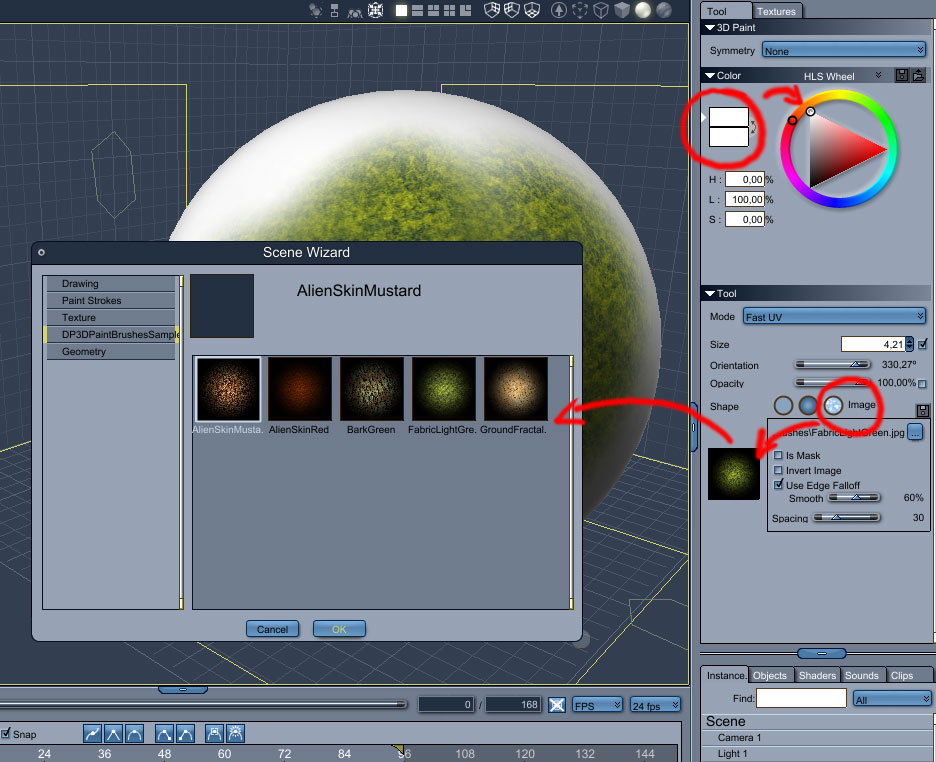
After that you could paint freelly. You need to add a object (or character) click in the new Brush and Plane icon and add a color channel to the object... now you can use the brush.
I will do a simple tutorial about using the paint feature soon.
Follow me at euQfiz Digital
Hi Martial, theres a problem with the brushes path, so take a look at the post at Daz3D (link above) to see more. But you can add any image as a brush, just click in the disk icon and load any image.
Follow me at euQfiz Digital
Merci
Now it is working with others brush
Where can i change the path for the one i bought ?
I see the folder ( DataStrokesDP3DPaintBrushesSampler )containing the jpg and a text file (where the path seems ok)
I see that you say :
'' I open up the CBR files and saw that the problem is in the path for the images '':
Just rename the folder DP3DPaintBrushesSampler to DP3DPaintBrushes and it will work fine.
Follow me at euQfiz Digital
I never used raydream but I think I begin at same time that you too... using Amiga 1200
Follow me at euQfiz Digital
Great I hated computer at this time... I saw only those green screen computers at this time!
Follow me at euQfiz Digital

Privacy Notice
This site uses cookies to deliver the best experience. Our own cookies make user accounts and other features possible. Third-party cookies are used to display relevant ads and to analyze how Renderosity is used. By using our site, you acknowledge that you have read and understood our Terms of Service, including our Cookie Policy and our Privacy Policy.
Bonjour
I just install Carrara pro 7
I also bought and install in my carrara folder this product from DAZ :8386_2_ca_DigitalPainters3DPaintBrushes_2
Someone knows how to use it for 3d painting ??
a tutorial link may be or some other hints
Thanks