
martial opened this issue on Dec 20, 2008 · 11 posts
martial posted Sat, 20 December 2008 at 5:44 PM
Bonjour
I just install Carrara pro 7
I also bought and install in my carrara folder this product from DAZ :8386_2_ca_DigitalPainters3DPaintBrushes_2
Someone knows how to use it for 3d painting ??
a tutorial link may be or some other hints
Thanks

GKDantas posted Sat, 20 December 2008 at 6:27 PM
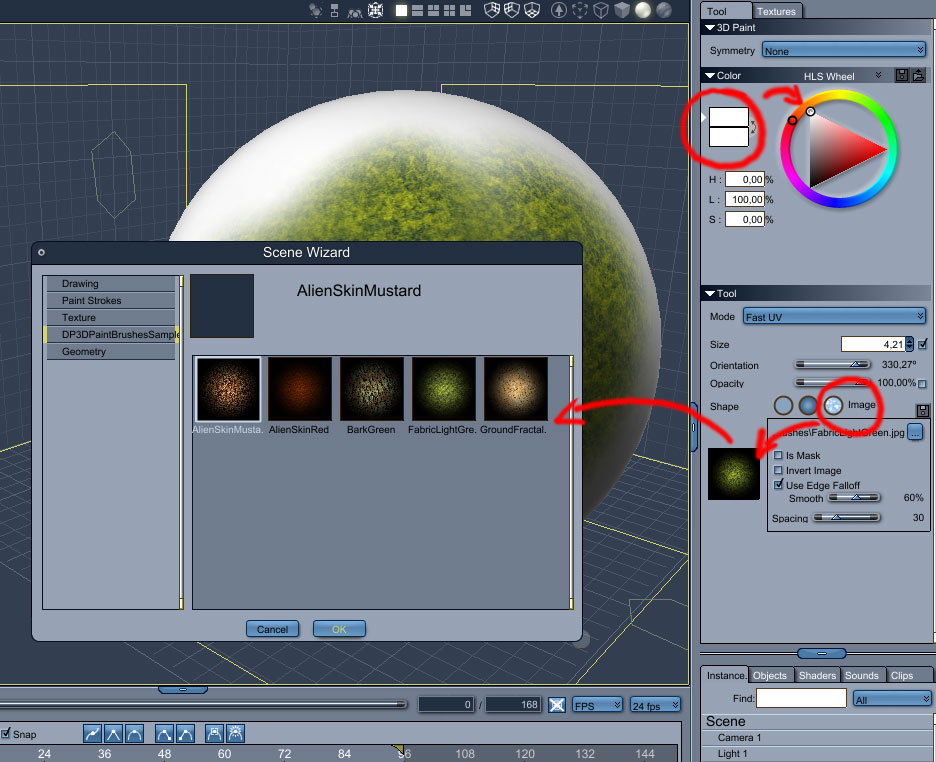
http://forum.daz3d.com/viewtopic.php?p=1604406#1604406
After that you could paint freelly. You need to add a object (or character) click in the new Brush and Plane icon and add a color channel to the object... now you can use the brush.
I will do a simple tutorial about using the paint feature soon.
Follow me at euQfiz Digital
martial posted Sun, 21 December 2008 at 4:57 AM
Many thanks ,SIR
martial posted Mon, 22 December 2008 at 11:33 AM
Bonjour
I have the brush like i see on your picture below
But when i try to put with the tool on the objet (a cylinder) nothing happen and i see nothing onn the objet
I don't know why but 3d brush seems not work in my case
(I have Vista 64 bits with 8 gigs ram)
GKDantas posted Mon, 22 December 2008 at 12:14 PM
Hi Martial, theres a problem with the brushes path, so take a look at the post at Daz3D (link above) to see more. But you can add any image as a brush, just click in the disk icon and load any image.
Follow me at euQfiz Digital
martial posted Mon, 22 December 2008 at 1:58 PM
Merci
Now it is working with others brush
Where can i change the path for the one i bought ?
I see the folder ( DataStrokesDP3DPaintBrushesSampler )containing the jpg and a text file (where the path seems ok)
I see that you say :
'' I open up the CBR files and saw that the problem is in the path for the images '':
GKDantas posted Mon, 22 December 2008 at 2:06 PM
Just rename the folder DP3DPaintBrushesSampler to DP3DPaintBrushes and it will work fine.
Follow me at euQfiz Digital
martial posted Mon, 22 December 2008 at 3:12 PM
Thanks
So simple and i did not think about it .I beginning to be older than i am ...since i used computers more than 20 years and used Raydream designer following by Carrara from the beginning
Shame on me
GKDantas posted Mon, 22 December 2008 at 5:13 PM
I never used raydream but I think I begin at same time that you too... using Amiga 1200
Follow me at euQfiz Digital
martial posted Mon, 22 December 2008 at 6:01 PM
With Atari ST in 1985 and using a 3d program made by a guy named Tom Hudson (if i remember correctly) ,who did after 3d Studio for DOS with some others
GKDantas posted Mon, 22 December 2008 at 7:02 PM
Great I hated computer at this time... I saw only those green screen computers at this time!
Follow me at euQfiz Digital