
Renderosity Forums / Carrara
Welcome to the Carrara Forum
Forum Coordinators: Kalypso, Anim8dtoon
Carrara F.A.Q (Last Updated: 2026 Jul 11 2:50 am)
Visit the Carrara Gallery here.

Subject: Anaglyph 3D and Carrara


Hope that some expert have the answer... but theres softwares out there that can do this too... I saw one this week, from Aballone (the makers of Face Shop):
Follow me at euQfiz Digital
Hum this is bad... I saw others softwares out there to do this task but cant remember names... maybe a google search can help.
Follow me at euQfiz Digital

Attached Link: Stereoscopic Thread.
Your in luck. I just happened to search for an old thread that we did about stereoscopic images. Jan. 2003. The thread also show how to create an anaglyph image using PS and the very last post has a link to an app that does it for you in all the different anaglyph types.The best part is it's Free.Now I don't have PS so I don't know it it does batching but if it does there is one solution and I can't remember if the anaglyph app does batching. You still need to render each side and combine the two. I have not tried if you can parent 2 cameras together to create a constant set up. I would think you would still have to render each camera single.
See if that thread helps you some.
After re-reading your question. The simple answer to the cameras. Set one camera up render the animation but as image files and keep that in it's own folder. Move the camera a few degrees in the X trans and render again but save those frames in another folder.
It is really a simple trick. The hard part or should I say the time consuming part would be the converting each frame/side to anaglyph, unless you want to spend a bunch of money. The rest would be easy. Any video editing software to put the single images to an .avi. Virtual Dub would do that and it's Free if you don't have one.
I still have not had a chance to install C6Pro on my new quad I just built or I would do some tests for you and show what I know. I need to re- DL C6 from Daz and get all the updated plugs before I can do anything Carrara right now.
I just have to much fun playing with my modo to get around installing anything else.
 whoa, does Carrara's render engine fly on my new quad. I'll put together a quick .gif tonight and post it here. So have your glasses ready.
 Attached Link: test gif image 3D
It took longer to get it done than I had planed. Carrara, is a pain to use compared to Vue. LOL. I forgot the lack of plants or I couldn;t find them.Then there is finding some place to host it because the gif is to big for here including the galleries. So I'm not sure how it will look on that site. Could also be this old monitor I use for the net.
All in all it works. I used the cyan settings. Remember it was a quickie just to show it can be done.
Thats fantastic. I will email all my poser scenes to you and you can take it from there...seriously thats very good.
I have two questions.
1. How do you manage to move the camera a few degrees to the right or left..in Carrara I click on the track xy but the only I can find to move it is to drag the mouse and that always also moves it slightly up and down.
2. What did you use to combine the images..what anglyph software?
Thanks.
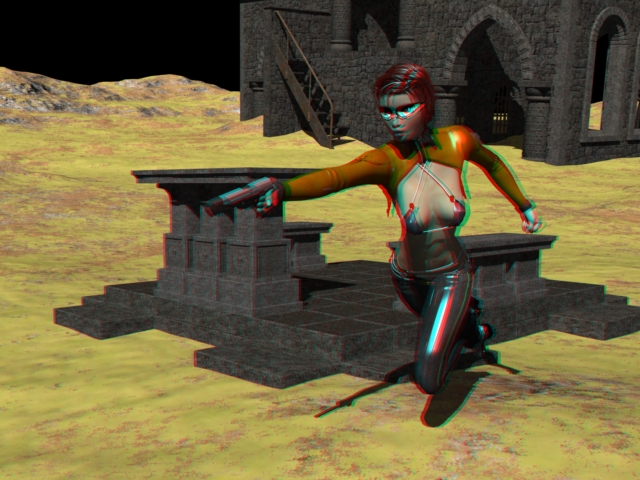
 You need to click on the image to bet the full size.
 - select your camera in the item tree on your left. You will then see the camera trans dials.
The X trans is the one you move. Depending on your camera focal point on how much you move.
Render your first image and name that whatever left. Type in the Xtrans about 0.06 in any directon.
If your camera is center. It is easier to move the Xtrans to 0.03 then render. Then move your camera to -0.03 to render the other side. That is a ruff number.
- Then just run the two images through the Free app that I gave you the link for in my first post. It is in the very last post of that thread.
The .gif, I realized that .Gifs compress so that is why it does not look as good as the .avi I made. Better for toon renders though.
Oh and for that animation, I did it the hard way of rendering twice fo each side and then put each frame together one at a time. The good news was I only rendered 15 frames and used 13 of them in reverse order to get the smooth tansition of the .gif.
So post something for me to see or if you need any other question answered, just ask.
Okay no progress here.
I have a carrara project open to render. On the right I click the main camera. So now I look under transform and see xyz across
Then down I see:
Center
Hot Point
Orient
Rotation
scale
sizing
overall
Is there where I am supposed to be. I have tried rendering and then going back and adding 0.06 each way but now am thinking of setting original to 0 and adding 0.03 each way.
Please advise which camera dial I should use.
Thank you.

Privacy Notice
This site uses cookies to deliver the best experience. Our own cookies make user accounts and other features possible. Third-party cookies are used to display relevant ads and to analyze how Renderosity is used. By using our site, you acknowledge that you have read and understood our Terms of Service, including our Cookie Policy and our Privacy Policy.
Hello
I have another question. I would like to make an anaglyph 3d scene. I wrote to an expert who also has some software and he was very helpful and he told me the following:
In order to get a 3D image, you need to render the scene from two cameras which are roughly as far apart as your eyes would be if viewing the scene. You want to render one animation from the left eye and then one from the right. This will leave you with a left video file and a right video file.
So how would I do this in Carrara. I have created the animation in Poser and then import it and open it in Carrara and then am lost on how to set up the cameras.
Please advise and thank you.