
Renderosity Forums / Carrara
Welcome to the Carrara Forum
Forum Coordinators: Kalypso, Anim8dtoon
Carrara F.A.Q (Last Updated: 2026 Jul 11 2:50 am)
Visit the Carrara Gallery here.

Subject: Stuck on Poser Character in Carrara and Import BVH


Just ADD Hiro3 to your Assembler Room from the Browser (select and drag or click twice), then in the instance tree find the MODEL instance for Hiro and then import the BVH file... only this in Carrara 6 that I can remember now.
Follow me at euQfiz Digital

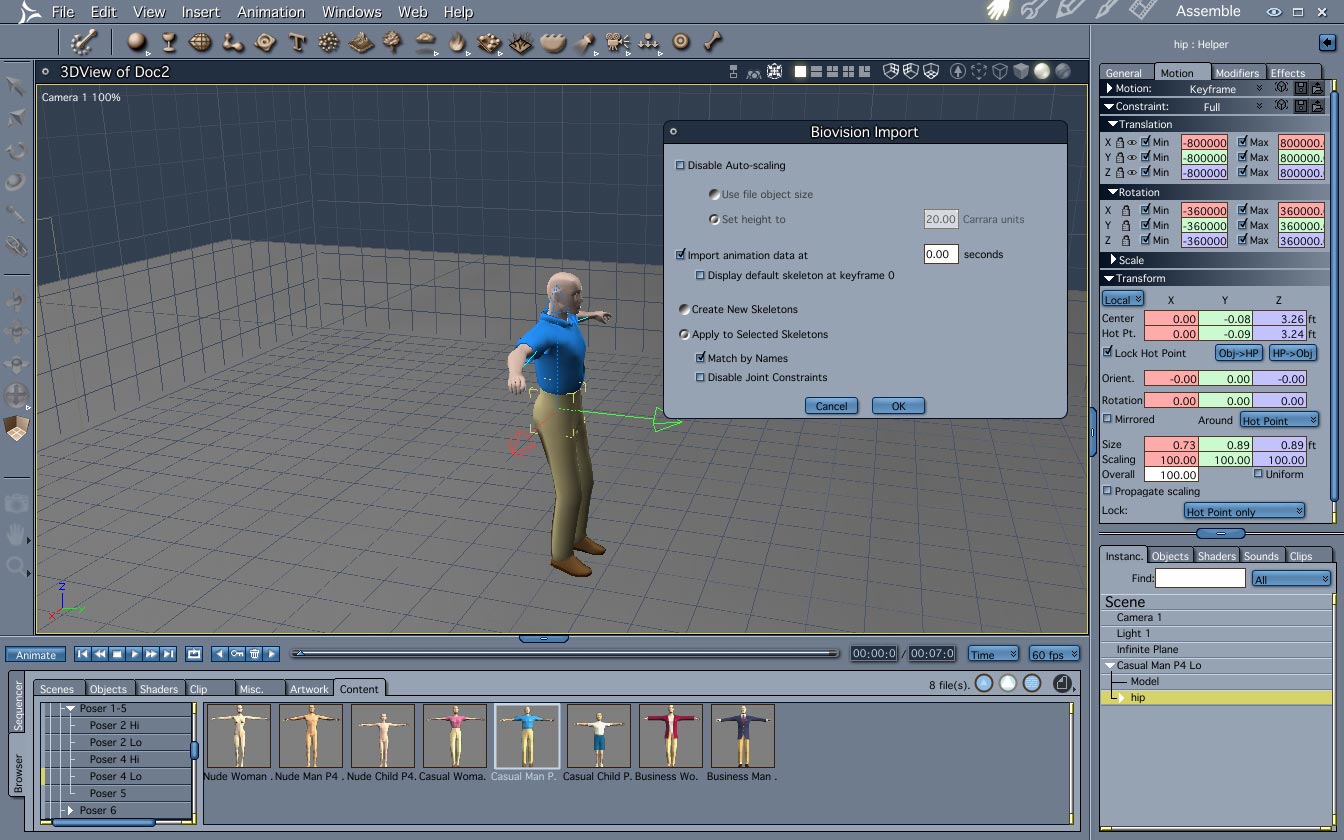

Keep in mind that not all BVH files will work on Poser content too... they need to be setup for Poser use!
Follow me at euQfiz Digital
I'd love to post the video from Poser and the video from Carrara, but when I try to render the video in Carrara it keeps showing memory allocation errors to stop the process.
I also can get Hiro and some shorts on him in Carrara, but when I try to bring in a shirt it isn't conforming to him.
I've tried making this video from Carrara for about an hour, but the memory allocation errors (I have 8GB) have me stumped.
I want to show how in Poser his neck bends (he looks down) and arms lift, but the same BVH in carrara leaves his head and neck looking up and his arms don't bend correctly.
Carrara looks to be a lot of trouble.
Take a look to this video to see if you are doing the right thing when adding cloth;
Before render dont forget to clean all unused objects and shaders from Edit menu
Follow me at euQfiz Digital
Re: the video and adding cloth, yes. But those are clothing items, not really cloth. Some items don't conform correctly, but work ok if I zero the figure and the item.
Tried clearing all unused objects and shaders, but still can't get through a 700 frame animation without memory allocation errors.
I do like the way items conform. It looks like they conform right along with figure morphs, so if I make a character heavier, I don't then have to adjust the clothing. Although it seems pants get puffed up and shirts get very puffy around the chest and arms, don't like that. It makes any character look heavier than they are. Is that because they are inflating to cover poke through?
Carrara dont do nothing to dont poke... end when you move the character it will bend the cloth too then sometimes you will need to adjust morphs dial to make it conform better. Hope that we can get a cloth simulation sometime for Carrara when Daz launch the plugin for Daz Studio...
Follow me at euQfiz Digital
flibb, one other tip: with aiko and hiro, it may work better to import the bvh into
poser, then fix it with one of the various free scripts, or phil's bvh tools, then
save as pz3 file for import into c6pro. despite what they say, we still need poser
for pose-related items, as poser is still superior to carrara for that IMVHO. but not
for rendering. they have kept FFRender on life support for sevl yrs, despite its many
flaws, but they need to pull the plug and move into the 21st century.
My question is how to edit a figure in poser, add all the clothing etc, and morphs, and then export it to Carrara? I tried saving a character in Poser as a CR2, but when it loads in carrara it's tiny.
Also, how to import pz3 into carrara.
BTW, with the memory error I don't see how Carrara will do the job for rendering a movie. It's fantastic speed wise, but it doesn't finish the render.
Flibbits, try to render frame by frame them assemble the animation in a video editor like Videodub that its free
Follow me at euQfiz Digital
Frame by frame is the right way to render. When you render this way you get some advantages:
1 - if the render stop (hardware failure, software crash or other thing) you can continue from it stops
2 - you always have the uncompressed format
3 - you can edit the frames in Photoshop or other software
4 -- you can converte your frames to any format without loose quality
Follow me at euQfiz Digital
just a few of the questions that the daz techs might ask:
using 64-bit CPUs with a 64-bit OS?
bad RAM?
bad graphics card/VRAM?
too many figures/textures in scene?
bad display prefs/scratch disk prefs?
remove unused masters?
what is frame size in pixels?
after how many frames does it run out of RAM?
can poser finish the same animation?
using 64-bit CPUs with a 64-bit OS? - Yes
bad RAM? - NEw PC, checked at build, RAM is ok
bad graphics card/VRAM? - Brand new card with all the latest drivers, checked on build, no other apps crashing.
too many figures/textures in scene? - one figure in scene. If one is too many we're in trouble.
bad display prefs/scratch disk prefs? no idea what these are, please explain.
remove unused masters? - yes, makes no difference
what is frame size in pixels? no idea where to find this
after how many frames does it run out of RAM? - sometimes around 10, sometimes around 70
can poser finish the same animation? - Poser can not only finish the same animation, but even some where three of the same size are added one after the other, the same model (Hiro) with more clothing, and other objects added in the scene. No doubt Carrara is much faster, but Poser doesn't crash.
If you have only one character in the scene did you tried to rebuild this scene froma cratch again? Sometime some propers can have problems, can you send a printscreen from the scene?
The pixel size you can see in the Render Room.
Follow me at euQfiz Digital
o.k., it sounds pretty bad. it may be:
- bad install of carrara app
- bad car file containing hiro animation
- bad prefs. check them again. I dunno where the scratch disk or multiple undo
is in the vista version, so you'll hafta read all the prefs to find 'em. once found,
post screen shots of 'em.
2 things to try:
-
open c6pro, go to browser/scenes/animation and try those, e.g. ghost.
if they render to the end, then c6pro app may be o.k.. I dunno what the longest
anim I done in c6pro - maybe 500 or 750 frames (OS X). -
save the hiro.pz3 scene file that animated successfully in poser 7, then import it into c6pro.
it may be necessary to read the manual to learn how to import a pz3 file, either using
c6pro native importer or transposer. it may be necessary to have an install of poser 6
or poser 5 in order for transposer to work, unless they fixed that in c6pro 6.2.1 (I doubt it).

Privacy Notice
This site uses cookies to deliver the best experience. Our own cookies make user accounts and other features possible. Third-party cookies are used to display relevant ads and to analyze how Renderosity is used. By using our site, you acknowledge that you have read and understood our Terms of Service, including our Cookie Policy and our Privacy Policy.
I've imported a poser obj (hiro 3) into carrara. I import a BVH file.
According to this tutorial: http://www.youtube.com/watch?v=8Jy5Z6YbtwQ
I should then be able to select Hiro and the imported BVH skeleton and attach the skeleton to the object. But that option is gray in the animation pull down.
Can someone provide a link or a simple step by step to bringing in a Poser 7 object (a character) then animating it with a BVH?