
Renderosity Forums / Carrara
Welcome to the Carrara Forum
Forum Coordinators: Kalypso, Anim8dtoon
Carrara F.A.Q (Last Updated: 2026 Jul 11 2:50 am)
Visit the Carrara Gallery here.

Subject: Bug eyed A4


Quote - I know that there are still some Aiko => D/S => Carrara morph issues being worked out. However, at this point, posing Aiko directly within Carrara seems to prevent the problems. I personally don't have A4 so this info is passed along from some folks that I know who work with her.
It's no help to me with the character I have done now as I just cannot seem to recreate her in Carrara.It just isn't as immediate as in DS.I just wish I knew how to save poses and morphs in DS so I can use them again..I've never found out how to or if it's possible.Seems so easy in Poser which I'm starting to learn how to use.You make a pose, click to add it to the library and there you go.
Stamp,stamp.Damn I get so frustrated by these bugs.

Privacy Notice
This site uses cookies to deliver the best experience. Our own cookies make user accounts and other features possible. Third-party cookies are used to display relevant ads and to analyze how Renderosity is used. By using our site, you acknowledge that you have read and understood our Terms of Service, including our Cookie Policy and our Privacy Policy.
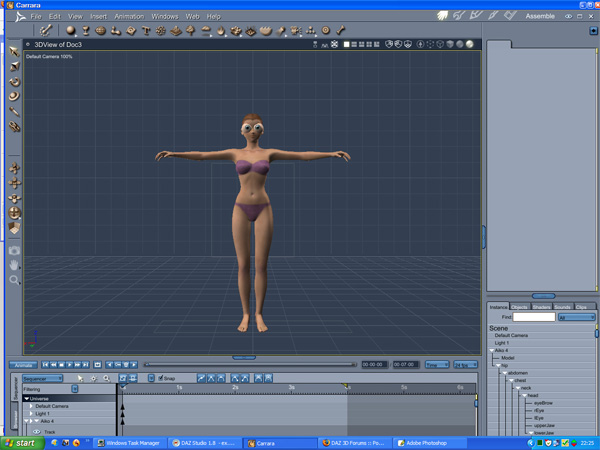
I've set up Aiko 4 in a really nice pose in DS but when I open the file in Carrara 6 Pro I get a bug eyed character.As I don't know how to save the morphs etc that I've used for the character in DS(STILL NO DAMNED MANUAL for this application) I find I just cannot redo the character in Carrara just using the morph sliders.So what is causing this bug eyed look.