
Incognitas opened this issue on Mar 01, 2008 · 5 posts
Incognitas posted Sat, 01 March 2008 at 4:33 PM
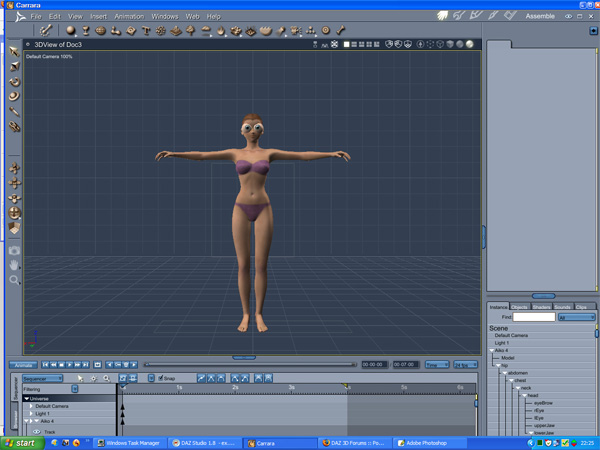
So what is causing this bug eyed look.

MarkBremmer posted Sat, 01 March 2008 at 4:43 PM
I know that there are still some Aiko => D/S => Carrara morph issues being worked out. However, at this point, posing Aiko directly within Carrara seems to prevent the problems. I personally don't have A4 so this info is passed along from some folks that I know who work with her.
Incognitas posted Sat, 01 March 2008 at 4:53 PM
Quote - I know that there are still some Aiko => D/S => Carrara morph issues being worked out. However, at this point, posing Aiko directly within Carrara seems to prevent the problems. I personally don't have A4 so this info is passed along from some folks that I know who work with her.
It's no help to me with the character I have done now as I just cannot seem to recreate her in Carrara.It just isn't as immediate as in DS.I just wish I knew how to save poses and morphs in DS so I can use them again..I've never found out how to or if it's possible.Seems so easy in Poser which I'm starting to learn how to use.You make a pose, click to add it to the library and there you go.
Stamp,stamp.Damn I get so frustrated by these bugs.
MarkBremmer posted Sat, 01 March 2008 at 5:17 PM
In DS you can save poses. At the bottom of the content tab is a plus/minus key. Click it and check out your options.
Mark
Incognitas posted Sat, 01 March 2008 at 6:09 PM
Sadly I'm not getting any options when I do that.