
Renderosity Forums / Carrara
Welcome to the Carrara Forum
Forum Coordinators: Kalypso, Anim8dtoon
Carrara F.A.Q (Last Updated: 2026 Jul 30 8:26 pm)
Visit the Carrara Gallery here.

Subject: Sky and Terrain adjustment--the brown Hiatus?


Quote - Try with the"Enable Ground" in Atmosphere Unticked!
OK, so in experimenting with realistic sky, I find that the default inserts a sizable haze between the sky and ground. The two controls for it, Haze Altitude and Haze Density don't seem to work as I expected: A setting of 100% turns the whole sky to haze, which makes sense, but a setting of 0% still leaves a sizable haze between the sky and ground. What am I mising here? Jim
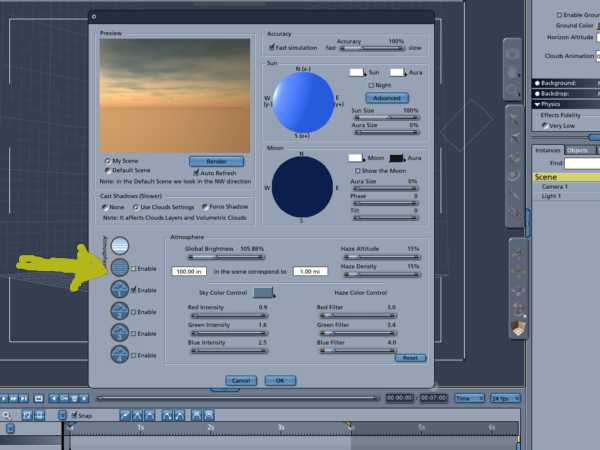


Quote - Lower the value where it says " in the scene corresponds to" from "1.00 mi" to ".01 mi "and the haze will be drastically reduced.
Thanks for suggestion... Values now read "100.00 in the scene corresponds to .01 mi" Still no luck; haze size still looks about the same as before even with altitude and density set to zero. Best Thoughts, James

Still hazy about the haze controls. Here is a picture; what's wrong with this picture? I've turned the haze red so it stands out. How do I get the line of haze which is already set to zero. Thanks, Best Thoughts, James

Privacy Notice
This site uses cookies to deliver the best experience. Our own cookies make user accounts and other features possible. Third-party cookies are used to display relevant ads and to analyze how Renderosity is used. By using our site, you acknowledge that you have read and understood our Terms of Service, including our Cookie Policy and our Privacy Policy.
I'm just starting to play with skies and terrains and I notice that when you load a terrain preset the sky/terrain are nicely joined but that when you create sky/terrain from scratch or alter existing presets you often get a break or space between the sky and terrain that shows in render as a brown streak or swath between the two. Exactly how is this juncture controlled so the two mesh correctly? Thanks, Jim