
Renderosity Forums / Carrara
Welcome to the Carrara Forum
Forum Coordinators: Kalypso, Anim8dtoon
Carrara F.A.Q (Last Updated: 2026 Jul 30 8:26 pm)
Visit the Carrara Gallery here.

Subject: Please help - problem of Skylight Global Illumination ?


Hello Kett, I don't have a sure-fire way to fix this one. Here is the list of things I go through when I have similar issues. Usually one of them corrects the problem: 1) Enable "Improved Edges" in the Render Room 2) Add a gentle, low power spotlight aimed at the face with Soft Shadows enabled 3) Increase Photon count in small amounts (10,000) 4) Try with different background/HDRI map. (low fidelity maps create all kinds of rendering problems) Hope one of these work. Please post back with your progress. Mark
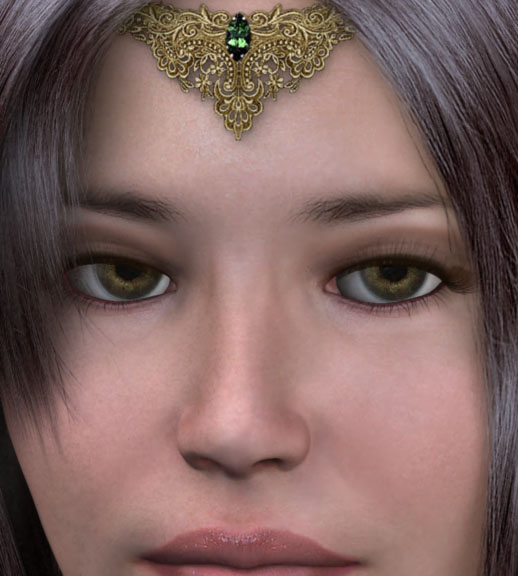
Attached Link: http://www.renderosity.com/mod/gallery/index.php?image_id=1426736
Hi Mark,A final result of global illumination rendering is uploaded at Carrara Gallery
I like the global illumination.
KFG a.k.a. Kett

Privacy Notice
This site uses cookies to deliver the best experience. Our own cookies make user accounts and other features possible. Third-party cookies are used to display relevant ads and to analyze how Renderosity is used. By using our site, you acknowledge that you have read and understood our Terms of Service, including our Cookie Policy and our Privacy Policy.
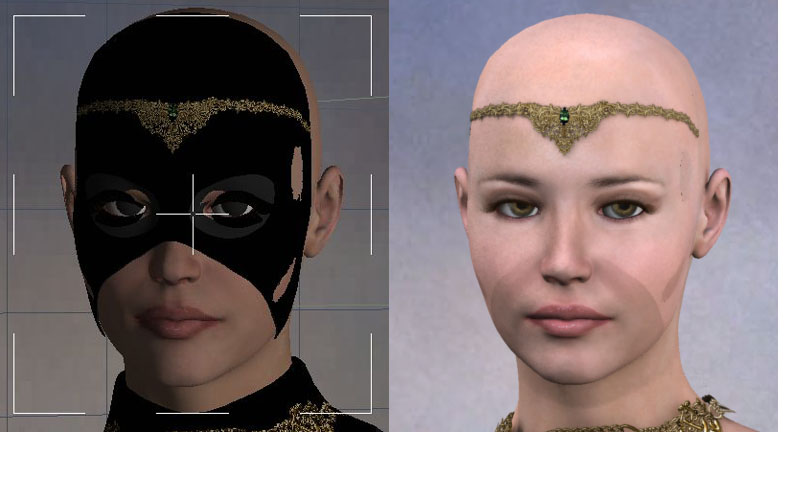
The left picture is preview. The right picture is CarraraPro5 rendering.This problem only happens when we use Skylight of Global Illumination.
Light Through Transparency was checked.
The interpolation was unchecked.
How can we fix this problem?
Thank you.