
Renderosity Forums / Carrara
Welcome to the Carrara Forum
Forum Coordinators: Kalypso, Anim8dtoon
Carrara F.A.Q (Last Updated: 2026 Jul 30 8:26 pm)
Visit the Carrara Gallery here.

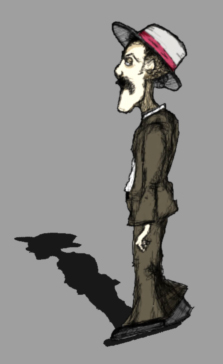
Subject: Alpha Shadow?




Privacy Notice
This site uses cookies to deliver the best experience. Our own cookies make user accounts and other features possible. Third-party cookies are used to display relevant ads and to analyze how Renderosity is used. By using our site, you acknowledge that you have read and understood our Terms of Service, including our Cookie Policy and our Privacy Policy.
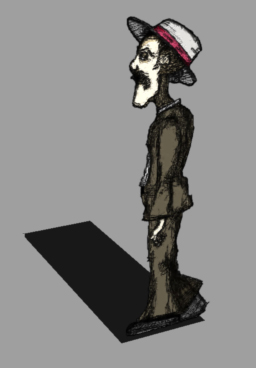
I've got this character mapped to a plane via an alpha channel. I want the character's shape to cast the shadow, instead of the plane it is mapped to. Is there a way to do this? I know years ago I used to do it in Bryce very easily, but I can't seem to figure out how to make it happen in Carrara. The texture map will be animated, so mapping the image to a shape cut the same as the image will not solve my problem. Any ideas on how to create the shadow from the mapped image?Chucker