
Renderosity Forums / Carrara
Welcome to the Carrara Forum
Forum Coordinators: Kalypso, Anim8dtoon
Carrara F.A.Q (Last Updated: 2026 Jul 30 8:26 pm)
Visit the Carrara Gallery here.

Subject: the great mystery.....or headache?...haha


Increase photon count to 20,000 - 50,000 so there's more diffused light bouncing off the mirror to the camera. Set Interpolation to 100% to remove most of the ashes without taking too much of a render hit. Check that indirect lighting can also travel through transparent objects.
www.youtube.com/user/ShawnDriscollCG
since my post, i already tried at 20k, 40k, 50k photons
interpolation already at 100%, effects stay if i turn off, but then black spots on walls :)
trying to get my scene to be lit completely from indirect lighting, so ofcourse light through trans is on
if anything, my settings are too high, 2 hours to render this is not fun =P
appearently the reflection value from the glass doors reflects light onto the wall
the glass was only 2% value in reflection though -_- far from being a mirror
the effect isn't there in a direct view, only looking at it thought the mirror
tested some other scenes, seems to only happen when the view is reflected multiple times


Privacy Notice
This site uses cookies to deliver the best experience. Our own cookies make user accounts and other features possible. Third-party cookies are used to display relevant ads and to analyze how Renderosity is used. By using our site, you acknowledge that you have read and understood our Terms of Service, including our Cookie Policy and our Privacy Policy.
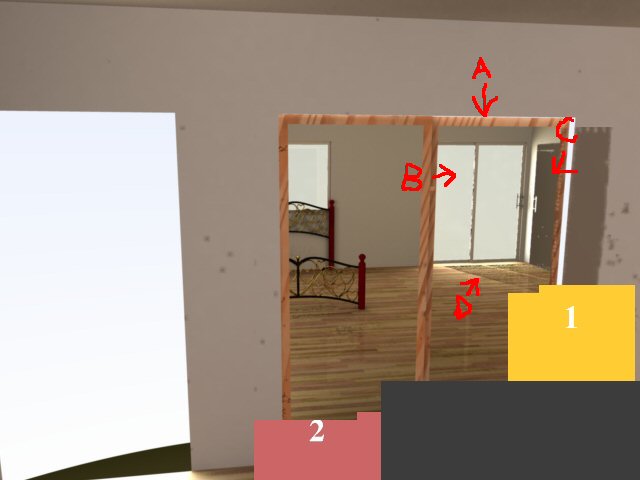
ok so i went to render a pic of a scene i was making, not a noob to the world of 3d, checked my materials and other things multiple times, someone else can figure it out :rolleyes:A) a large mirror (closet door, but not finished)
B) sliding glass doors to the outside world......not that i'll ever go there
C) wall, yet its having a "mirror" effect and showing the sliding glass doors? material is fine
D) the lovely glass is making shadows! yet lighting is set fine
C and D seem to be only seen in reflections, if i turn the camera for direct view, works fine
all updates are installed