
Renderosity Forums / Carrara
Welcome to the Carrara Forum
Forum Coordinators: Kalypso, Anim8dtoon
Carrara F.A.Q (Last Updated: 2026 Jul 11 2:50 am)
Visit the Carrara Gallery here.

Subject: Animation Tools VS Posers?


i'm not even a Carrara owner yet, but I'll throw in two cents while waiting for users to describe Carrara's animation tools; I didn't get a chance to try them during my trial run of Carrara. The action of the Carrara scrubber (slider) is substantially more sluggish than Poser's, scene for same scene. ::::: Opera :::::

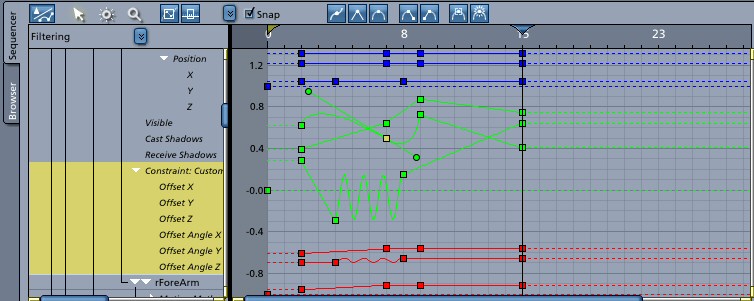
...I just recently started doing some tests animating in C5Pro using native import of Poser characters. At first it felt clunky just because it was different (I'm very comfortable with Posers animation tool set only because I've worked with it a lot), but it's starting to feel smoother with practice. One thing so far that I love: predictable IK! I still have to do more tests, but up to this point the IK has been great to work with, which I can't say about Poser. Carrara also has more contraint options, an important part of any animation tool set, which I haven't had time to play with much yet. C5Pro also has 8 different kinds of interpolation. Can't comment on whether Carrara would make sense for the work flow you described. I've never had a reason to send something back to Poser once I've imported it to Carrara ;)
...one unrelated observation I've noticed since working more with Poser figures in C5Pro: It looks like you might not even need to have Poser in order to use Poser figures, although I could be wrong. I've been importing cr2's instead of pz3's lately. This weekend I'll make a dummy installation of Poser with no actual Poser files in it, install Maya Doll with a couple pieces of conforming clothing, point Carrara to the dummy Poser installation and see if it lets me open Maya doll and then conform the clothes. Anybody tried this yet to see if it works? I'm sure there would be many things that wouldn't work such as morph injections, smart props, and whatever else. But there might be a few C5 users out there who don't own Poser but might like to have a few Poser figures to play with.
Message edited on: 03/15/2006 16:27

"three axis curves on the same graph" I like that also. Are there any kind of layers / blending / NLE features such as in Motion Builder? Can you export the result from Carrara to a BVH file? Or, is there a combination of native import and Transposer that would work - for instance, animate the base figure in Cararra, and then return to Poser for Dynamic hair and cloth calculations - the return via Trans for rendering. I must say all I am really looking for is more advanced features for animateing Poser characters. IF Poser had FBX - the Motion Builder or Messiah would be a great option. I am wishing now for a really GREAT Poser 7! JP
I tested the query above and yes, I was able to import a pp2 prop just like a PZ3. So you can skip Poser entirely for certain processes. I haven't tried any animation stuff in C5 yet, but I got curious, so I animated one of my Steph files and hauled it over. THe PZ3 is 12 megs and 120 frames: Steph3, transhair, Figure Studio stage, one primitive. Steph has her own textures and shaders, the rest I textured with procedural stones in C5. Brought it in with Transposer, added lights and custom camera, animated the camera, and set it up to render. The render is taking 1.5 hours. I wouldn't even bother to TRY rendering this setup in Poser, and if I did and it took less than 36 hours, I'd be astonished. Using the QuickTime generator, C5 was running 3.45 min/frame. With the Intel Codec making AVI, it's running about 2 min/frame. By the way, it took my 30 fps and converted it to 24fps, so I only have 95 frames instead of 120. Not a big deal for the sort of crudity I'm working with, but worth remembering. My next big project is to "rotoscope" Betty Boop's hula and create an animation for one of the Poser gals. I can't wait. Piles of challenges, but lots of fun. M
changed the default I didn't look, but I'm not surprised. I think what I'll do is change Poser's default to 24fps rather than use their oddball 30fps in Carrara. Slightly OT: My animation worked just find, except that when it was done, neither QT nor DivX could run it. Both brandnew installs I added last week to read the Betty Boop mp4s. I finally managed to run it on another machine that has WMP on it, and I'll move WMP to the production machine this weekend. The AVI was 8 megs, by the way. I'm very confused about what ought to be some pretty simple things. 1. My new W2K machine apparently does not have a DVD Codec to go with the DVD player. Say what? So I need to purchase a piece of software. Yippee. But when I look at Power DVD and WinDVD, I can't tell what I'm getting. If I buy a DVD "Creator" do I get a "DVD Player," or do I have to buy BOTH? Any recommendations? I don't mind paying the extra for a DVD creator, if I am also getting the player and codec. If I'm not, it's just good money after bad. 2. I have an MP4 of Betty Boop's Bamboo Isle which I want to recreate as a Poser animation, but the first step is capturing enough keyframes to allow me to see the stills. If I want to pull frames from an MP4, can I do that? If so, with what? Are there actually "frames" in an MP4, or is it a continuous bitstream? What I have appears to be a lossy datastream rather than a set of frames, but I have no way of telling, really. My only video software right now is an old copy of Corel Lumiere which I'm sure predates MP4, possibly predates MPEG entirely. I don't care enough to invest in a $300+ video tool. 3. Those of you who are doing animation, what would you recommend as the best settings for output? With Poser, I stuck with AVI and did still frames once just try it out. I like the idea of creating frames rather than an AVI, but I kind of doubt if my GIF animator (PSP's) is up to assembling 95 100K frames, and I don't think it will do streamning output (like an AVI). Any advise would be welcome. Cheers, M
Okay, the very first item: Frames. I never render to a finished movie; always to an image sequence, that is a folder of individual files, one file for each frame. You want that folder full of frame masters, lossless, at the highest posible resolution. This gives you total power. You can open that image sequence in many post-processing apps and manipulate to your heart's content, and then output to a host of formats/compression. It is the foundation of control. I have the entire Adobe Video Suite and all the apps can import and export an image sequence. But at a lower price and lower complexity: Quicktime Pro, $29.99 at apple.com. QT can import and image sequence, and on the way in you tell it the frame rate. Once it assembles a movie of your image sequence, you can make final video with a certain choice of compression, AVI, etc. The longest image sequence I've imported into Quicktime is 1800 frames. It got a little sluggish, but performed. With more advanced video post-processing software such as After Effects, Final Cut Pro, Premier, etc., you are not hindered by the frame count. Now, going in the other direction. If you can get a movie open in Quicktime Pro, you can EXPORT TO IMAGE SEQUENCE! That's right, it will take your clip and give you a folder of frames. You can elect TIFF as the format for the frames and get lossless results. Now, Quicktime will open certain .avi clips, but not all. It will open most mpeg/mpg clips, but not all. If Quicktime Pro will not play your clip, you might have to get certain codecs, OR find a translation app that will turn your clip into a format Quictime will open. Besides the software I've mentioned here, there are others from inexpensive to expensive, that will also do the job. ::::: Opera :::::
Two last points: Quicktime Pro is available for both Mac and Win. Second, when I say that QT will export to lossless image sequence, don't take that to mean that a small, highly compressed web version of Betty Boop will suddenly become a folder of gigantic brilliant frames! Let's put it this way: the frames will be NO WORSE than that which you see in the movie; they may be somewhat better. It depends on how the movie was encoded in the first place. Adobe has a one-month trial version of After Effects, availabe at its website. ::::: Opera :::::
For my limited interest, QT sounds like the way to go. The free 6.2 player will open the MP4. In fact, it's the only player I can find that WILL! I assumed, from blowing up the video, that what I would get is very crude lossy images. JPG artifacts start showing up at less than 200%. Not to worry. All I want them for is to drop in the background and "trace" from. QT's ability to stitch TIFFs is also great news. I am aware of the advantages of generating frames rather than a stream of video, but if putting that together means owning at least a mid-range video editor, that's more than I care to commit to right now. Thanks for the suggestion. Cheap is good. M
So I trudge over to apple.com and start to buy QTPro 7. Then I notice that on their own site the user reviews give it a rating of 2.0! So I look. Sweet Mother MacCree! QTP6 may be a great product, but apparently you can't buy it any more, and QTP7 sounds like a nightmare of the P5.000 level. Back to the drawing board, I guess. M
Hunh? My reaction exactly. There are more than a hundred comments, and the highest one I saw was a 3 of 5. Some of them are doofus complaints, and quite a few involve things I don't need or want, like iPod file making. But they are all over the map and heavy-duty negative, many on the order of "It won't run" or "I want my money back," and quite a few begin "Version 7 ruined a great program." You are running a PC environment, right, not Mac? Trouble is, lots of the complaints suggest that it is very temperamental about which machines it will run on, so the fact that it works for you doesn't imply much for me. I'll probably buy it anyway, after I stew over it for a while. But they have no return policy, and a few of the complaints begin, "When I saw the ratings, I figured it was malcontents whining. DON'T You BELieve it!!! This program is a mess!" Not inspiring confidence. M
Quicktime is a major platform, protocol and application in the audio video world, not some obscure toy. I have no idea why the user forum has a slew of bad comments. I know of no general negativity against it world-wide. If nothing else, Quicktime Pro enables download -- as opposed to immediate stream -- of videos, such as movie trailers, rock videos, etc., that are embedded on webpages. I use it on three OS: OSX - Tiger Windows XP Home Windows XP Pro (totally different than home) on three different CPUs, AMD, AMD+ and P4. Nary a problem. ::::: Opera :::::
I downloaded the player, and I'm going to risk buying the Pro key this weekend. Like I said, I was as shocked as you are by the comments, but finding them on Apple's site is pretty compelling. The complaints are specifically about screwups in version 7, and I've already hit one. You can't download or install QT without getting iTunes, which I have NO use for. I had to install it, and then uninstall it, with a boot for each change, to end up with just QT7. Anyway, I'll give it a try. Mick
Some closure on QTPro7: I bought the key, registered, set it up and it is busily exporting my Betty Boop stills as I write. It's actually done two of four cartoons already, so the whole process has worked. Of course, now I have 12000 stills per cartoon to comb through somehow for my hula images.... Plus the 3 other 10,000-12,000 still piles I'll be combing to see if I can build a virtual Betty. QT's is the most intuitive setup on the planet, and it comes up with some brain-dead error messages. (I am "missing a required file, OK!!!?" to run my BB cartoons on machine #2, but the movie runs just fine after I "agree.") The Help file is strictly web-access, so my sensibly isolated main machine is help-less. But once I figured out that it was installed, and it was working, and the menu item I needed was File/Export, things went smoothly. And yes, for $29.00, it's a great tool. I dunno how to explain the screed of angry folks over at the Apple site. Maybe OperaGuy and I just got lucky. Which is Ok with me, but a bit of a warning. M

Here's a bit of irony on the QTPro front. It works just fine, and it paid for itself over the weekend. The irony? The day after I installed it, I discovered that my CD drive was vanished and the NVidia TV drivers were hosed. No telling when these things happened. Since the machine is networked, I seldom use the CD drive, and I don't use the nVidia "Video Capture" tools at all. Don't do TV any more. Of course I assumed QTPro was the culprit, so I removed it. No joy. I removed about 2 gigs of games after I discovered that secdrv.sys (notorious security system that wrecks CD drives, brought to you by your "friends" as Sierra) had somehow reappeared after I isolated and fried it for doing this (tossing the Sierra game infected with it) last November. I removed DivX and QTPro and installed the CD's drivers by every sequence of disable, install, enable, etc. I could think of, cursing at W2K for taking away the admin tool that NT uses to let me work with drivers (replaced with the user-friendly "Device Manager for Bob"). I spent hours debugging and surfing. The only clear information I could find was that Roxio's Easy CD frequently did what something had done to my drive. But I didn't put Roxio Easy CD on that machine, because it has screwed up others in my network. DirectCD specifically is certified pig poop. Then I ran across a reference to upgrading WMP7 as a solution, and sure enough, I had also added WMP7 to the machine when I was shopping for multimedia. I ran Remove on it, and lo, one option is to just remove the Roxio CD burner. MS has one of their circle-jerk relationships with Roxio, apparently, and WMP had installed it without telling me. The CD returned like Pop! The nVidia problem appears to be a coincidence, and updated drivers fixed it. QTPro is back on the machine, and WMP is in the toilet where it belongs, floating beside my Sierra games. I find a wonderful irony in the fact that the worst problems I have with Windows are usually associated with the crap created by MS. Even cheating, they can't make decent applications. M

Privacy Notice
This site uses cookies to deliver the best experience. Our own cookies make user accounts and other features possible. Third-party cookies are used to display relevant ads and to analyze how Renderosity is used. By using our site, you acknowledge that you have read and understood our Terms of Service, including our Cookie Policy and our Privacy Policy.
I was wondering if someone could compare C5's animation tool set compared to Poser's? I am interested in what features are more advanced - and if you think Carrara would be worth it, just to make animation easier. What I would "like" to do is to be able to create a character in Poser, use Carrara for animation if it has a better tool set, and the re-export the result back to Poser, - where I would then send it back out to VUE 5I (where all my sets are done) - for rendering! Crazy workflow I know! JP