
Renderosity Forums / Carrara
Welcome to the Carrara Forum
Forum Coordinators: Kalypso, Anim8dtoon
Carrara F.A.Q (Last Updated: 2026 Jul 11 2:50 am)
Visit the Carrara Gallery here.

Subject: Bender tool in Hexagon


www.youtube.com/user/ShawnDriscollCG

Privacy Notice
This site uses cookies to deliver the best experience. Our own cookies make user accounts and other features possible. Third-party cookies are used to display relevant ads and to analyze how Renderosity is used. By using our site, you acknowledge that you have read and understood our Terms of Service, including our Cookie Policy and our Privacy Policy.
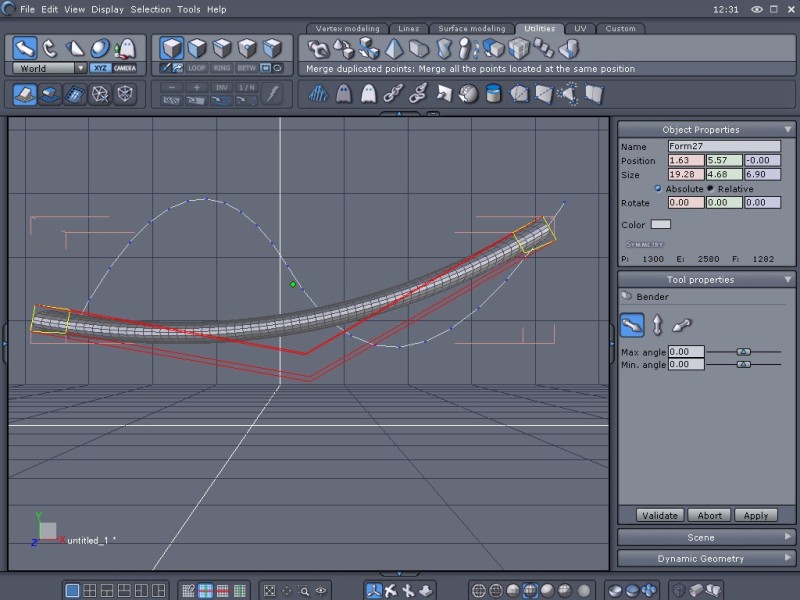
I've been trying for a couple hours to get the "bender" tool in Hex 1.21 to behave like the example in the pdf with no luck. I've tried clicking on different points on the line, reorienting and rotating the line, reverting the line, using a grid, using a cylinder, using all available axes, dynamic geometry on/off and no combination so far has worked. The result with most of these combinations has been to get one 'bend' in the object when it should have two (I've been using mostly s-shaped curves while trying to figure out the tool.) Heres a pic of one example. In this particular example Im just trying to get the cylinder to follow the shape of the s-shaped curve. Am I overlooking a setting somewhere or is the tool just bugged? Thanks for any help. edit: I know I could do this particular task by extruding but I'm trying to figure out the bender tool. Thanks.Message edited on: 03/05/2006 11:59