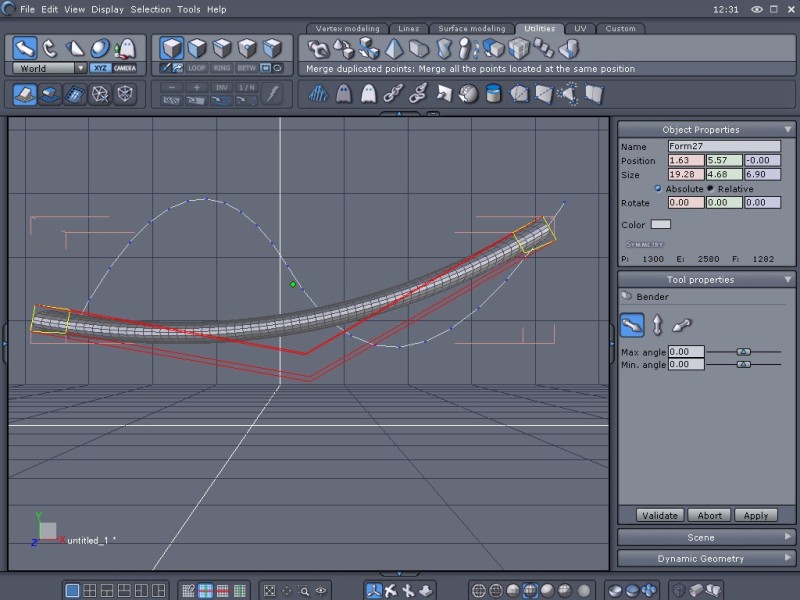
I've been trying for a couple hours to get the "bender" tool in Hex 1.21 to behave like the example in the pdf with no luck. I've tried clicking on different points on the line, reorienting and rotating the line, reverting the line, using a grid, using a cylinder, using all available axes, dynamic geometry on/off and no combination so far has worked. The result with most of these combinations has been to get one 'bend' in the object when it should have two (I've been using mostly s-shaped curves while trying to figure out the tool.) Heres a pic of one example. In this particular example Im just trying to get the cylinder to follow the shape of the s-shaped curve. Am I overlooking a setting somewhere or is the tool just bugged? Thanks for any help. edit: I know I could do this particular task by extruding but I'm trying to figure out the bender tool. Thanks.
Message edited on: 03/05/2006 11:59

The Bender tool you're using is doing what it's supposed to. But there's another tool called Bend that does more what you want. First select your object you want to bend. Then click the Bend tool and select the profile polyline you want to bend your object along. Sounds easy enough, but there is a catch. You have to be viewing your profile polyline from an angle that best shows the bends in it. In your case, the viewing angle is fine. If your camera was looking down at the profile polyline, the line would appear straight and so no bending would occur.
www.youtube.com/user/ShawnDriscollCG
Great. Thanks for the info, Shonner.

