
Renderosity Forums / Carrara
Welcome to the Carrara Forum
Forum Coordinators: Kalypso, Anim8dtoon
Carrara F.A.Q (Last Updated: 2026 Jul 11 2:50 am)
Visit the Carrara Gallery here.

Subject: Poser morphs in Carrera 5 Pro?



I have a question. I am trying to test a poser male figure - one of the 6 or 7 that came with Poser4. I want to do all renders in Carrara5pro, so I created a file with model in Poser, saved, and opened file in Carrara as (the other, not Transposer) so I could use bones to position and morphs. All went great, except I want to add my own props and clothing in vertex room to the model so the bones will control clothing as well. What is the best way to do this? And adding texture maps... I see if I move the model to the vertex room to add clothing, the options change in model room - I still have morphs, though reset, and I have access to UV for the face (want to add details to face, bump map wrinkles, etc.), but I am not sure if this is the "best" way to do it.
Never Give Up!
ominousplay,
Unfortunately I am a infant with Carrara's native motion control tools. I use it primarily as a modelling tool and have ignored it's other capabilities, which I am just now starting to learn.
Hopefully one of the other members will jump in with an answer.
mike
Message edited on: 02/20/2006 17:15
I can answer some of my own question, since asking I've been playing around... I pulled over the model (pz3file) and then converted it by opening it in the vertex room. There I could add clothing, make more morphs, etc. But I think one trick is to remove the skeleton when adding morphs... I only say this after having some crash/ freeze issues after trying to add morphs to a boned model. I still want to know other's ideas on how they attack this issue.
Never Give Up!
I can answer some of my own question, since asking I've been playing around... I pulled over the model (pz3file) and then converted it by opening it in the vertex room. There I could add clothing, make more morphs, etc. But I think one trick is to remove the skeleton when adding morphs... I only say this after having some crash/ freeze issues after trying to add morphs to a boned model. I still want to know other's ideas on how they attack this issue.
Never Give Up!

I mentioned to ominousplay in the other thread that D|S can be good to help out here, because some things are so easy and quick in there. You can also get the morph loader plugin which is handy for loading a morph in D|S from an obj, the dformer also lets you adjust/make morphs(however, I don't use these yet even tho I have one(dformer) and will most likely be getting the other). Currently, not doing any morphing.
No need to think outside the box....
Just make it
invisible.
Ominousplay, I think one major problem you are going to have w/ D|S and your situation is w/ rigging. You can't rig in D|S and it will only accept daz or poser format rigs. Obj will come in, but no rigs.Since it really supports rigs, but has no tools for this I expect riggin will be arriving shortly. However, that may not help w/ your own rigged creations. I truely hope that carrara can support D|S files or the other way around. They are supposed to be partners, but neither of the formats is widely supported.If you could convert it to a poser rigged character it could probably read it.Carrara says their file format is difficult, probably all the information it includes.
No need to think outside the box....
Just make it
invisible.

Privacy Notice
This site uses cookies to deliver the best experience. Our own cookies make user accounts and other features possible. Third-party cookies are used to display relevant ads and to analyze how Renderosity is used. By using our site, you acknowledge that you have read and understood our Terms of Service, including our Cookie Policy and our Privacy Policy.
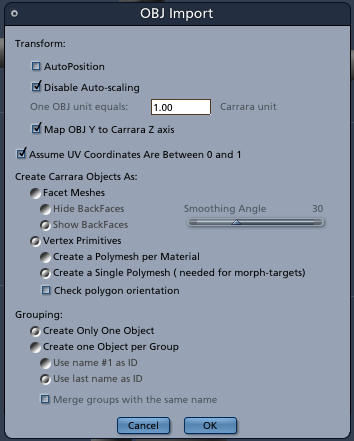
Hello I was wondering if anyone could help me?. I want to make morphs for poser5 in carrera, I have a question on the correct import/export settings when bringing in the mesh as an obj. into carera and then exporting back out to use in poser. any help would be appriciated.