
Renderosity Forums / Carrara
Welcome to the Carrara Forum
Forum Coordinators: Kalypso, Anim8dtoon
Carrara F.A.Q (Last Updated: 2026 Jul 11 2:50 am)
Visit the Carrara Gallery here.

Subject: Eyebrows again......


All that parametric mapping is hairy.;) Are you sure that to the right is your brow settings? Did you put a light right in front of it? Did you look at the new GI light thru trans option?(I haven't needed it and got mixed results). The problem with these long parametric mapping shaders is they have a drill down a mile long...anything in there could be affecting it.My alphas still don't come in. Maybe replace the eyebrows if all else fails.
No need to think outside the box....
Just make it
invisible.

I've been playing with the native poser import today, and it seems that the trans map doesn't always get picked up. Make sure that you have the shader for the eyebrows selected. You may have to select the items in the left column one-by-one (click on or near the "shader spheres") until you get the right shader in the tree (when your at the top level of the individual shader, the shader name will show in the upper part of the right side of the shader editor). Once you get the right shader selected, expand it to show all the levels, if transparency isn't set to texture map, you'll have to manually edit it. When you manually add a poser transmap you need to click the invert texture check box or your trans map won't work properly.
Hope this helps!
__________________________________________________________
My Rendo Gallery ........ My DAZ3D Gallery ........... My DA Gallery ......

Dang. Still there, eh? I was hoping Carrara5 had cleared it up. I wasted several hours with a light-lab confirming that this was a problem in the GI render. Basically, it can't deal with "short" distances between the transparent object and the object being shadowed by it. (In my light-lab test of Carrara4, "short" is defined as "six inches Carrara scale." However, scaling the scene did not seem to take care of the problem either.) Best answer I've come up with for Poser renders is to add direct light on the figure's face. A nasty compromise, but...

Make sure you have light through transparency checked in the lighting settings... there are now two boxes in the render area for light through transparency... and with GI you want to be sure you have the one in lighting checked. (with the 5.03 update) Christina
Christina -- "Love me but don't tell me so" Lilly
Bart
My Art
Yeah that's what I mentioned (GI trans option), however, I actually found in one of my experiments that turning that option on under GI created an overly highlighted area. I only needed the original option. Nice to have the option tho. I will say that if you put a bulb in front of the face the option to light only what you want is very handy. I have used this option w/ lighting many times.It is really useful...love it. Also try turning GI down(20% then up from there) and supplementing.
Message edited on: 02/06/2006 00:16
No need to think outside the box....
Just make it
invisible.
I noticed the overlighting too... thought it was just my imagination....
Christina -- "Love me but don't tell me so" Lilly
Bart
My Art


Privacy Notice
This site uses cookies to deliver the best experience. Our own cookies make user accounts and other features possible. Third-party cookies are used to display relevant ads and to analyze how Renderosity is used. By using our site, you acknowledge that you have read and understood our Terms of Service, including our Cookie Policy and our Privacy Policy.
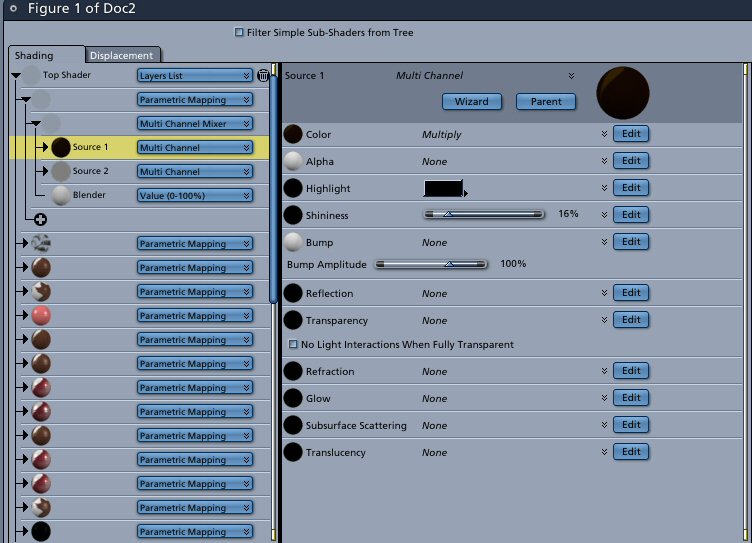
I've tried native & Transposer. I've tried with GI off & ON. I've tried with trans thru light unchecked & checked....to no avail. I've run out of ideas Maybe a screen shot of the brow settings will help.