
Renderosity Forums / Carrara
Welcome to the Carrara Forum
Forum Coordinators: Kalypso, Anim8dtoon
Carrara F.A.Q (Last Updated: 2026 Jul 11 2:50 am)
Visit the Carrara Gallery here.

Subject: c5 Anything Glows?


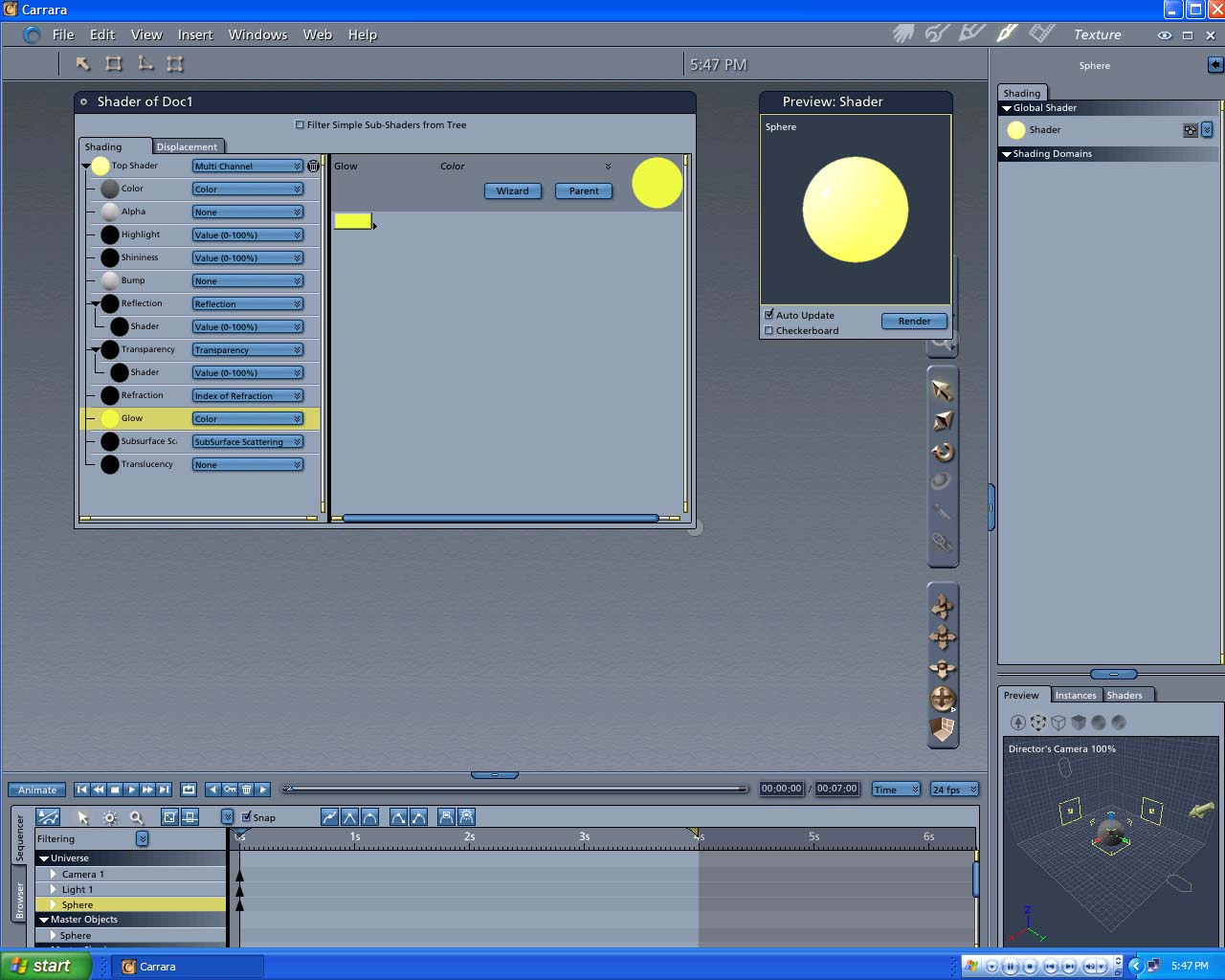
THanks for posting. I just did that which does cause the item to light up as I would expect glow would. But then tried to use the anything glows light to change the sphere into a glowing light. I cant see a difference when useing anthing glows no materr which sliders I use wether its 0 or 200% brightness makes no difference in the brightness of the obect in the render. I'm new to carrara I guees I just dont know how to apply anything glows. If there was a scene that I could download or one that came with carrra that I don't of to study that uses anything glows that would help. Is there one some where.
Frank Hawkins/Owner/DigitalDaydreams
Frank Lee Hawkins Eastern Sierra Gallery Store
My U.S.A eBay Graphics Software Store~~ My International eBay Graphics Software Store

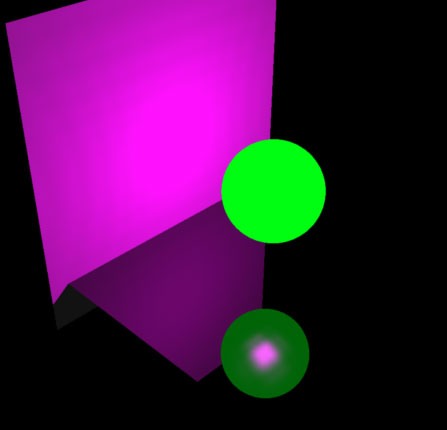
If you apply Anything Glows to an object you turn that object into a light emitter, it doesn't change the look of the object. To make the object itself look as though it is glowing you need to edit the Glow channel in the shader (as in bwtr's post above).
To see that your object is emitting light make sure there's something else in your scene to receive the light. This example has a plane and a sphere, both using the default shader. The sphere has AGlows applied, using pink light.
Message edited on: 01/08/2006 03:27
Ah! I thought anything glows would both light from within and emit light. That explains that Thanks Armed with this new knowlage I have spent the last hour trying to get the sphere to emit light to some close objects, still no luck. My settings are the same as what your screen capture shows. I'm still at a loss. The brightness slider has no effect and the sphere is not emitting any noticeable light to the surrounding items. My best bet is to find and study an "Anything Glows scene" in which moving the brightness slider is effective. Is there one in existence in carrara 5 already or online. That way I can compare and find the wrong setting I must have somewhere.
Frank Hawkins/Owner/DigitalDaydreams
Frank Lee Hawkins Eastern Sierra Gallery Store
My U.S.A eBay Graphics Software Store~~ My International eBay Graphics Software Store

THanks very much both of you. I now have a working AGlows to study. This works as I thought it should. When and if I figure out what setting was wrong in my old scene. I'll post why it was not working here.
Frank Hawkins/Owner/DigitalDaydreams
Frank Lee Hawkins Eastern Sierra Gallery Store
My U.S.A eBay Graphics Software Store~~ My International eBay Graphics Software Store

Thanks ren mem I found em.
Frank Hawkins/Owner/DigitalDaydreams
Frank Lee Hawkins Eastern Sierra Gallery Store
My U.S.A eBay Graphics Software Store~~ My International eBay Graphics Software Store
OK Here is what I did not know that was messing me up. The item box that you type the name of the item you are going to use as a light source is "CASE SENSITIVE" I was typing in sphere small s instead of Sphere big S like up top.When you do that it does not cast light. So now I can sleep tonight.And it only took 4 hours with help to figure it out. At this rate I should have my first Carrara post in April, Just kidding. With my own patience with myself and your help I hope to do Somekind of first Carrara Art soon Thanks All
Frank Hawkins/Owner/DigitalDaydreams
Frank Lee Hawkins Eastern Sierra Gallery Store
My U.S.A eBay Graphics Software Store~~ My International eBay Graphics Software Store

Privacy Notice
This site uses cookies to deliver the best experience. Our own cookies make user accounts and other features possible. Third-party cookies are used to display relevant ads and to analyze how Renderosity is used. By using our site, you acknowledge that you have read and understood our Terms of Service, including our Cookie Policy and our Privacy Policy.
I'm trying to apply "anything glows" to a sphere primitive. No mater what i do I can't make it light up using anything glows, tried all sliders esp brightness. it just keeps rendering as the same barly visable sphere . there are no nother lights or objects in the scene. I'm at a loss. The sphere has the default shader. The sphere is the only thing in the scene. The sphere is choosen as what to light. Does avyone know how to get this to work or know of a scene from the content disk that uses anything glows. thanks
Frank Hawkins/Owner/DigitalDaydreams
Frank_Hawkins_Design
Frank Lee Hawkins Eastern Sierra Gallery Store
My U.S.A eBay Graphics Software Store~~ My International eBay Graphics Software Store