
Renderosity Forums / Carrara
Welcome to the Carrara Forum
Forum Coordinators: Kalypso, Anim8dtoon
Carrara F.A.Q (Last Updated: 2026 Jul 11 2:50 am)
Visit the Carrara Gallery here.

Subject: Alpha transparency help?

Correction... it's just more noticable with indirect lighting... and yes I've got the light through transparency box checked. :)
Christina -- "Love me but don't tell me so" Lilly
Bart
My Art

I don't know the answer other than to check the original transparency texture and correct the alpha. This has come up before. I would say to make the alpha color pure black or white. Might be a gamma difference issue possibly.Might be shading domain blending. Not sure cause I don't know carrara well enough.
No need to think outside the box....
Just make it
invisible.

Well this may not be what your looking for as i have only ben at Carrara for about 5 hours,but i have figured out for the pubes and eyebrows in the Poser figures you can delete the pubic hair and eyebrow objects themselves and the map is still there.Loks good,but as i said i dont know anything about this prog yet:D Now if i can only figure out the eyebrows tranparence problem:P
Making sure the black and white was correct didn't help. And the problem is the current figure I am working on I didn't put eyebrows on the main texture... so deleting the eyeborws would leave her looking like Whoopi Goldberg... "eyebrowless" Thanks for the thoughts on trouble shooting this far.
Christina -- "Love me but don't tell me so" Lilly
Bart
My Art
Did you use a graphic program to alter the texture and alpha channel? A solution would be great...like I said eyelashes and eyebrows keep coming up. I think I will go look myself.Also did you try differnt light methods to see if it might be a gi problem?
Message edited on: 01/01/2006 19:27
No need to think outside the box....
Just make it
invisible.
You know I haven't tried to see if it's a gi problem... Will check that, but still want a solution... right now I'm thinking of scrapping the eyebrow trans and just put them on a body texture... not too happy with the texture I'm working with anyway. (YEah I know... the grapes were probably sour):P I used Photoshop to correct the trans map.
Christina -- "Love me but don't tell me so" Lilly
Bart
My Art
It's still there with GI turned off... just not as noticable... in fact I could post work it out... but trying to do little to no post work... Thanks for the suggestion Christina
Christina -- "Love me but don't tell me so" Lilly
Bart
My Art
My great concern is that this is a carrara issue. I have had other transparency problems. Usually at an angle. Several people have had this problem. I just checked the file and even made a new one...it was fine and a new one didn't fix it. I tried many options. However, the realistic sky might actually be a problem because that has also come up with this and I do have that set.I will go check. I used alpha and the transparency method. However, I didn't do a layers list. This is very annoying.
No need to think outside the box....
Just make it
invisible.
It is very annoying... thanks for the trials and help... I've been working with it off and on today... I'm determined to come up with a solution even if it's more trouble than it's worth.
Christina -- "Love me but don't tell me so" Lilly
Bart
My Art
No need to think outside the box....
Just make it
invisible.
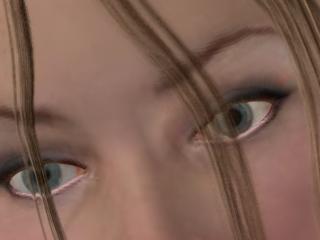
MY biggest complaint... is we shouldn't have to not use skylighting and indirect lighting to get the proper transparency... of course even that isn't working for me. I'm ready to just scrap this project, but I hate to give up. I'm also having problems with hair importing with the morphs (using the native import) therefore I've exported as an obj and I can't get to the eyebrows anywhere except in the shader room. Not sure if it would be different with a pz3 file or not. Guess I should look into that. Your fairy image isn't bad. What I don't understand is why aren't we seeing the same problem with the hair alpha maps?
Christina -- "Love me but don't tell me so" Lilly
Bart
My Art
Thanks for the input... unfortunately I don't have tranposer, and right now it's not in the budget. I'm running C5 Standard. But I was wondering if TP2 would be the answer, and it looks like it might. So maybe in the future... esp since I am finding other quirks in the native poser import. Thanks for the insight.
Christina -- "Love me but don't tell me so" Lilly
Bart
My Art
Well I wondered why only certain things also and not others. I do not have poser. That is an obj from daz studio. But D|S doesn't seem to export a proper mtl file. I haven't been doing to much animal and people yet w/ c5, but hex outputs a proper mtl and it comes in fine. D|S needs better export. On poser can't say much since I don't use it right now.It is frustrating that all this is really just file format issues.
No need to think outside the box....
Just make it
invisible.
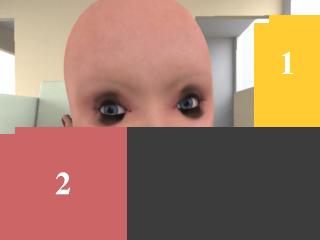
Poser does an mtl file, but I'll be darned if carrara5 has ever read it. I don't like D/S maybe because I started with Poser? Just not as good... but what can you expect for free? It is a great program considering the price. My gripe with C5... is I shouldn't have to fake GI to get certain transparencies to work. Even when I make my own transmaps so I know they are true, I still get the shadow on the brows and eyelashes. It's frustrating. If I didn't like C5 so much I'd go back to Poser... what can I say despite the alpha problems I'm hooked.
Christina -- "Love me but don't tell me so" Lilly
Bart
My Art
No need to think outside the box....
Just make it
invisible.

Privacy Notice
This site uses cookies to deliver the best experience. Our own cookies make user accounts and other features possible. Third-party cookies are used to display relevant ads and to analyze how Renderosity is used. By using our site, you acknowledge that you have read and understood our Terms of Service, including our Cookie Policy and our Privacy Policy.
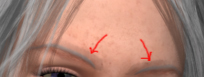
OK... looking for help from the gurus here. I'm working with a trans map for the eyebrows... in the alpha channel. Works fine until I turn on the indirect lighting, and then I get a funny shadow (it follows the path the the eyebrows would without trans) Strange thing is the hair is transmapped in the alpha channel as well, and I don't get the same problem. Maybe because it's farther away? Any help/suggestions would be greatly appreciated.Confused,
Christina
Christina -- "Love me but don't tell me so" Lilly Bart
My Art