Filter: Safe | Mon, Jul 13, 9:48 AM CDT

Renderosity Forums / Carrara


Welcome to the Carrara Forum

Forum Coordinators: Kalypso, Anim8dtoon

Carrara F.A.Q (Last Updated: 2026 Jul 11 2:50 am)


Visit the Carrara Gallery here.

Carrara Free Stuff here.

 
Visit the Renderosity MarketPlace - Your source for digital art content!


Subject: Where in the texture is there a place to resize?


dlk30341 ( ) posted Sat, 19 November 2005 at 3:51 PM · edited Mon, 13 July 2026 at 9:08 AM

I can't seem to find the place in the texture editor where you can increase/decrease the size. Using a JPG & want to scale it down. TIA :)


mmoir ( ) posted Sat, 19 November 2005 at 4:07 PM · edited Sat, 19 November 2005 at 4:07 PM

Hi,
Several thing come to mind.

  1. Make sure your shader is in Flat mapping and then look for the Transform tab.
    2.You can also tile your textures seamlessly and then tile the texture.
    Mike

Message edited on: 11/19/2005 16:07


dlk30341 ( ) posted Sat, 19 November 2005 at 4:28 PM

Thanks :)


dlk30341 ( ) posted Sat, 19 November 2005 at 6:18 PM

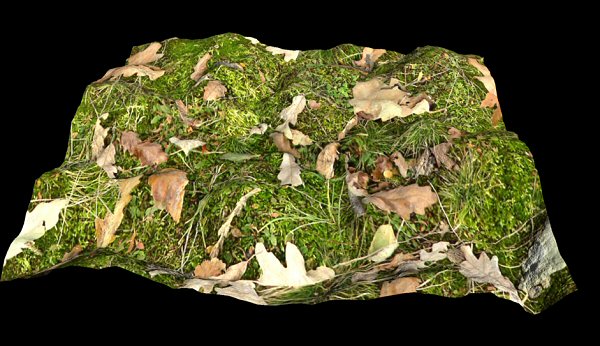
I find the terrain scale under transform....But I'm looking just to scale down the texture..... I hate/don't want to compare but in Vue in the material editor I can scale the TEXTURE ONLY up or down. This is what I need to do.....as my jpg. it is too big relative to the terrain. Hope I'm making sense :) If I've missed thing, could you please post a screen grab :) Thanks again :)

dlk30341 ( ) posted Sat, 19 November 2005 at 6:48 PM · edited Sat, 19 November 2005 at 6:49 PM

file_305820.jpg

I need the JPG shrunk down to scale with the terrain...you can tell it's much to large. I'm hoping there is somewhere inside Carrara to do this w/out me having to re-scale in a paint program :)

Message edited on: 11/19/2005 18:49


dlk30341 ( ) posted Sat, 19 November 2005 at 10:14 PM

As stated above...got it figured out :)


sfdex ( ) posted Mon, 21 November 2005 at 11:06 AM

And what did you do? I'm not intimately familiar with the new terrain editor, so I'd be interested. Thanks! Dex


dlk30341 ( ) posted Mon, 21 November 2005 at 12:49 PM

Where it says seamless I INCREASED the number from 1 to 5-7. This would depend as to the size of your map.


Privacy Notice

This site uses cookies to deliver the best experience. Our own cookies make user accounts and other features possible. Third-party cookies are used to display relevant ads and to analyze how Renderosity is used. By using our site, you acknowledge that you have read and understood our Terms of Service, including our Cookie Policy and our Privacy Policy.