
Renderosity Forums / Carrara
Welcome to the Carrara Forum
Forum Coordinators: Kalypso, Anim8dtoon
Carrara F.A.Q (Last Updated: 2026 Jul 11 2:50 am)
Visit the Carrara Gallery here.

Subject: MikeMoir Car Tute


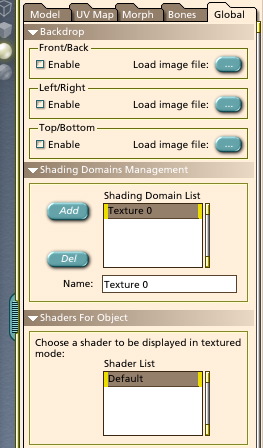

Hey Bwtr, The Backdrop image on Page 224 of the manual I think is an old version , the image Mark posted is what you should see. Find the FrontView,SideView and Top view images and load those into the Front/Back view,Left/Right and Top/Bottom as in Marks image. I just tried it with the files that are part of 3dXtract and it works. Post again if you have any more troubles. Mike

Privacy Notice
This site uses cookies to deliver the best experience. Our own cookies make user accounts and other features possible. Third-party cookies are used to display relevant ads and to analyze how Renderosity is used. By using our site, you acknowledge that you have read and understood our Terms of Service, including our Cookie Policy and our Privacy Policy.
I am trying to do this tute from 3dXtract but no way can I work out how to properly enter the images into backgrounds to match figure3 on page 5. Not even using Mikes presized images! Also the backdrop panel enable shown on page 224 of the manual can not be found? (No difficulty in Hexagon!). Please help me in solving the Carrara difficulties.
bwtr