
Renderosity Forums / Poser 13
Welcome to the Poser 13 Forum
Forum Moderators: nerd, RedPhantom
(Last Updated: 2026 Aug 09 1:22 pm)

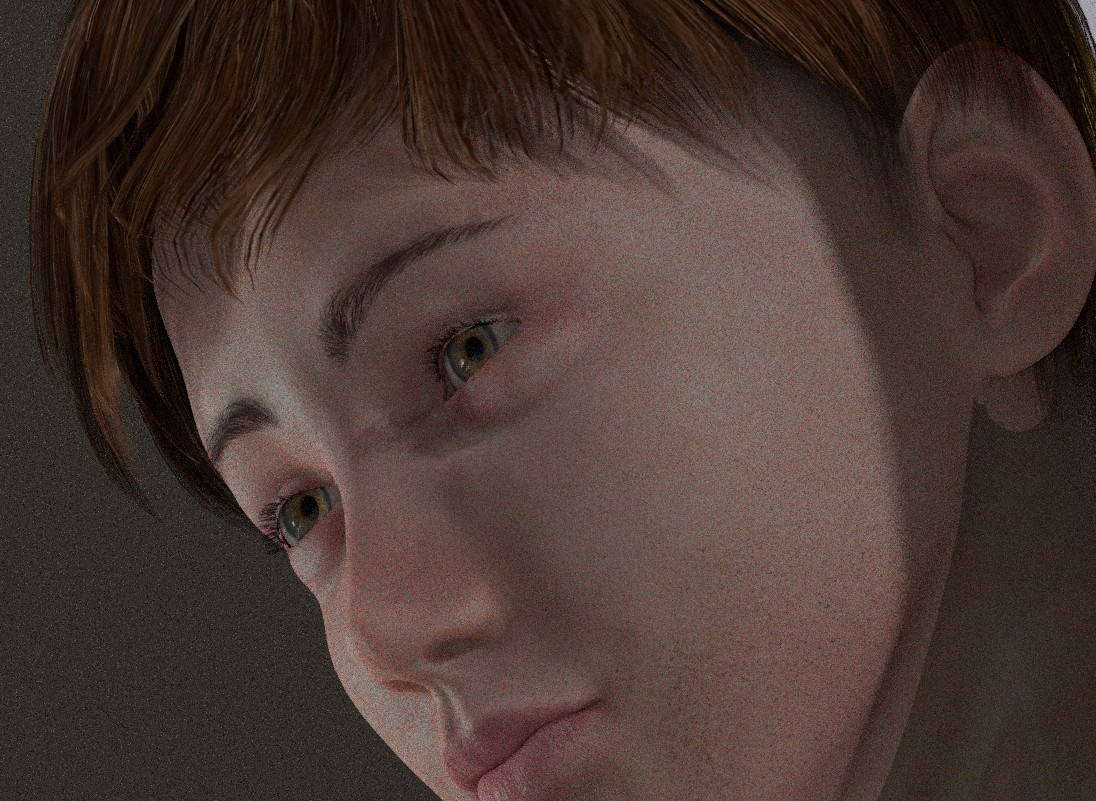
Subject: How do I make eyebrows appear?


which figure is this?
Available on Amazon for the Kindle E-Reader Monster of the North and The Shimmering Mage
Today I break my own personal record for the number of days for being alive.
Check out my store here or my free stuff here
I use Poser 14 and Windows 11

My guess is it's L'Homme 2 because the eyebrows on the LaFemme and L'Homme generation 1 and 2 have seperate geometry. And somehow the eyebrow geonetry didn't get morphed.
Did you create your morph in an external modeling program? Is there a way you can export again the way things are, but be sure that the eyebrow is included and just change the eyebrow morph?
One easy way to do this is to duplicate your morphed figure. Open the morph brush. Select the morph you made rather than make a new one. Set the "restrict to" to materials, eyebrows. Then use the tighten or loosen fit with a very low magnitude and a goal of the duplicate figure. If you set the tighten fit poke through margin to 2-4, it should bring the eyebrow to the surface without going too far from the head. Loosen fit can go farther, so you want a low magnitude, maybe .05
Available on Amazon for the Kindle E-Reader Monster of the North and The Shimmering Mage
Today I break my own personal record for the number of days for being alive.
Check out my store here or my free stuff here
I use Poser 14 and Windows 11

Privacy Notice
This site uses cookies to deliver the best experience. Our own cookies make user accounts and other features possible. Third-party cookies are used to display relevant ads and to analyze how Renderosity is used. By using our site, you acknowledge that you have read and understood our Terms of Service, including our Cookie Policy and our Privacy Policy.
I just created a morphing image and I can't get the eyebrows to reappear. Thanks if you have any ideas.