
Renderosity Forums / Poser - OFFICIAL
Welcome to the Poser - OFFICIAL Forum
Forum Moderators: RedPhantom Forum Coordinators: Anim8dtoon
Poser - OFFICIAL F.A.Q (Last Updated: 2026 May 26 12:28 am)

Subject: File gatherer thingy


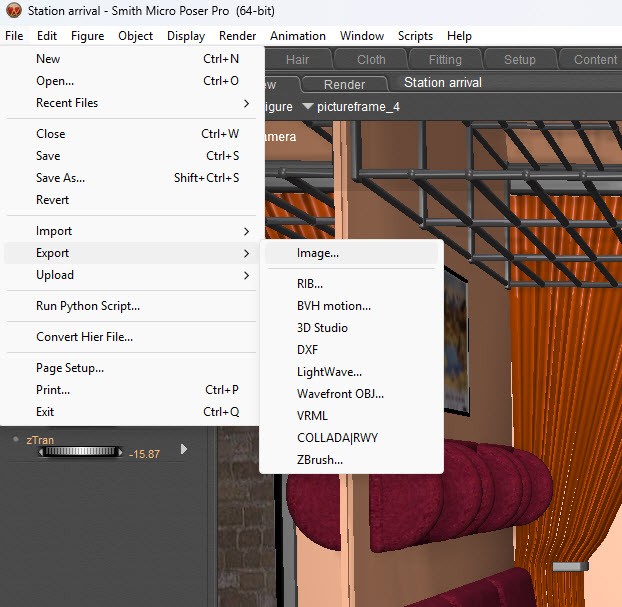
Try File > Export > Save for Sharing
But you're right you should organize better. ;)
"It's not that I don't understand, it's just that the world changes too fast."



Privacy Notice
This site uses cookies to deliver the best experience. Our own cookies make user accounts and other features possible. Third-party cookies are used to display relevant ads and to analyze how Renderosity is used. By using our site, you acknowledge that you have read and understood our Terms of Service, including our Cookie Policy and our Privacy Policy.
I'm still working on my 'inside a railway carriage as it pulls into a station' animation and suddenly got a 'texture couldn't be loaded' type of message. I used a program called Everything to find the file but I don't know why the scene lost the file unless it was because it wasn't inside the Poser Runtime.
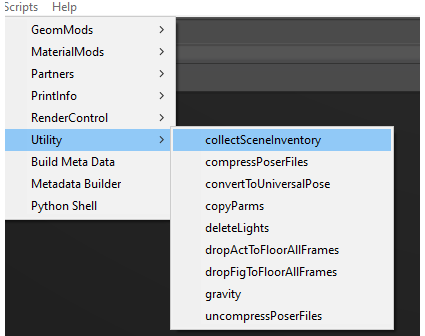
This got me to thinking. Is there something like a file finder and gatherer in Poser or for Poser that can gather all the files in use and place them all in one folder? I'd find it useful as I'm an untidy so and so and have things like images used as backdrops and object files for props etc on portable drives and second drives within the machine.
I know there's a Print Info script set in PP2014 but that only show where the files are.
Maybe I should just stop being messy!