phil_lawson opened this issue on May 04, 2026 · 5 posts
phil_lawson posted Mon, 04 May 2026 at 11:15 AM
I'm still working on my 'inside a railway carriage as it pulls into a station' animation and suddenly got a 'texture couldn't be loaded' type of message. I used a program called Everything to find the file but I don't know why the scene lost the file unless it was because it wasn't inside the Poser Runtime.
This got me to thinking. Is there something like a file finder and gatherer in Poser or for Poser that can gather all the files in use and place them all in one folder? I'd find it useful as I'm an untidy so and so and have things like images used as backdrops and object files for props etc on portable drives and second drives within the machine.
I know there's a Print Info script set in PP2014 but that only show where the files are.
Maybe I should just stop being messy!

Sunfire posted Mon, 04 May 2026 at 1:20 PM
Try File > Export > Save for Sharing
But you're right you should organize better. ;)
"It's not that I don't understand, it's just that the world changes too fast."
phil_lawson posted Mon, 04 May 2026 at 2:59 PM
Unfortunately my version of Poser doesn't have that option.
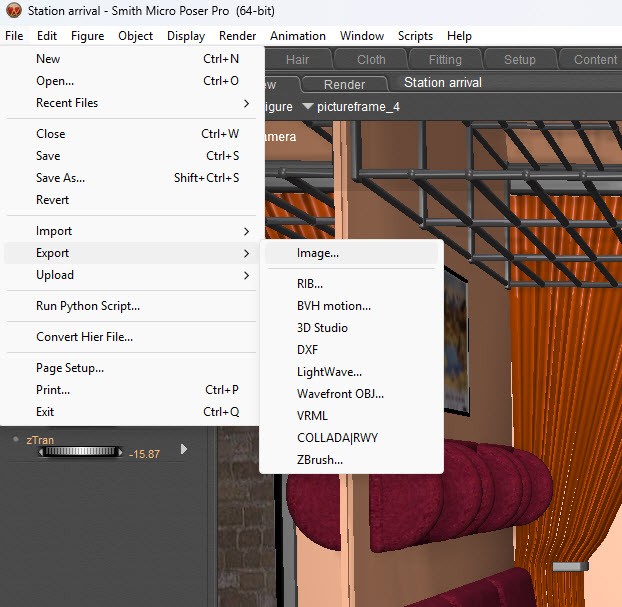
Looks like I've some tidying up to do!

jonnybode posted Mon, 04 May 2026 at 10:11 PM
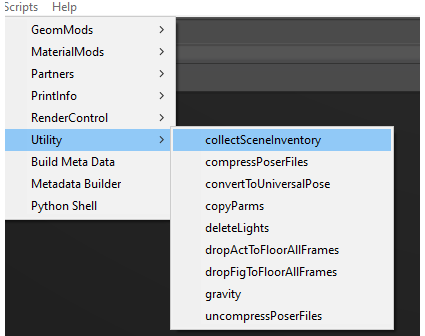
Try this scripts thats included in Poser, it lets you save a PZ3 to a specific folder and collects all objects and texturefiles needed.
When that is done you just open that previously saved PZ3 and work from that folder/project.
phil_lawson posted Tue, 05 May 2026 at 5:29 AM
Well that seemed to work! Great! I don't have to do any housework!