
Renderosity Forums / Poser - OFFICIAL
Welcome to the Poser - OFFICIAL Forum
Forum Moderators: RedPhantom Forum Coordinators: Anim8dtoon
Poser - OFFICIAL F.A.Q (Last Updated: 2026 May 21 1:31 pm)

Subject: Shadow Catcher Conundrum


The shadow catcher doesn't appear transparent enough for the render; it still has a hazy translucency. The first image lighting is off, and the shadow under the skirt is too dark, with not enough blue tint. I would have to go back and play with EZDome again; it has been a long time since I experimented with its setup.
That could be it. I'll be interested in what results you get from tinkering around with EZDome.The shadow catcher doesn't appear transparent enough for the render; it still has a hazy translucency. The first image lighting is off, and the shadow under the skirt is too dark, with not enough blue tint. I would have to go back and play with EZDome again; it has been a long time since I experimented with its setup.

You're using Poser 13, aren't you? If you are, you can use the background with the HDRI and set the ground as a shadow catcher.
Available on Amazon for the Kindle E-Reader Monster of the North and The Shimmering Mage
Today I break my own personal record for the number of days for being alive.
Check out my store here or my free stuff here
I use Poser 13 and win 10
Red, no, I'm using Poser 11 Pro here with these HDRI backgrounds. I do have Poser 13, but can't install it till I do an OS upgrade to meet the system requirements, and as it is, it's not for the faint of heart. As a matter of fact, I'll have to have a tech expert do the OS upgrade. *Sigh* So I am stuck with P11 till then ...
I have narrowed down the problem, and it should be an easy fix for P11. I am troubleshooting using P14, but there shouldn't be any difference between the versions. You need to select the shadow catcher in your scene and enter the Material Room. You will be looking for the following node:
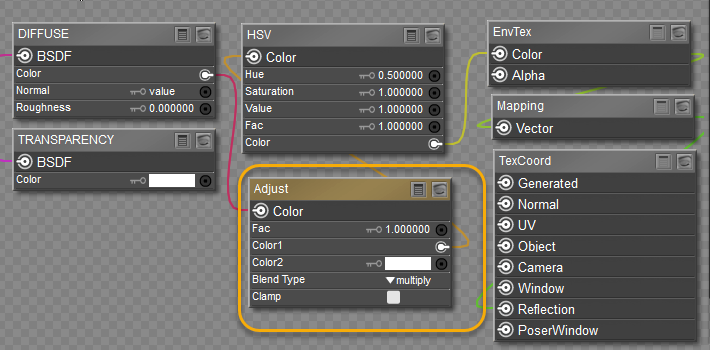
What you want to do is plug the HSV node also to Color2; that will eliminate the hazy ground.
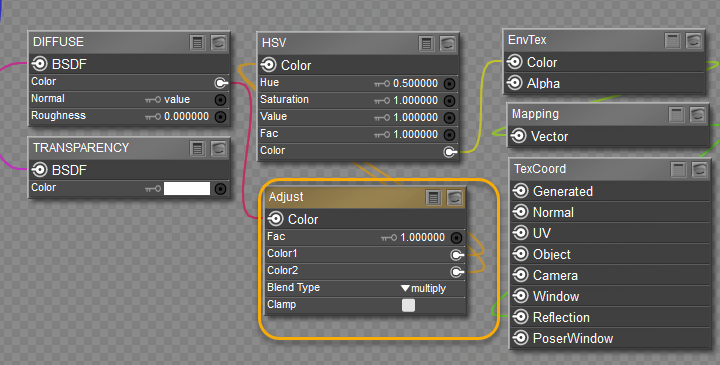
I found that my system has issues with reflection according to the Texture Coordinates channel. Don't bother playing with the other settings; they don't improve the situation. Once you upgrade to P13, EZDome will not be necessary. Also, keep your HDRI resolution around 4 to 6 k; higher resolution is a render killer and, frankly, is unnecessary.
Well, I did as you suggested, Hborre, but unfortunately, it didn't fix the issue of the background being badly distorted, especially the trees. I just don't understand why it's turned out like this when the beach photo shoot scene was just perfect without distortion with the shadow catcher being used.
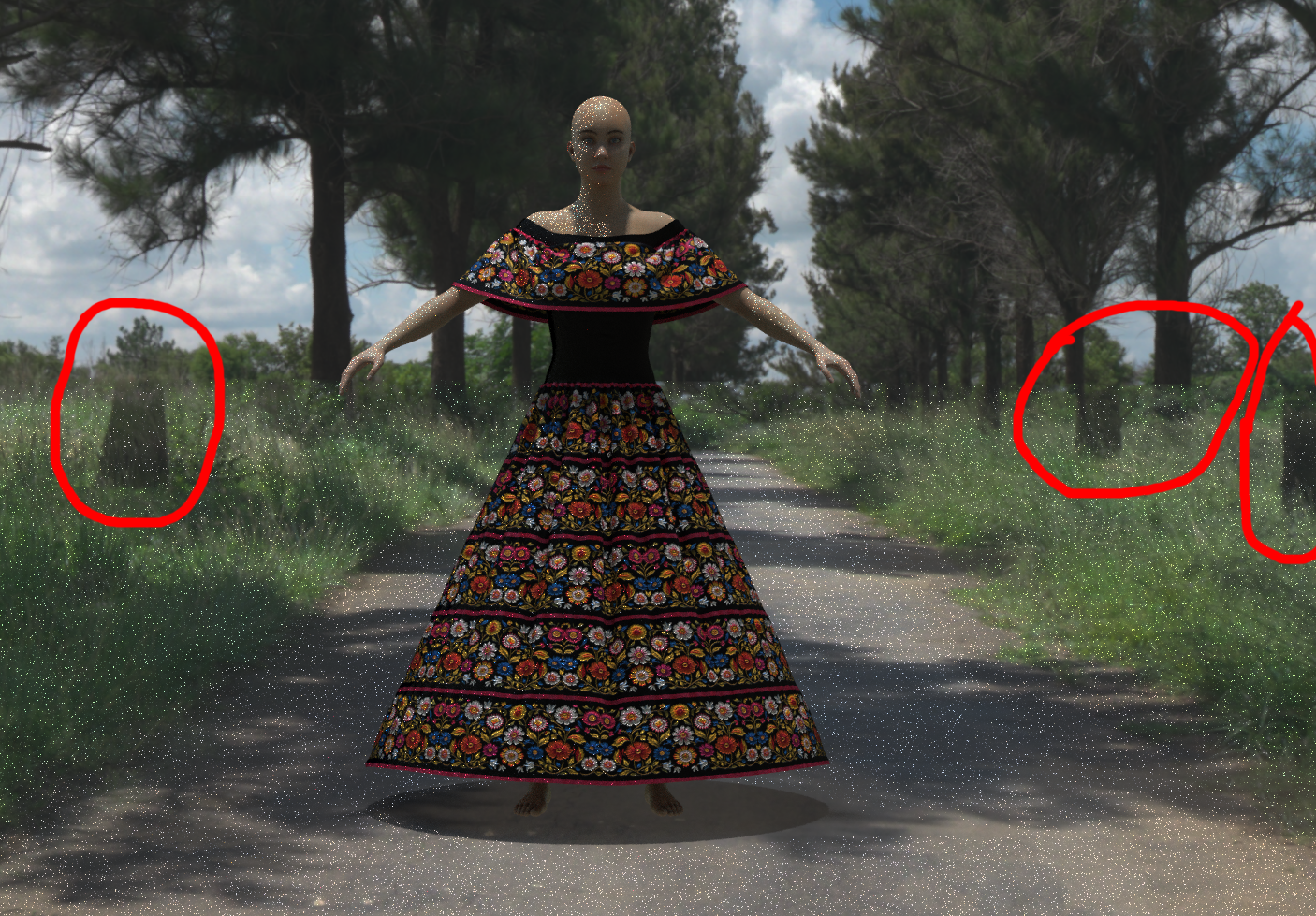

Rhia474 posted at 8:53 PM Wed, 15 April 2026 - #4505354
Oh no, not at all, Rhia. When I bring in the EZDome, I've always hidden the ground so that the HDRI image renders. I just don't understand what's happening here. I've got a handful of gallery images in which I used EZDome and an HDRI map, and they all rendered just fine without any wonky distortion. Here's one of them: Animals are NOT Disposable!Hold on, are you saying you are using both EZDome AND the provided Poser background?
No, it isn't. I downloaded that HDRI file from PolyHaven just recently and it's one of their new uploads ...That distortion is the background reflection on the shadow catcher. It appears to be misaligned with the image. I tried a few settings within EZDome, but I couldn't get it to improve. I don't know how the beach scene is set up to eliminate obvious distortion. Is this a legacy scene within Poser 11?
I downloaded a 16k HDRI from Poly Haven and ran it through my P11 EZDome. As far as I can see, it is behaving itself when all the parameters remain nominal. However, if I tilt the dome within EZDome, I start to see distortions at the shadow catcher and image intersection. Camera rotation and movement don't cause any problems. Try to recall if you tilted the dome at any point before rendering. Two degrees is enough to distort the render, especially if you made an EZInner dome adjustment through the Parameters/Properties panel.
I made sure to either rotate the main camera on the yOrbit parameter or simply rotate the EZInner dome on the Y-axis, no tilting at all, yet the render still turned out wonky. I feel that the shadow catcher is the culprit in some way because if you delete it and then render, the image comes out looking crisp as it should. I'm frankly stumped over this ...I downloaded a 16k HDRI from Poly Haven and ran it through my P11 EZDome. As far as I can see, it is behaving itself when all the parameters remain nominal. However, if I tilt the dome within EZDome, I start to see distortions at the shadow catcher and image intersection. Camera rotation and movement don't cause any problems. Try to recall if you tilted the dome at any point before rendering. Two degrees is enough to distort the render, especially if you made an EZInner dome adjustment through the Parameters/Properties panel.
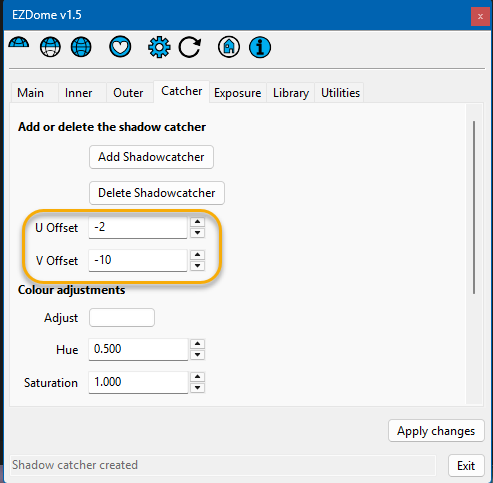
I think I figured out where adjustments need to be applied to correct the problem. It may be HDRI-specific, meaning that some HDRIs will project correctly with the shadow catcher, and others will give you an awkward offset where the shadow catcher meets the projected image on the dome. To correct the problem, adjust the U and V offsets under the shadow catcher tab.
Content Advisory! This message contains nudity
The render below shows how the scene appears without the shadow catcher.
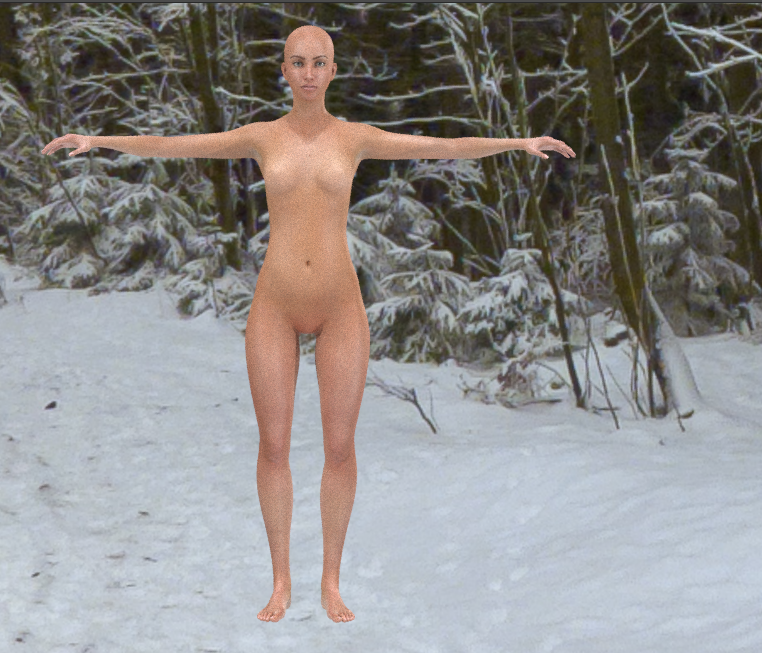
The following render shows what happens when the shadow catcher is introduced into the scene. Notice the shift in image in the red circle.
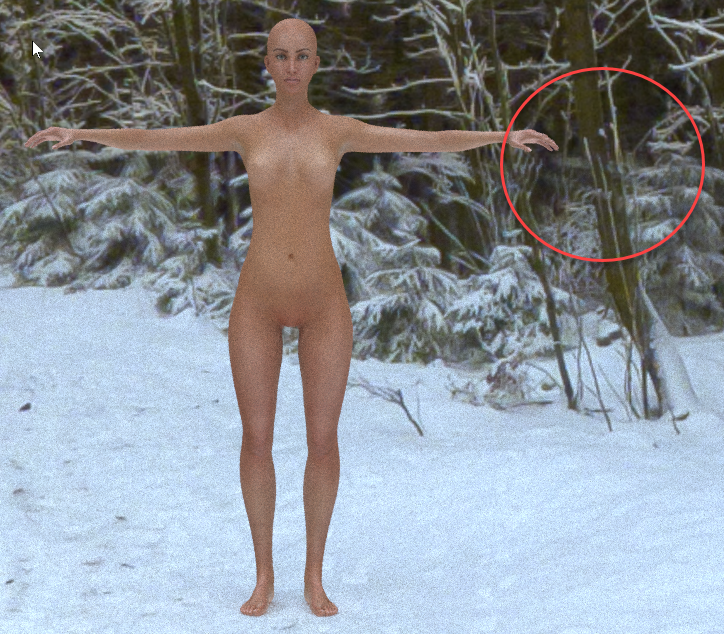
After troubleshooting setting changes under different parameters, I stumbled on a parameter that corrects the issue. Below is the EZDome setup for the shadow catcher. Notice the values for the U and V offset.
This is the result after the adjustments.
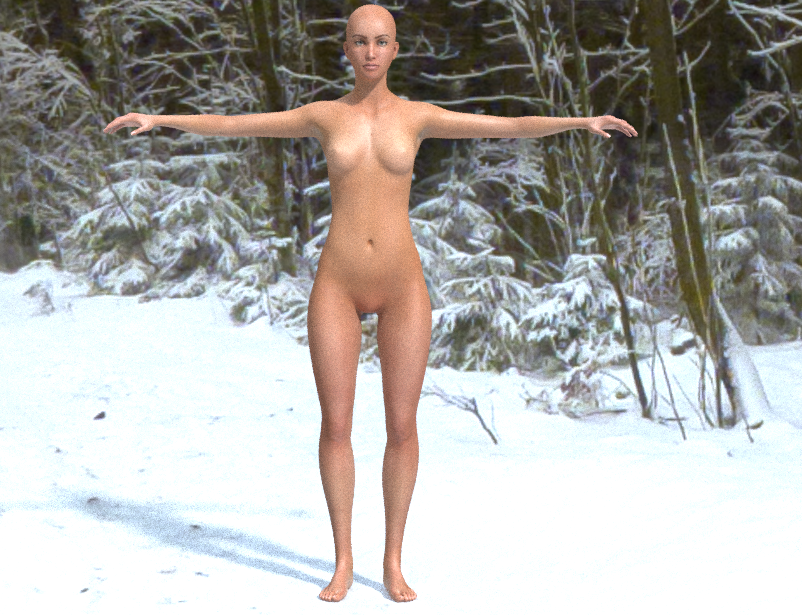
There was a reason those parameters were included in the app, but there was no clear explanation about their use in the manual.
Yes, I did note the change in color tint, but I didn't keep track of the how or why, but it did occur after I added the shadow catcher. The HDRI I used is a winter scene without a visible sun. It would make sense that the overall tone of the scene would be bluish, or a high Kelvin temperature range.
Hopefully, this will solve your issue and show you where to address it. It helps to know your way around the material room where Cycles is concerned. I would like to see your results.
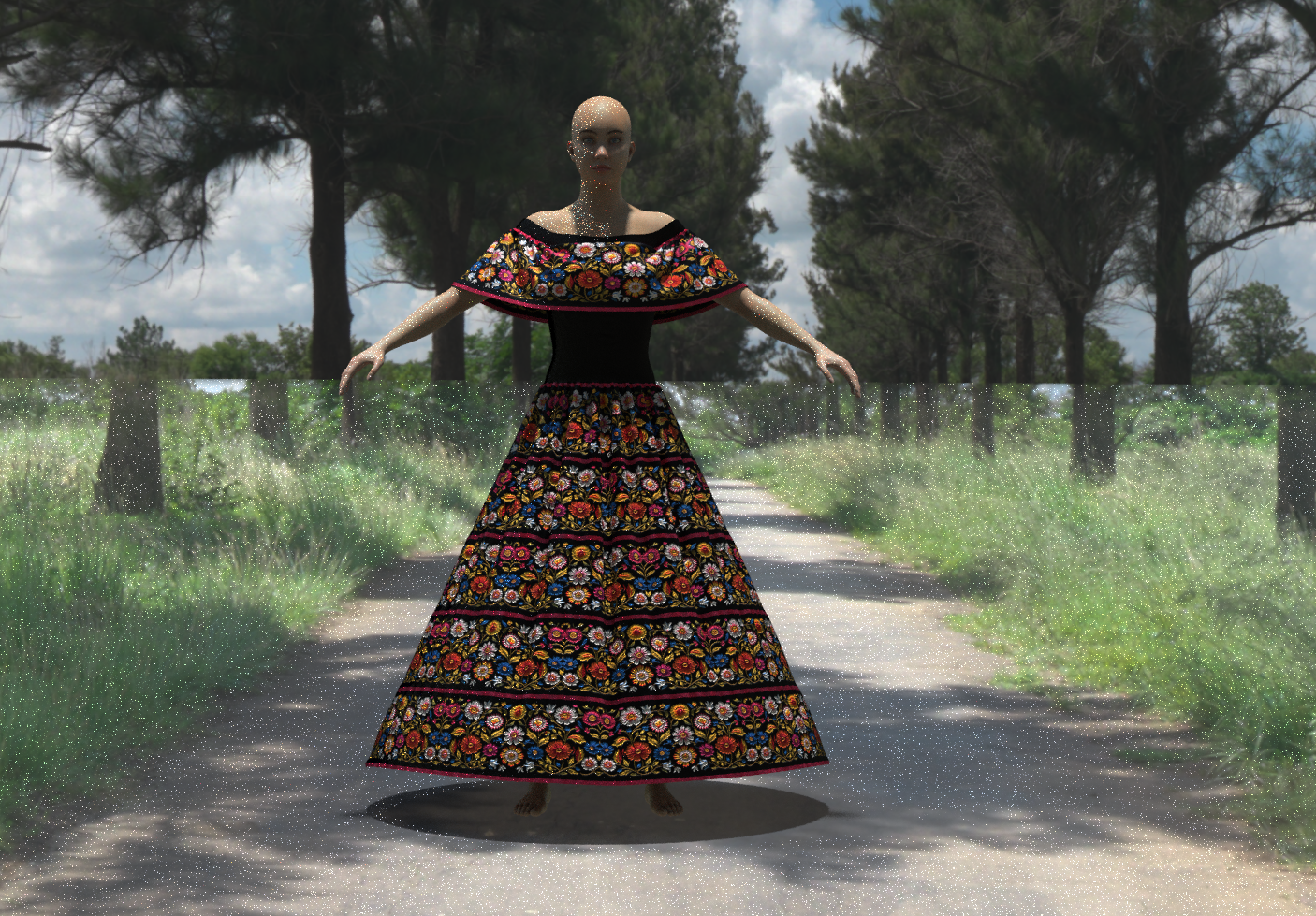
Grrrrrr! I made the adjustments to the shadow catcher parameters and it STILL came out wonky, and when you look at the image, you can see a definite line going across the middle through her waist as well. I'm beginning to think this particular HDRI file is bad because I've done well with the others I've used, some from PolyHaven and others from different sources. Throwing in the towel, I think :'(
Content Advisory! This message contains nudity
This is as close as I can get it without clipping something else.
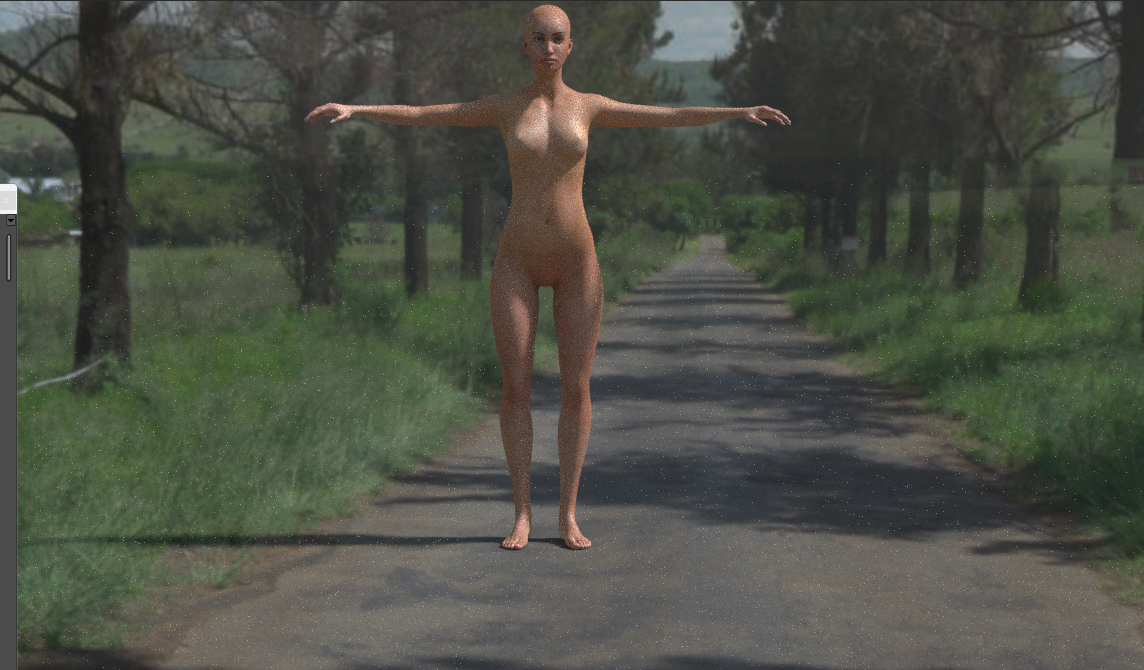
Note the settings I am using for the render.
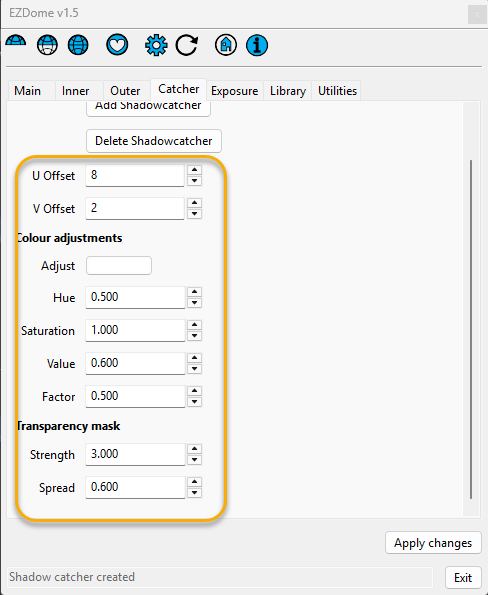
This particular HDRI is problematic; the lighting's luminance might be causing unusual reflections on the shadow catcher. To offset that, I decreased the Color adjustments Value to 0.6; it controls the brightness. I also decreased the Factor to fine-tune the render.
My recommendation: get the model into its final position and pose; don't apply it after making the shadow-catcher adjustments. Avoid making camera adjustments after setting the shadow catcher, otherwise you will wind up redoing the U- and V-Offsets.
I got this render with a little trial & error, but I knew where to make the changes. But hopefully this should get you a little closer to what you want. It is still not perfect, but it is close.
Well dang it, I tried tweaking the settings, but the HDRI image still turned out wonky. I'm chalking it up to its being a bad HDRI. The majority of HDRIs I've gotten from PolyHaven and a few others have all turned out beautifully. Just not this one. Oh well ...Good luck. Don't be afraid changing settings, but do it in small increments with quick renders in between. You will record the changes in that order.

Privacy Notice
This site uses cookies to deliver the best experience. Our own cookies make user accounts and other features possible. Third-party cookies are used to display relevant ads and to analyze how Renderosity is used. By using our site, you acknowledge that you have read and understood our Terms of Service, including our Cookie Policy and our Privacy Policy.
Hi Poser peeps!
Here's hoping some of you can help me out here. I'm now using HDRIs more often in my projects but have run into a problem that involves the shadow catcher. I'm using Snarly's EZDome (version 1.1 within Poser 11 Pro on a Mac) and just about every single time I add a shadow catcher, the Superfly render comes out looking very wonky. In the example I'm posting below, you can see that the trees look like they've been chopped up, etc., etc. When I delete it, the scene looks normal (image posted below).
Now, the third image has me mystified because I added a shadowcaster (image rendered in Superfly) and it came out perfectly fine, no wonky background image or anything. Both 16k HDRI files were downloaded from PolyHaven. Why would the background image look so weird in one and perfectly normal in another one? I'm stumped. Maybe you peeps can figure out what's what. TIA!
With shadow catcher~
Without shadow catcher~
With shadow catcher and looking perfectly normal~