
Renderosity Forums / Poser 11
Welcome to the Poser 11 Forum
Forum Moderators: nerd Forum Coordinators: Anim8dtoon, Digitell
Poser 11 F.A.Q (Last Updated: 2026 Jun 01 8:15 am)

Welcome to the Poser Forums! Need help with these versions, advice on upgrading? Etc...you've arrived at the right place!
Looking for Poser Tutorials? Find those HERE

Subject: How can I change a body parts parent in a cr2 file?


As CR2's as text file, you should be able to edit one.
Have you tried to change this, as an example?
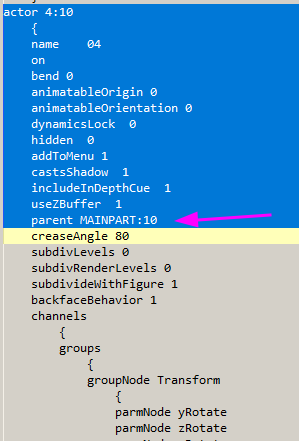
Just take the right reference:
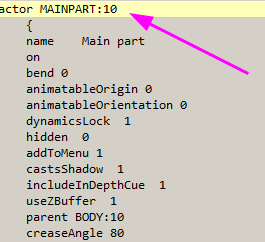
As always: make a backup of the CR2's before 
𝒫𝒽𝓎𝓁
(っ◔◡◔)っ
👿 Win11 on i9-13900K@5GHz, 64GB, RoG Strix B760F Gaming, Asus Tuf Gaming RTX 4070 OC Edition, 1+2 TB SSD's, 6+4TB HD
👿 Mac Mini M2, Tahoe 26.5, 16GB, 500GB SSD
👿 Nas 10TB
👿 Poser 13 and 14 ❤️

First off don't even try this unless you reeeeeely know how a CR2 works. I been doing this since 1997 and I probably wouldn't attempt this except as an act of complete desperation. And then, probably only to salvage body parts from the busted CR2.
The easy way is to just fix it in the setup room. Delete the bone. Select the new parent and recreate it as a child of the new parent. Sanity saved.
If you've lost your last particle of common sense or want to experience a psychotic episode read on.
Really don't ... the the chances of creating a broken CR2 are near 100%
NOTE: I'm showing these screen shots from NotePad++ and I'm using a Poser language file so I highlights and can collapse curly brace pairs.
There's a LOT more to changing an actor's parent. After editing the parent line in the part you'll also need to re-arrange the addchild lines in the figure section.
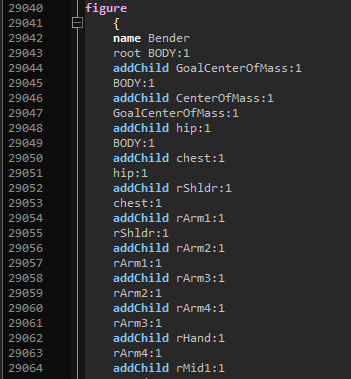
You'll need to change the weld lines as well to match the new hierarchy too. Weld lines actually glue the vertexes between body parts back together.
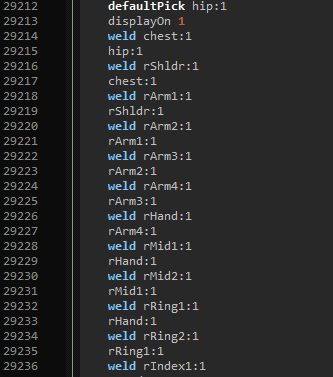
That was the easy stuff.
Every actor's parent actor has a set of channels that are the actual "bends" for the joint between the parent and the child. Poser keeps that stuff in the parent actors channels because that more confusing /s. You either have to create these new channels or move them from the parent to the child. That includes all related weight maps.
Find the twist, bend and smoothScale channels for the transplanted body part in the original parent's channels need to be moved to the new parent.
In this example I've highlighted the rShldr in the chest. I've also collapsed the elements so this can fit on a display less than a few thousand lines tall. Note the skips in the line numbers.
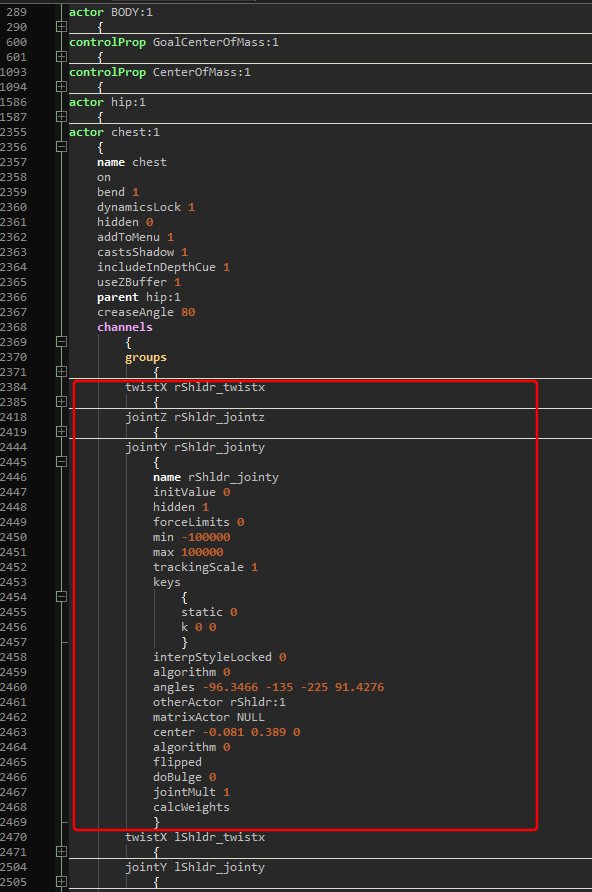
All this needs to move to the new parent. The smoothScale (XYZ) needs to move too.
Now for the weight maps ... They can't be transplanted without vertex explosions. But, they need to exist so they can be fixed in app.
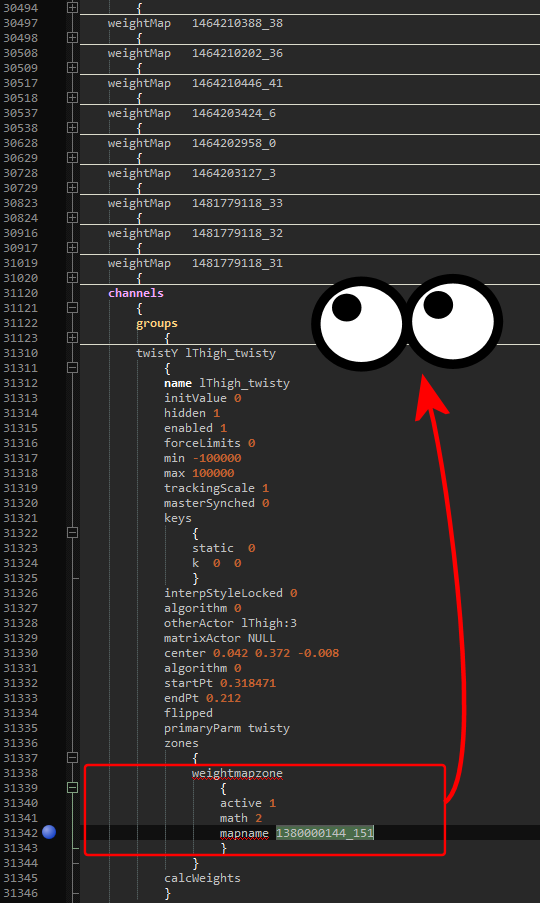
Look in the mapname for each involved map. Move it to the new parent's maps. Again this will almost certainly cause the weights in the affected actors to explode. You will need to fix the weight maps in app.
See, it's easier to just fix it in the Setup Room.
Thank you for your replies guys!
Nerd: I figured there was going to be a lot of redirecting in the cr2 and it wouldn't be easy, thanks for confirming that :-)
I usually use phi builder to initial rig the figures, then joint editor them. I wound up fixing the phi file to re-parent the part, ran the new phi file, then copied the joint rotations from the original to the new figure. Worked like a charm with minimal effort.
Thanks again for your replies.
Cheers,
Davo
Thank you Nerd.
𝒫𝒽𝓎𝓁
(っ◔◡◔)っ
👿 Win11 on i9-13900K@5GHz, 64GB, RoG Strix B760F Gaming, Asus Tuf Gaming RTX 4070 OC Edition, 1+2 TB SSD's, 6+4TB HD
👿 Mac Mini M2, Tahoe 26.5, 16GB, 500GB SSD
👿 Nas 10TB
👿 Poser 13 and 14 ❤️

Privacy Notice
This site uses cookies to deliver the best experience. Our own cookies make user accounts and other features possible. Third-party cookies are used to display relevant ads and to analyze how Renderosity is used. By using our site, you acknowledge that you have read and understood our Terms of Service, including our Cookie Policy and our Privacy Policy.
I have already created and rigged a figure in poser. I notice that one body part is parented to another body part, and I'd rather have it parented to a different body part. For example, dentalTop is parented to dentalBottom, and dentalBottom is parented to dentalBase. I want dentalTop parented to dentalBase instead of dentalBottom. I changed the parent for actor dentalTop to dentalBase in the cr2 file, but it doesn't work, still parented to dentalBottom. Are there more places in the cr2 file that I must fix this?
Cheers,
Davo