
Renderosity Forums / Poser 12
Welcome to the Poser 12 Forum
Forum Moderators: nerd Forum Coordinators: nerd, Digitell
Poser 12 F.A.Q (Last Updated: 2025 Dec 29 5:28 pm)
Welcome to the Poser Forums! Need help with these versions, advice on upgrading? Etc...you've arrived at the right place!
Looking for Poser Tutorials? Find those HERE

Subject: Genesis 8/9 Charakter with Poser 12 compatible?


While a few individuals have managed to import Genesis 8 and 9 into Poser, the process is quite complicated. It may not be something for a new user. If you're looking in the marketplace here, you can filter by the software you want to help you find content to work in Poser.
Available on Amazon for the Kindle E-Reader Monster of the North and The Shimmering Mage
Today I break my own personal record for the number of days for being alive.
Check out my store here or my free stuff here
I use Poser 13 and win 10

Hello,
I have Poser 12 and no experience with it yet.
I would like to purchase content for it in the future, but I can only find "DAZ3D" content. I know it from before and think its structure looks exactly like Poser.
So I wanted to ask if the DAZ3D content can also be loaded into Poser 12, or what I need to be aware of.
For example, I have figures for Genesis 8 or Genesis 9 in the shop. Can I load them into Poser?
Thank you very much.
I'd like to reply, because I know how open questions can keep spinning around in your head and not let you rest.
If you want to load Genesis into Poser in a way that you can actually pose it, it really is quite complicated. As far as I know, you even need an older version of Poser for that.
But yes – you can export Genesis content from DAZ and bring it into Poser. There are several ways to do this.
Because I like to keep things as simple as possible, I usually pose and morph Genesis in DAZ, sometimes even dress them there, and then I export the figure as an OBJ file. I use OBJ because it comes in as a single piece, which makes using them in Poser easier (for me).
In Poser, you can manually assign the materials in the Material Room. (I think the export in DAZ can export materials too, but I do not use this feature)
However, for someone new to Poser, this can definitely be quite a bit of work, because some basic knowledge of the Material Room is very helpful.
Props, on the other hand, are much easier to use in Poser. You can either export them from DAZ and import them into Poser, or use a script that makes this process simpler.
There’s one called “DUF Prop Converter for Poser 12” – you can find it on Renderosity. The vendor also has a few more helpful scripts for Poser, by the way. Worth a look!
The main reason I've never spent much time with Poser or Daz3D is the complicated handling of content. I don't understand what the different content elements really are. Are they independent characters, or do they require a "main character"? Sometimes it's just the eyes, hair, or face, sometimes the clothing, etc. I've bought some things before, but ultimately couldn't really use them because I didn't know how to place them.
I think the whole thing is just too powerful to just dabble with it casually. Unfortunately...
It can be a little confusing to tell what the content is for. There are several main characters (figures), and then there are character morphs for each. These will change the shape and coloring of the figures to give them a specific look. There are also separate morphs that are usually mix-and-match to give the figure morph changes, maybe elf ears or more muscles. And there are textures to change the skin or eye color, or provide other features like makeup, bruises, freckles etc. These are all figure-specific.
Clothing and hair also is figure specific although hair sometimes comes with morphs to fit it to other figure.
If you're looking in the marketplace, you'll see something like this
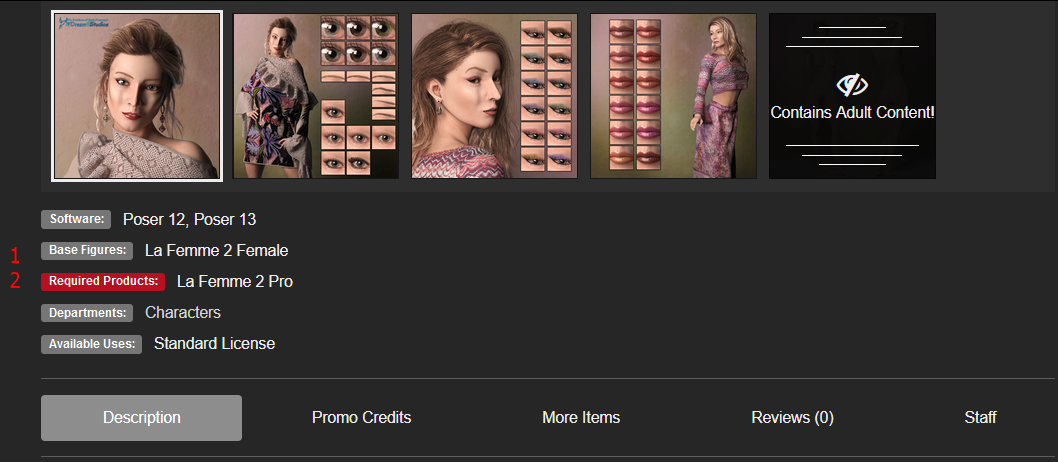
This is a character for Lafemme 2. At the 1 you'll see what base figure is needed. At number 2, you'll see what all you need to use this character.
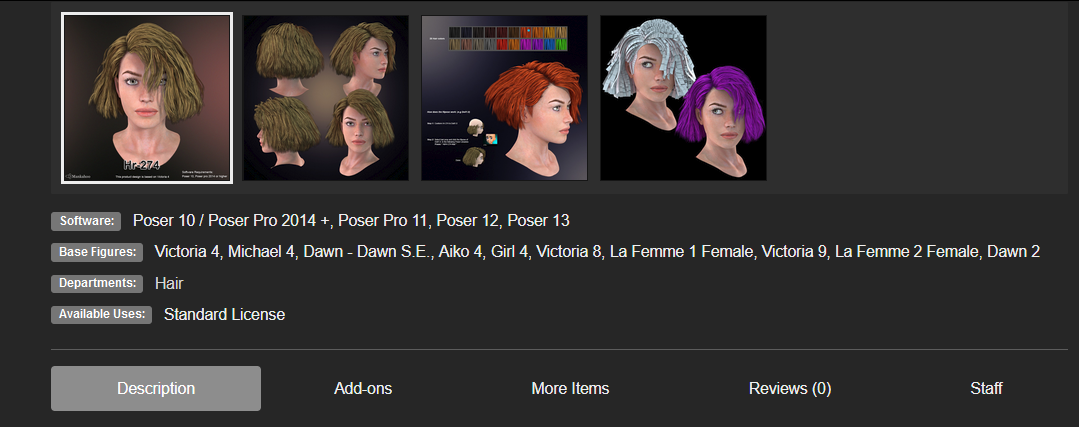
In this one, you'll see there is no required figure because it is designed to work with several. The base figures lists all it's designed to work with.
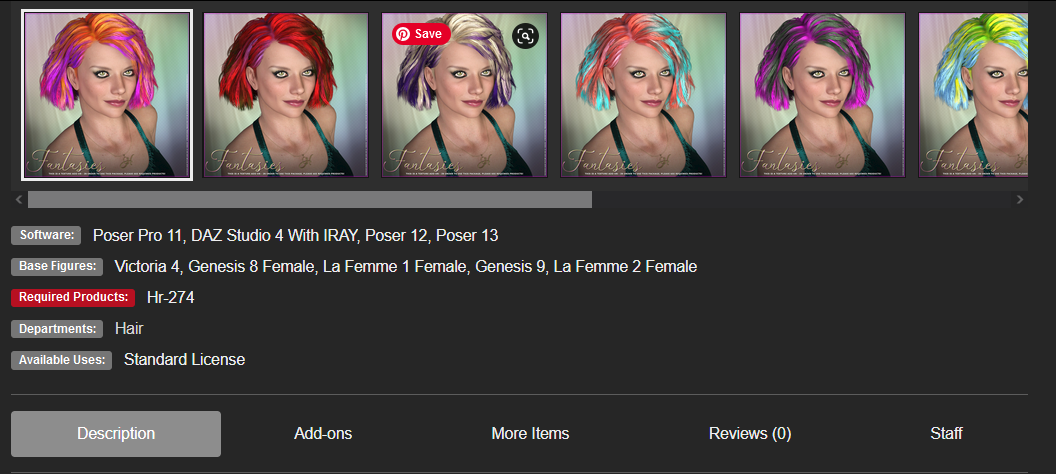
This one requires the hair pictured above because it's an add on to give the users more color options.
I hope this helps a little with how to use content. If you have more questions, please ask. There are plenty around who know a lot about Poser.
Available on Amazon for the Kindle E-Reader Monster of the North and The Shimmering Mage
Today I break my own personal record for the number of days for being alive.
Check out my store here or my free stuff here
I use Poser 13 and win 10

*** Without Poser 11 ***
https://www.renderosity.com/forums/threads/2964076/ds-genesis-into-poser-12
DS Genesis into Poser 12
https://www.youtube.com/watch?v=PNHx4DqAFeA*Ref
Genesis 3 Poser Updater
https://www.renderosity.com/freestuff/items/76121


Privacy Notice
This site uses cookies to deliver the best experience. Our own cookies make user accounts and other features possible. Third-party cookies are used to display relevant ads and to analyze how Renderosity is used. By using our site, you acknowledge that you have read and understood our Terms of Service, including our Cookie Policy and our Privacy Policy.
Hello,
I have Poser 12 and no experience with it yet.
I would like to purchase content for it in the future, but I can only find "DAZ3D" content. I know it from before and think its structure looks exactly like Poser.
So I wanted to ask if the DAZ3D content can also be loaded into Poser 12, or what I need to be aware of.
For example, I have figures for Genesis 8 or Genesis 9 in the shop. Can I load them into Poser?
Thank you very much.