
Renderosity Forums / Blender
Welcome to the Blender Forum
Forum Moderators: Lobo3433 Forum Coordinators: bwsupport
Blender F.A.Q (Last Updated: 2026 Apr 20 6:45 am)
Welcome to the Blender Forum!
Your place to learn about Blender, ask questions,
exchange ideas, and interact with the other Blender users!
Gallery | Freestuff | Tutorials
Visit the Renderosity MarketPlace. Your source for digital art content!


Subject: Modifier is disabled skipping apply


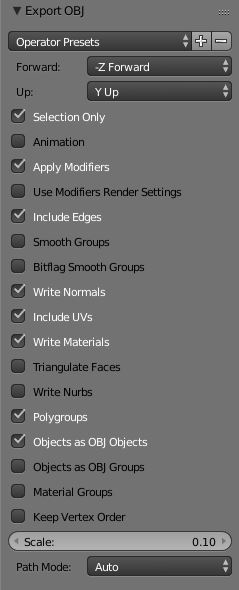
When you export under the export options did you try making sure apply modifier is checked on export? (See screen shot below) Also make sure that rotation and scale has been applied prior to applying the modifiers and last option is trying exporting as FBX I ran into similar problems with the boolean from Blender causing issues when bought into Daz or Poser but applying the scale and rotation before applying the Boolean seems to do the trick

Lobo3433
Blender Maya & 3D Forum Moderator
I had that checked. This is the settings I used.
I also tried the FBX and had the same problem.
Available on Amazon for the Kindle E-Reader Monster of the North and The Shimmering Mage
Today I break my own personal record for the number of days for being alive.
Check out my store here or my free stuff here
I use Poser 13 and win 10
I am not sure then and you are using 2.79 not sure what else could be causing the issue
Lobo3433
Blender Maya & 3D Forum Moderator

Hi RedPhantom Not sure if this is any help at all but a little while back I had a similar issue with some archipack stuff on window boolean not working. After a while I found that it had worked but extra object had been placed in the window hole that was used as the glass which showed up as solid and connected. And required node changes to make it show up as it should ie glass. Not sure if it helps but worth checking.
Incantrix

Privacy Notice
This site uses cookies to deliver the best experience. Our own cookies make user accounts and other features possible. Third-party cookies are used to display relevant ads and to analyze how Renderosity is used. By using our site, you acknowledge that you have read and understood our Terms of Service, including our Cookie Policy and our Privacy Policy.
I'm working with archipack to make a room to use in a poser scene. When I just export an obj, the holes for the windows don't show. I figure it's something to do with it using boolean. I've seen it before when I wasn't using archipack. Then I was able to apply the boolean modifier and do some cleanup to fix it. I tried to apply the modifiers this time but I got this error 'modifier is disabled skipping apply'. Does anyone have any suggestions?
Available on Amazon for the Kindle E-Reader Monster of the North and The Shimmering Mage
Today I break my own personal record for the number of days for being alive.
Check out my store here or my free stuff here
I use Poser 13 and win 10