
Renderosity Forums / Poser - OFFICIAL
Welcome to the Poser - OFFICIAL Forum
Forum Moderators: RedPhantom Forum Coordinators: Anim8dtoon
Poser - OFFICIAL F.A.Q (Last Updated: 2026 May 13 6:03 pm)

Subject: Connecting a Blinn Node


Just a bit of background on this... the Specular channels on the PoserSurface node are inputs to an internal Specular node (just as the Diffuse channels are inputs to an internal Diffuse node).
You (usually) won't want to feed the output of a Blinn node (a different type of specular) into a Specular node, so as hborre says, normally it would go into the direct input channel labelled alt_specular.
You may also wish to consider the fact that reflected light reduces diffuse light from a surface. To model this, you would use the output of the Blinn node, inverted, to attenuate the Diffuse. This is known as CoE (conservation of energy), and helps to prevent the strong edge highlights you get with the Blinn node from creating blown out areas when added to the Diffuse.
"If I were a shadow, I know I wouldn't like to be half of
what I should be."
Mr Otsuka, the old black tomcat in Kafka on the Shore (Haruki
Murakami)

Thus, to continue with IsaoShi's thought, you would Color_Add() the output of the Blinn node to the output of the diffuse() node before plugging into alt_diffuse or alt_specular... doesn't matter, they both do essentially the same thing.
This is easier to visualise in a node set (my apologies to GC converts for leaving out those essential bits):

This is not impossible to do using the diffuse_color and diffuse_value channels (we just saw BB do something like it in the Nylon Material thread) but it is simpler and you do have total control over your materials.
Of course, GC is missing here (feels weird to be putting this together without GC - like, what's the point???)
Monterey/Mint21.x/Win10 - Blender3.x - PP11.3(cm) - Musescore3.6.2
Wir sind gewohnt, daß die Menschen verhöhnen was sie nicht verstehen
[it is clear that humans have contempt for that which they do not understand]
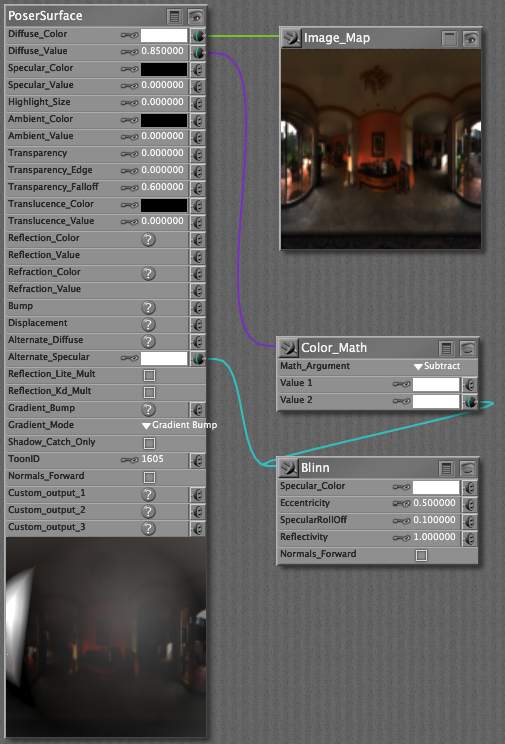
RV's version can be gamma corrected if required... this simple one can't.
"If I were a shadow, I know I wouldn't like to be half of
what I should be."
Mr Otsuka, the old black tomcat in Kafka on the Shore (Haruki
Murakami)

In the material room, it comes under New Node -> Lighting -> Specular -> blinn. Has to do with how shininess is interpreted for certain materials (not all). Heaps more accurate (physics) than the inbuilt Specular stuff in Specular_Color and Specular_Value channels.
Monterey/Mint21.x/Win10 - Blender3.x - PP11.3(cm) - Musescore3.6.2
Wir sind gewohnt, daß die Menschen verhöhnen was sie nicht verstehen
[it is clear that humans have contempt for that which they do not understand]
You're more than welcome, hun - there's a lot more to get the head around... barely scratching at the surface.
Monterey/Mint21.x/Win10 - Blender3.x - PP11.3(cm) - Musescore3.6.2
Wir sind gewohnt, daß die Menschen verhöhnen was sie nicht verstehen
[it is clear that humans have contempt for that which they do not understand]
Thanks Guys! Would have never figured out how to do it this way. Both methods worked well. I got Poser Pro 2010 so that I could go the simplest route for GC. But I can see that there's still alot I need to learn even when some node connections aren't needed. Yes Siree, there's some sharp people in this place. Thanks again.
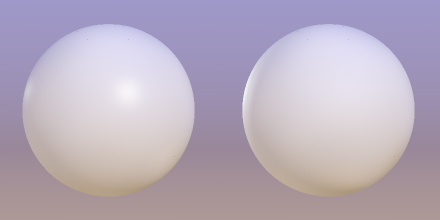
As you see, at the default settings Blinn has more diffuse (spread out) highlights, and the edge highlights are much stronger than the facing highlights.
Edit: there is zero diffuse on the rim light, so the edge highlight is purely specular/blinn.
"If I were a shadow, I know I wouldn't like to be half of
what I should be."
Mr Otsuka, the old black tomcat in Kafka on the Shore (Haruki
Murakami)

Privacy Notice
This site uses cookies to deliver the best experience. Our own cookies make user accounts and other features possible. Third-party cookies are used to display relevant ads and to analyze how Renderosity is used. By using our site, you acknowledge that you have read and understood our Terms of Service, including our Cookie Policy and our Privacy Policy.
Sorry if this sounds stupid, but I can't seem to find any info on how to properly connect a Blinn node. I have a figure with a texture map and I want to have the blinn specular setting. I can hook the Blinn to the Specular channel, or I can hook it to the Alternate Specular channel, or I can hook to the texure map from the Specular channel and come off of that with the Blinn. Different ways will require different adjustments, but they all seem to work. But I keep thinking that there must be a preferred method on how to simply set up blinn specular. Would appreciate any help.