
Renderosity Forums / Carrara
Welcome to the Carrara Forum
Forum Coordinators: Kalypso, Anim8dtoon
Carrara F.A.Q (Last Updated: 2026 Sep 09 4:39 am)
Visit the Carrara Gallery here.

Subject: trouble setting up network rendering for carrara 7.2 on intel mac


You need to have the same Carrara Render node version for each computer.
---------------------------------------
Holyforest,
Hundreds of shaders for
Carrara
Hi,
I have the same version on all my machines. On the main machine I have installed Carrara 7 Pro (7.2.0.73) and on the other machines the corresponding render nodes. No firewalls are turned on.
I left the settings (Render Room) on the host machine as default:
Port 1: 5020
Port 2: 5040
Port 3: 5060
ID: 192.168.1.xx (ip of the host machine)
Mask: 255.255.255.0
Tried both automatic as well as manual.
The rendernode preferences (Application )are left as default
Port 1: 5020
Not sure if I should change the Render Room settings of the render node.
The IP addresses of the systems with the render nodes are like 192.168.1.nnn
Log network connections hangs my Carrara application, so no debugging there :(

It worked! Great! I'm so happy!!!!
Thanks everybody!
They should default it to something which works out of the box (if possible).
Always thought the note meant that if I changed port 1 I should change it on all render nodes. Haha... I almost feel silly misinterpreting that line :P
Thanks again everybody!

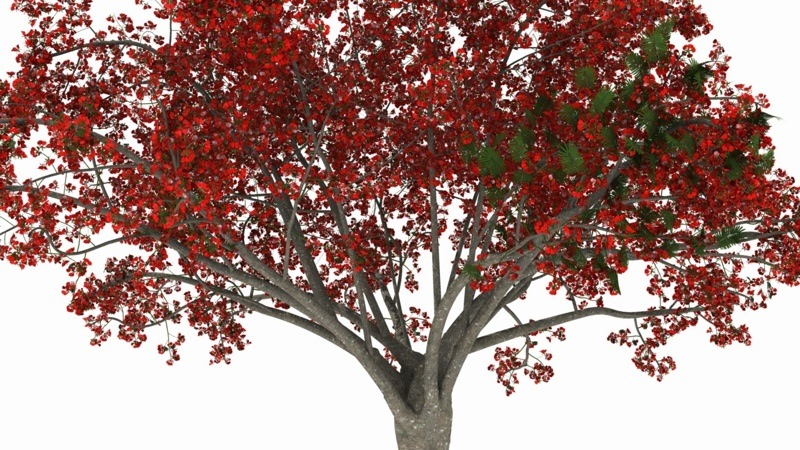
I need to get it to look more realistic, so any tips are welcome :)
The leaves don't look very realistic not sure how to improve that though...
Nice start. The leaves are appearing too dark because they lack the translucency of real leaves. Placing the same color, but darker, as your leaves into the translucency channel will help with this.
Also, unless you like doing long renders, you may want to try Ambient occlusion rather than full Global Illumination for objects like this - at least while you're testing them. GI is expensive time-wise when rendering plants with leaves, so many times, I'll create a light array instead to imitate GI.
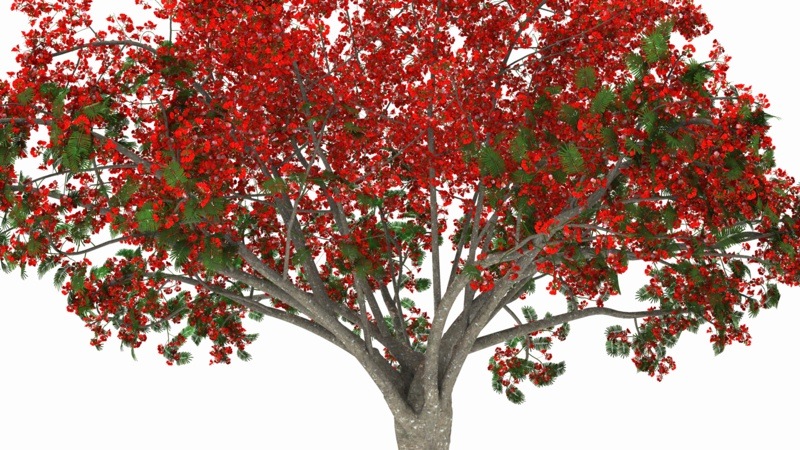
Really fast to do. It's all done with distance lights. Start with one and make it sky blue, turn shadows off, set intensity around 5 and aim it at about a 45 degree angle down. Then duplicate it and rotate 30 degrees. Continue duplicating until you have 12 lights. (sometimes 6 lights rotated at 60 degrees is adequate)
You can then create a new distant light for the sun and position it where you want or link it to a Realistic Sky.
If you have shiny objects in your scene, this isn't the best thing to do because there will be multiple highlights on your object. However, for non reflective objects and outdoor scenes it works great.

Privacy Notice
This site uses cookies to deliver the best experience. Our own cookies make user accounts and other features possible. Third-party cookies are used to display relevant ads and to analyze how Renderosity is used. By using our site, you acknowledge that you have read and understood our Terms of Service, including our Cookie Policy and our Privacy Policy.
Hi,
I'm having trouble setting up network rendering for carrara 7.2 on mac.
I'm using mac 10.5, without firewall. But I cannot get network rendering to work. All machines are intel macs. Anybody got it working?
Thanks