
Renderosity Forums / LightWave
Welcome to the LightWave Forum
Forum Moderators: CHMedia Forum Coordinators: Kalypso
LightWave F.A.Q (Last Updated: 2024 Aug 27 11:07 am)

Subject: Hip Rigging and Methodology. (Big Images!)

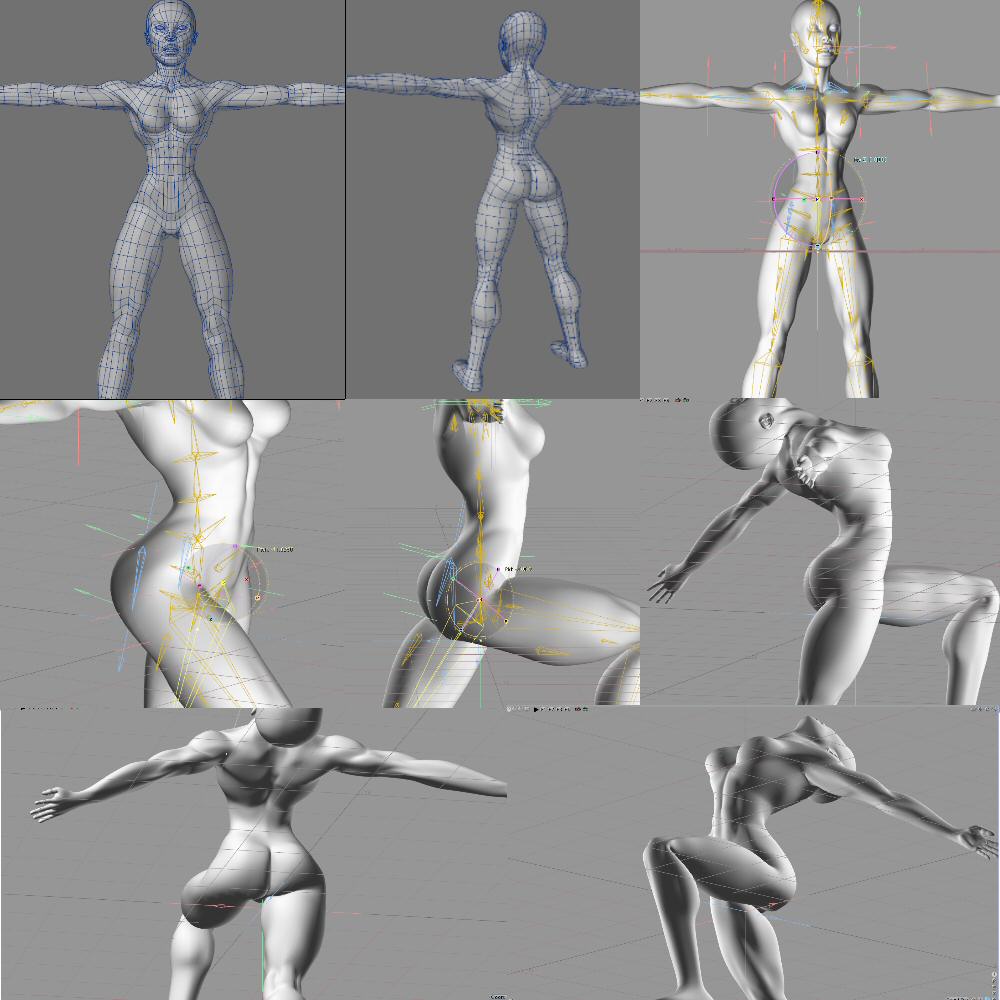

interesting set up Teph.
How you like Messiah? I am dying for a solid way of putting mocap in LW, but it all seems so glitchy. Motionbuilder seems lik eit handeles it well, just a bitch to get into LW.
I heard some good things about Messiah, just scares me that it don't have a solid company behind it.
lightwave, photoshop, oreo's...tools of the trade.
Heyas petes. I love it. Been using now since 2003. When I upgraded to vista and was having trouble running it I thought the world was going to end. hehehehe. Although I can rig in Lightwave, the slowness and clumisness of it remains. I'm very expression heavy and it's not uncommon for me to have 30 or 40 expressions per rig. Even Lightwave 9.6 doesn't seem to like that very much. Messiah doesn't even hiccup.
As for the company, heheheh. XSI going to autodesk, RH failure, Newtek's dibacle. Buying software is like navigating a mind field these days. We take our chances.
Thanks for posting this Tephladon. After looking at several models (including the 2 you have posted) I’m thinking some of my problem is with the topology of my model. The “V” shape in its hips is a lot sharper than most other models I’ve seen. I’ll definitely read and examine your set-up a lot closer at home….
Damn work always get’s in the way….. Thanks again.
Hey Pent, are you using graph editor or motion modifier to do your expressions. I've heard that makes a difference but I've never tested it. I always get slow response or sometimes no response when I implement my expressions. The model movement becomes jerky positioning clumsey. I don't know why that is and that's with just the 30-40 expressions I mentioned. I'd like to think my machine was fast enough who knows?
Attached Link: jerico rig
well... I try to keep them in graph editor as best I can... simply because if you swap the mesh, or rename it etc, they auto update, whereas the expressions under motion modifiers will keep the old names, and break until they're manually updated... But the MM expressions become necessary if you need after IK behaviour, etc...atm, for this rig, ive managed to keep it all in graph... I do find sometimes LW gets a lil choked over time, dont know why, but trashing the configs has always sorted all sorts of ills for me.
give the rig a download if u like and check it out... ive yet to add some updates on it, but its pretty fly as is..
Check the readme.
wow pent. I knew you were a good modeler but rigging too. That is a nice rig and about 90 expressions too. I've been playing around with it a bit. I'm not sure about the how the root bone handles general global positioning but that's more a question of style. I do like the FK/IK locks. That's something I generally don't apply to my rigs. I usually save by pose and tween the motions while remaining in IK the entire time. Yours is quite a bit more flexible in that respect. I'll keep that as an option should I run across trouble with my current techniques.
57 morphs mostly dealing with expressive motion. I'd probably work most of the stuff under fix into the rig. I however noticed that it is not all corrective. You got some expressive things there too that looks pretty cool. You've worked in a facial rig too. hehehehe, not bad. It's hard to avoid morphing in the face. It's one of the places where I endomorph heavily.
Have you considered using IK on the hands and fingers and toes? After setup it's alot less tedius to animate especially if slaving them to a single null so that scale can come into play.
I'm not much for corrective morphing as I have mentioned. I'm very big on expressions however and you seemed to have nailed that down tight. There's alot of elements that allow flexible control of the rig, my style doesn't require so many controls however. I don't use sliders much if at all. If I can't fit it on the rig, I'm probably not going to use it. Of course that is subject to change by circumstance.
I'm gonna spend some more time going over this rig and checking out your more motion oriented expressions. I'm interested in seeing how you work subtlety in your rigs as this one seems to breathe it although we have stark differences in style.
I had a chance to play around with some of the bone placement you recommended Tephladon and it worked like a charm. My amateur eye could not tell where you have all the hold bones, but once I moved my hip bone down added a bone to the front of the thigh and the one in the front of the pelvis (not sure if I’m describing that right) the crease in the hip started to look much better. I didn’t even have to change the geometry like I thought I might.
Quick question… When you guys design and build these advanced rigs. Can you import them to other characters with relative ease, or do you need to rebuild the whole thing per character?
ok... got a few extra mins...
re my style of rigging... Im basically just emulating the kind of control thats pretty much become standard in other apps such as maya and xsi, at least so far as LW is capable... the past few years character rigs have taken on something of an homogeny within the industry, much like cars... wheel, pedals, wipers, indicators, gear stick, all in much the same place in every model. Thing is, a lot of these approaches to character rigs were very difficult or impossible in earlier versions of LW, so LW kind of wound up with its own style of character rigs, which are, at least now, pretty clunky, old fashioned, and lacking in control.
I know of plenty folks who use IK all the time, on all limbs, and it only does you a disservice, you cant cant clean arcs, you cant get decent timing offsets down a chain, etc, etc... adn the result is character work that looks like, well... what a lot of folks have come to associate LW character anim with... amateur lookin and poserish. Not only that, but to try and get things looking more natural, especially arcs in this fashion requires a whole ton of keyframes and tweens... and it just winds up as one big fight.
The reason I build my rigs the way I do is for purposes of isolation, everything can either follow along with, or be sectioned off from any other area of the body.
As for doing IK on fingers, I cant see any reason... fingers have too many posing possibilities, sometimes just turning at one joint, sometimes on all joints... the only time IK on fingers ever helps is if u got a character planting their hands on something but lifting the palms off and onto the finger tips... in 6 yrs of character work Ive needed to do this once, and I just built the control as it was required for the shot... otherwise to get all the control and nuance u need in fingers out of an ik system means creating a controller for every single finger bone... which is poitnless... cos the finger bones are already capable as controllers themselves... u just waste time building a control system you already have a second time. And it takes just as long to animate... I find it far easier to just set up a couple of common hand/finger gesture poses, and copy paste them in at the appropriate moments.
Also the lock offs and space switching is a must have a lot of the time... u try having a character scrathing his head while gesturing... or better yet leaning his elbow on a table, and his chin on his hand without it... itll take hours or even days to do, and ull still get slippage... takes me seconds and its rock solid. Perhaps cupping the hands together and having his arms still be movable at the elbows and shoulders... good luck without space switching, lol.
Most of my expressions deal with space, and looking up vectors, or switching co-ordinate systems, which is what allows for the isolated and switchable control in things... generally the only driver expressions I use are quick picks, like the auto hip, to give real quick workflow when animating common tasks... like walk/run cycles. Also I use a lot for my context sensitive controls, to show/hide things, or turn things on or off in different modes, etc...
Its a layer cake, thats all, lol.
btw... when it coems to modelling... i suck ass!!

This is one of the most frustrating cool things about rigging a character…. There’s about 1000 different ways to do it, but you can build them to your taste. I tried using Maestro, but I found using their interface instead of manipulating the model frustrating. It was purely a personal thing, I know there are plenty of people that love the program. I’m currently watching some videos by Larry Shultz about IKbooster. It seems very interesting, do you all have any opinion of the tool?
Hey Teph... that looks like an incredible rig!
Any possibility of you providing it so we can examine and see how everything works? I've been "playing" around with rigging for the last few months and it's been VERY frustrating. Seeing these incredibly beautiful deformations has my mouth watering. I would truly LOVE to see how I could adapt it to my models.
Thanks!
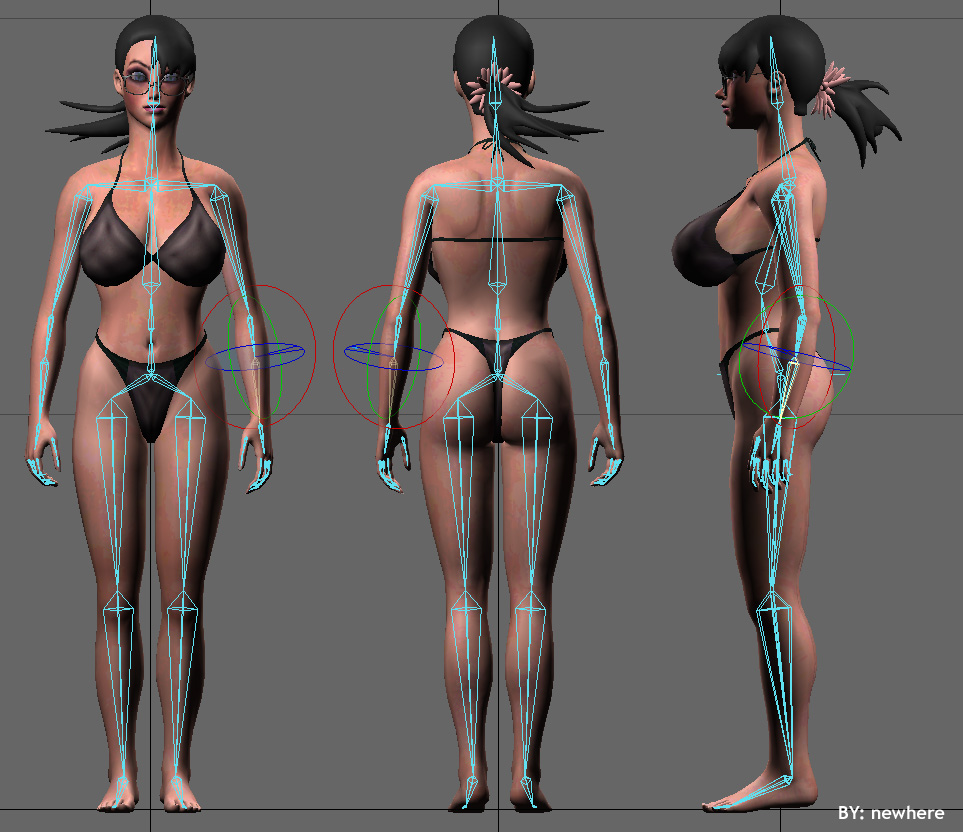
Quote - Try a more simple rig. It will save time animating and memory..........
Actually this is untrue... the more simplistic the rig the more time you'll waste while animating as you need to manually adjust for every little rotation and deform... Also, while heavier meshes eat up memory, heavier rigs, more bones, expressions, etc... use up very little... only a few meg at the most.
*Quote ~ Actually this is untrue... the more simplistic the rig the more time you'll waste while animating as you need to manually adjust for every little rotation and deform... Also, while heavier meshes eat up memory, heavier rigs, more bones, expressions, etc... use up very little... only a few meg at the most.
But what your saying is also untrue.....using complex rigs such like the one Tephladon is using will take up time animating because he will have to setup each in every bone on every keyframe he is animating as oppose to using the simple rig setup that i show in the picture (which uses "Goals" on certain key aspects of the body which are invisible). It is true however on what u said about using heavier meshes because that will take up memory. Which is why in Lightwave Layout you can down the quality of the mesh to a lower level to save memory space.
Quote - using complex rigs such like the one Tephladon is using will take up time animating because he will have to setup each in every bone on every keyframe he is animating
No, not at all... because u either construct your hold bones in such a fashion that they work for all your poses, or, if they need adjustment, you build in automation so as they animate themselves... trust me, I do it all the time... hundreds of bones all over the place... adn i never have to touch them.
its not, its absolutely necessary... ur rig is way too simple... I guarantee, you will get collapsing/pipe bend joints, weights alone wont cut it... also youve got no offsets in your hierarchies, so you'll get gimbal lock all over the shop... Lets see u try and raise her arm right up, get her hand behind her head, or spread her legs apart and twist her knees out...
Here is a video showing that:
http://s184.photobucket.com/albums/x52/newhere_bucket/?action=view¤t=Rigtesting.flv
Please note: the reason why the rig jumps like that is because of the limits i put on the IK.
Quote - A rig is nothing without the mesh it's supporting. I'm not going to post a mesh with potential on the internet. That would be the height of foolishness and an invitation of impropriety.
What you have shown is a BASIC humanoid mesh. There is nothing super special about the MESH. It is the rigging that is great. As you have said: "This is the type of rig I export from one model to the next."
Thanks anyway. :(
Quote - I am dying for a solid way of putting mocap in LW, but it all seems so glitchy. Motionbuilder seems lik eit handeles it well, just a bitch to get into LW.
What problems are you having with MotionBuilder To LW? It took me a long time to get it working (though LESS time than creating a decent rig - which I STILL have not done) and everything now works fine every time getting motions into LW. We're using OptiTrack and it's been flawless.
Newhere:
I don't have to do what you are suggesting I need to do. Basically all I need to do is work my goals. Whether you're using morph maps or bones, the secondary motions and corrections are AUTOMATED via expressions. Weights can only take you so far and they just might be part of the reason why yor rig is so jerky. Also you missed the entire point of my rig. I work outside of the program thinking. The whole point of my rig is to get good deformations in any program. I've created a paradigm that allows this, hence no weights or morphs.
Pentamiter is right. You may not see it yet but you will have problems down the line. What you are suggesting, I've done years ago when Lightwave 6 was first released. It's not good enough. My guess is Pent has already been down that road also.
Megalodon:
Why don't you build a BASIC! humanoid mesh and rig and post it, then we can both be happy. Do you know how many people have trouble modeling a BASIC humanoid mesh. There's nothing basic about it. Even poser has BASIC humanoid meshes and those BASIC meshes are also LICENSED! Or did the ownership part elude you? I guess you wanted something for nothing, I don't know but the Thanks for Nothing attitude can be shoved right back up your ass. I build it, I own it, I decide what to do with it. There's nothing BASIC about ownership.
Once it's out and some lazy modeler or animator decides to pick it up, tweek it, then use it in some paid project, there's no way I can track it for royalties. Yes, it's about money and I will get paid for my work. This naivete you're regurgitating not even close to pragmatic. If you don't think work is stolen off the internet then I don't know what to tell you. Any risk management team will tell you to take stringent control of your intellectual property.
I'm regretting more and more ever creating this post which initially made for rtlehr in response to his post. I just thought I'd jump in and allow others to view it. BIG MISTAKE! I guess I'll drop back into exile of this is the prevailing attitude here. No skin off my back, I already know how to do what needs to be done.
Quote - Megalodon:
Why don't you build a BASIC! humanoid mesh and rig and post it, then we can both be happy. Do you know how many people have trouble modeling a BASIC humanoid mesh. There's nothing basic about it. Even poser has BASIC humanoid meshes and those BASIC meshes are also LICENSED! Or did the ownership part elude you? I guess you wanted something for nothing, I don't know but the Thanks for Nothing attitude can be shoved right back up your ass. I build it, I own it, I decide what to do with it. There's nothing BASIC about ownership.Once it's out and some lazy modeler or animator decides to pick it up, tweek it, then use it in some paid project, there's no way I can track it for royalties. Yes, it's about money and I will get paid for my work. This naivete you're regurgitating not even close to pragmatic. If you don't think work is stolen off the internet then I don't know what to tell you. Any risk management team will tell you to take stringent control of your intellectual property.
I'm regretting more and more ever creating this post which initially made for rtlehr in response to his post. I just thought I'd jump in and allow others to view it. BIG MISTAKE! I guess I'll drop back into exile of this is the prevailing attitude here. No skin off my back, I already know how to do what needs to be done.
Nice dodge - especially after saying:
Quote - unless you're a messiah user, you won't get a complete rig. My lightwave rigs are only supplemental.
Hey smartguy...
http://www.daz3d.com/i/3d-models/free-3d-models?cat=382&_m=d
Basic human figures FOR FREE to use. Maybe your rig won't work perfectly with them... but it will STILL give a good idea as to how it DOES work.
NOT to mention the multitudes of "basic FREE human figures" available on the internet. Please though, feel free to continue your tirade about LICENSED models, etc. I don't want to elude anything. :)
You've got great pictures of a figure with bones but I have NO IDEA how those bones work with the mesh. What do you have them parented to? What is the strength? What kind of expressions do you use? Those pictures tell me NOTHING except bone placement - and that's not perfect since we can't see everything too well.
Yes... it would be TERRIBLE for you to supply the really great mesh you've got for us to see how the rig interacts. Penta can but not Teph. Or even use one of the FREE DAZ meshes OR other free human meshes available. Super secrets on how "the masters" can make a great rig but won't show IN DETAIL how it's done. I guess that's why I like SplineGod for showing how he does things in such detail.
I've worked with MB for some time and it took me a LONG TIME to get the workflow into LW seamlessly. When someone asked, I provided STEP BY STEP details on how it was done. Did THEY have to go through the same painful process to get to where I ended up? No. Why? Because I showed them step-by-step. Did it hurt me? No. Did it help them? Yes. It wasn't a super secret. Did they make money on MY information? Maybe, maybe not. So what!
Make money with YOUR rig/mesh? A rig does not an animation make. They would still have to animate it. And using a basic DAZ mesh would not hurt you at all. But it seems that you just want to keep it all to youself, and provide pictures and hints on just what CAN be done.
But yeah... feel free to go back into exile if you like. Keep making YOUR stuff without REALLY sharing how things were done. I will remember people like you as I continue to provide information to those asking for it. Maybe they'll make money off of the info I provide, or maybe they won't. Either way, I'm helping fellow animators the BEST I can without feeling I'm losing MY edge.
Maybe you should just write a tutorial and charge for it. Then you can make some cash and tell yourself that it was wirth it. ;)
PS. I was thinking... "finally, someone who can REALLY help" with my human rigging problems. Penta's mesh is nice, but the character is nowehere near human with the right proportions. And I end up with this. Sheesh.
Attached Link: advanced rigs and deforms...
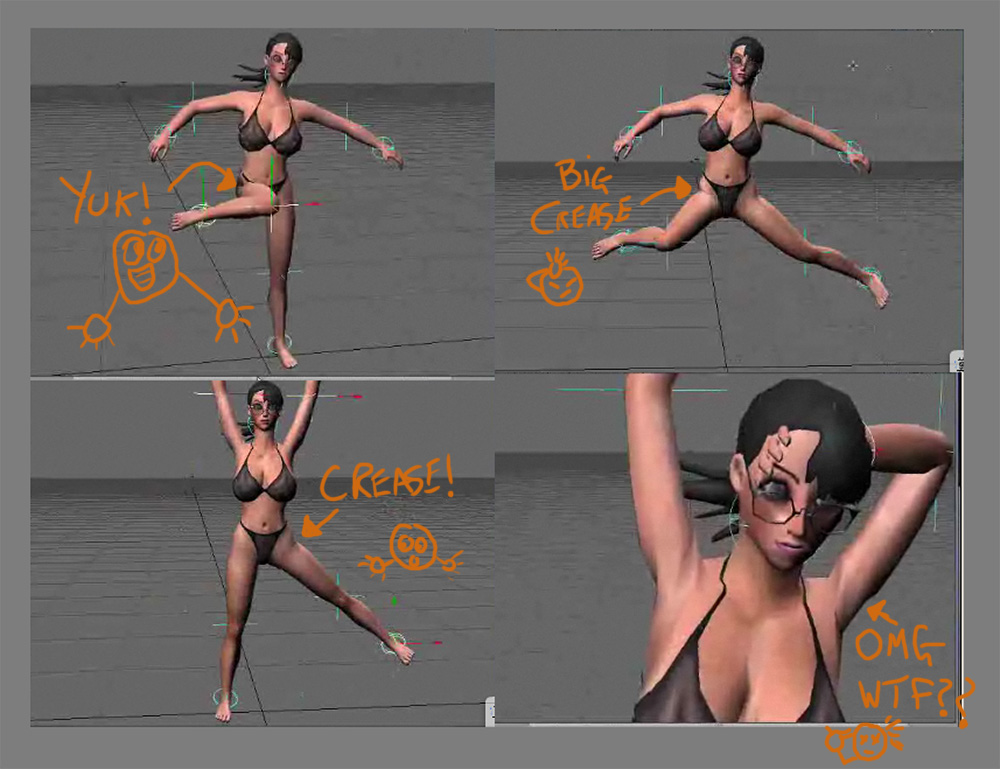
Well you see... that demonstrates EXACTLY what I said would happen... that rigs no good, mate, its very basic, and way sub-par for both deforms and animation... Not that thats a bad thing, we all have to start somewhere... but trust those of us who do this for a living when we tell u that u got a ways to go... check out the video of some of my stuff in action, look how well it holds up, look how quick and easy it is to work with...
Oh, and as for why you're getting problems with popping... I know you THINK its your rotation limits, but its not.. its a gimbal issue... eular flipping... honestly...
As for the teph/meg debacle here... teph, c'mon... NOBODY pays for character meshes anymore, you can get hundreds of high quality meshes for nothin all over the net, far higher quality than yours... all folks pay for now in bare meshes are ones of the absolute HIGHEST quality... like feature film fx quality... What sells are prerigged and tectured, and often animated meshes... So what if someone used your mesh in a commercial project, its not like anyone would buy it in the first place anyway, you've got nohting to lose...
But Meg.. if the guy wants to restrict the use/sharing of his actual data, then thats his perogative... theres NO onus on him AT ALL to give it away... like you say, (and me) theres no shortage of meshes out there (hell just download makehuman, endless supply of original characters there... jerico started out as a makehuman mesh, cos i suck at modelling)... But much as Im sure you'd like to see just where exactly the hold bones are placed, what their exact strengths and weights are... To examine a mesh like that aint gonna help you much... I can speak from vast experience that EVERY mesh is different... really... put a hold bone somewhere... see its effect, then (depending on the area of the body) you can move it just a couple of mm, andyoull get a totally different effect... theres SOooooo much that goes in... rest length, falloff distance, weight, strength, distance to certain vertices... its really something u have to "feel" your way through, and looking in depth at the EXACT values/positions on one character mesh wont really help you much on another one... promise... The rough pattern of bones placement, and where you need them will be pretty much the same from one mesh to another... but the exact details wont be... what teph's shown so far is about as much as you could hope to learn, even if he provided you with the mesh, scene, everything... Its the theory, not the execution that counts in this area... big time.
Happy rigging to all...
Quote - But Meg.. if the guy wants to restrict the use/sharing of his actual data, then thats his perogative... theres NO onus on him AT ALL to give it away... like you say, (and me) theres no shortage of meshes out there (hell just download makehuman, endless supply of original characters there... jerico started out as a makehuman mesh, cos i suck at modelling)
I agree. As there was no onus on me to provide detailed info on MB to LW. But I did because I was asked and I enjoy helping when I can - which is NOT very often. I suck at modeling too. The mesh I'm working with is a modified Hiro Toon character for my own short.
Quote - ... But much as Im sure you'd like to see just where exactly the hold bones are placed, what their exact strengths and weights are... To examine a mesh like that aint gonna help you much... I can speak from vast experience that EVERY mesh is different... really... put a hold bone somewhere... see its effect, then (depending on the area of the body) you can move it just a couple of mm, andyoull get a totally different effect... theres SOooooo much that goes in... rest length, falloff distance, weight, strength, distance to certain vertices... its really something u have to "feel" your way through, and looking in depth at the EXACT values/positions on one character mesh wont really help you much on another one... promise... The rough pattern of bones placement, and where you need them will be pretty much the same from one mesh to another... but the exact details wont be... what teph's shown so far is about as much as you could hope to learn, even if he provided you with the mesh, scene, everything... Its the theory, not the execution that counts in this area... big time.
This is where I disagree. Seeing how bones are placed and the details DOES help one to understand how things work - even if they don't work quite the same way on other meshes. Seeing behind the scenes as to WHERE bones are placed and WHAT they affect is extremely important - AND helpful. Obviously bone placement is important and can vary greatly between meshes - BUT... meshes that have similar size/volume, etc. CAN work with the same bones - maybe not perfectly, but they can be tweaked.
My characters have roughly the same proportion as the super mesh Teph illustrated. It would have been VERY nice to see a well-working rig on that size/type of character. As far as I'm concerned, it was a BS answer. Just wanting to keep secrets and paranoia. Thank goodness I don't run into these types of people often.
Thanks Pentamiter, but there's no real help here for me. I really was thinking... "finally, I can get really good deformation instead of just adequate deformation."
Oh well...
Quote - Acutally I pay for some meshes. Dosch design is one of my favorite places. Turbo squid has alot of nice stuff as well. A community with no money circulating around it is a community without resources. I also pay for humanoids.[/quote
I have a large library of purchased meshes - including Lo-Poly human figures which were also purchased. But then they are for arch-viz background only. Considering what is available on the internet - as well as Poser, Quidam, Make Human - there is no real reason to purchase separate meshes for human characters unless you want a specific type of character design that y9ou don't want to model. I certainly wouldn't be using YOUR characters - and no, not because I think they're bad, but because - I would not need that type of character. As I said previously, I'm using an altered Hiro Toon character (which I purchased and modified) and simply wanted to make the character deform better than I have it.
If times were better, I would pay an expert such as yourself to create the rig for my mesh. Unfortunately, last year my wife and I together made several thousand dollars less than our one employee - who we had to let go several months ago and wasn't making that much to begin with. Two years ago I would have asked you to create our rig. Now... we're running on savings. Then again... how much WOULD you charge? :)
People steal software all the time, but rarely have I seen meshes stolen AND used for profit. Your knowledge of rigging is worth FAR more than your mesh.
Oh well...

Quote - > Quote - Here is a video showing that:
http://s184.photobucket.com/albums/x52/newhere_bucket/?action=view¤t=Rigtesting.flv
Please note: the reason why the rig jumps like that is because of the limits i put on the IK.
Well you see... that demonstrates EXACTLY what I said would happen... that rigs no good, mate, its very basic, and way sub-par for both deforms and animation... Not that thats a bad thing, we all have to start somewhere... but trust those of us who do this for a living when we tell u that u got a ways to go... check out the video of some of my stuff in action, look how well it holds up, look how quick and easy it is to work with...
Oh, and as for why you're getting problems with popping... I know you THINK its your rotation limits, but its not.. its a gimbal issue... eular flipping... honestly...
As for the teph/meg debacle here... teph, c'mon... NOBODY pays for character meshes anymore, you can get hundreds of high quality meshes for nothin all over the net, far higher quality than yours... all folks pay for now in bare meshes are ones of the absolute HIGHEST quality... like feature film fx quality... What sells are prerigged and tectured, and often animated meshes... So what if someone used your mesh in a commercial project, its not like anyone would buy it in the first place anyway, you've got nohting to lose...
But Meg.. if the guy wants to restrict the use/sharing of his actual data, then thats his perogative... theres NO onus on him AT ALL to give it away... like you say, (and me) theres no shortage of meshes out there (hell just download makehuman, endless supply of original characters there... jerico started out as a makehuman mesh, cos i suck at modelling)... But much as Im sure you'd like to see just where exactly the hold bones are placed, what their exact strengths and weights are... To examine a mesh like that aint gonna help you much... I can speak from vast experience that EVERY mesh is different... really... put a hold bone somewhere... see its effect, then (depending on the area of the body) you can move it just a couple of mm, andyoull get a totally different effect... theres SOooooo much that goes in... rest length, falloff distance, weight, strength, distance to certain vertices... its really something u have to "feel" your way through, and looking in depth at the EXACT values/positions on one character mesh wont really help you much on another one... promise... The rough pattern of bones placement, and where you need them will be pretty much the same from one mesh to another... but the exact details wont be... what teph's shown so far is about as much as you could hope to learn, even if he provided you with the mesh, scene, everything... Its the theory, not the execution that counts in this area... big time.
Happy rigging to all...
Right on bud, gives me great pleasure to see you settle this without getting nasty. I knew you could do it :-p
Now how about helping out rtlehr with his hip thing? Can't be a biggie for ya to at least nudge him in the right direction...
RSpct

Privacy Notice
This site uses cookies to deliver the best experience. Our own cookies make user accounts and other features possible. Third-party cookies are used to display relevant ads and to analyze how Renderosity is used. By using our site, you acknowledge that you have read and understood our Terms of Service, including our Cookie Policy and our Privacy Policy.
Content Advisory! This message contains profanity
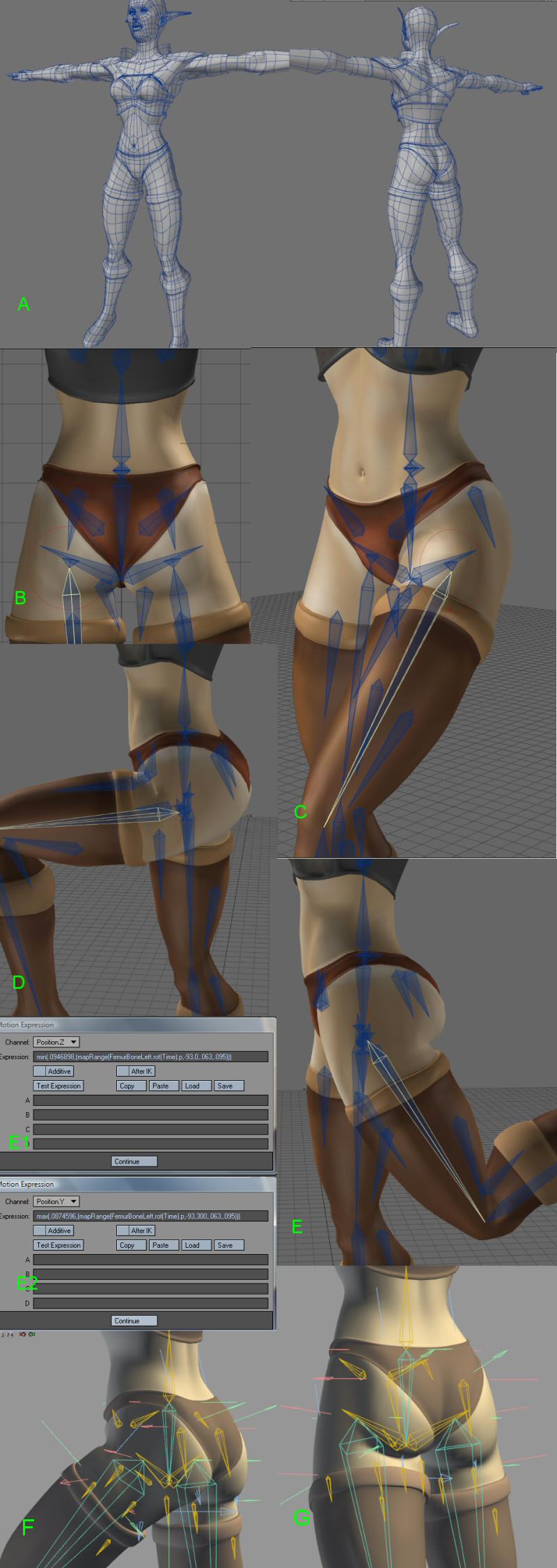
Welcome to my theory of rigging post with a focus on creating framework for the human hip.Rigging the human hip is a simple and complicated process. The simple part is that the building is straight-forward; back bone is connected to the hip bone, the thigh bone is connected to the hip bone, ect... The complex part is the fact that those 4 elements, back, hip, and thighs can lead you into deformation hell. This simple junction of bones is probably one of the most watched areas of 3D female human anatomy outside of breasts. By comparison, breasts are easy as they are only tissue and the number of approaches to that problem are many. Simply put, if you get breasts wrong you can always drop the dynamics and keep them stiff. However if you get the hips wrong and all of its moving parts, the entire rig can sometimes fall apart. That is unless you planning to shooting from the waist up and the thigh down. We however know how impractical that approach is. Some of us wanna see that ass.
Over the years of doing 3D I have developed a methodology for rigging this essential part of human body. Some of these rules you already know, others you probably question.
2. Keep it in the family
3. Be as robust as you need to be
4. Always think beyond the program in which you are working
Since this is the lightwave forum I'll focus on that program. I generally use Project Messiah for rigging and I will show the relationships in the rigging process between Lightwave and any other program.
Before we get started in ernest a few things need to be said about the relationship between modeling and animation. A model with bad topology will not deform correctly no matter what you do. Make sure you follow the guide lines when it comes to to modeling for animation. Static models do not have such constraints but models that you plan to animate, it's best to have intersections and good topology. Topology that allows you to more easily predict deformation than guess at it.
A. In the image provided you can see a mediocre model. I'm using this model to show that even a not-so-good model can have good results using my methods. All in all the topology is clean and the lines are easily tracable and the looping is simple.
B. Here we can see the hip rig. The human hip is a bone that uses alot of real-estate. You must add bones where that influence is most effective but not so many bones that you rig yourself into a corner. Allow the bones to work. Manipulate falloff where necessary. There are also hold bones at the thigh, I call them groin bones and bones at the gluts which I use most effectively for contraction, expansion and jiggling if motion dynamics fails.
C. I've been the leg slightly to show how deformation is forming. At this point it should be smooth. Creasing does not generally start until 45 degrees. Crease management is an art better mastered through practical application rather than explained in any one tutorial.
D. Implemented full 90 degree bend with crease. The deformation is robust around the hip, the lines are smooth and the look is acceptable at least.
E. 20 degrees to the rear you can see the gluts come into play using the expressions shown in E1. It may look redundant to use a null to control the glut bone however issues of scaling come into play when using expressions with bones therefore I avoided that but using a null instead. Notice how the gluts have contracted properly. Using this expression I can control how much creasing to have between the gluts and quads. Furthermore I can add jiggling where necessary should motion dynamics fail or results are unpredictable or insufficient.
F. and G. Proabably the two most important images in this piece.
It's the same basic rig, but done in Project Messiah. All of the same principles used in Lightwave have been applied to Messiah. The bone placement is relatively the same. The only difference is falloff which is shown in the size of the bones used. Still the expressions for glut contraction is there and the deformations are relatively the same. With the release of Lightwave 9.6 and the ability to have nulls as part of the rig, I can now export any rig made in Lightwave to messiah and all I would have to deal with is falloff.
Summary:
**
Keep it simple**
Though the rigging is robust, the model is not over-rigged. Bone falloff is allowed to happen and good deformation is achieved through that allowance. It's easy to track the roll that each and every bone is playing in the deformation of the object and adjust as needed.
Keep it in the family
There are no morph-maps, or weight maps in the rig. Only bones, and bones & nulls in the case of Messiah. Using bones allow greater flexibility and much better deformations that morphing. Weighing often makes the model harder to manage when rigging. Unless you have special applications for weight maps when rigging, avoid doing it. It's generally a waste of time. Learn to use expressions to achieve your desired results and automate them. I always have my hips and breast contract and expand with the expressions. It saves time and provides secondary motion that increase the appeal of your animations. It also provides more flexible and robust solutions to problems you often can't anticipate. Should I have problem I need not look beyond the bones and the model itself. No weights, no morph maps.
Be as robust as you need to be
The use of expressions and boning makes for a robust rig. This is the type of rig I export from one model to the next. There's plenty of motion in the hip. Secondary motion has been added through the use of clever boning and expressions. The role of all of the bones are easily tracable and expandible.
Always think beyond the program
This rigging method applys to nearly every program on the market. The problem with morph maps and weights is that they are generally program specific. Sure some features export but it becomes another feature that need to be tweeked and use is often never perfect and requires rescaling of values. Rigging with just bones removes that headace and provides a more universal and complete way of rigging for any program you use. I have just shown that I use the same methodology whether I'm rigging in Lightwave or Project Messiah. Should I go to Maya, chances are I would be using it again as it is a more pure approach to rigging even the most complex parts of a model such as a hip.