
Tephladon opened this issue on Apr 20, 2009 · 39 posts
Tephladon posted Mon, 20 April 2009 at 3:45 PM
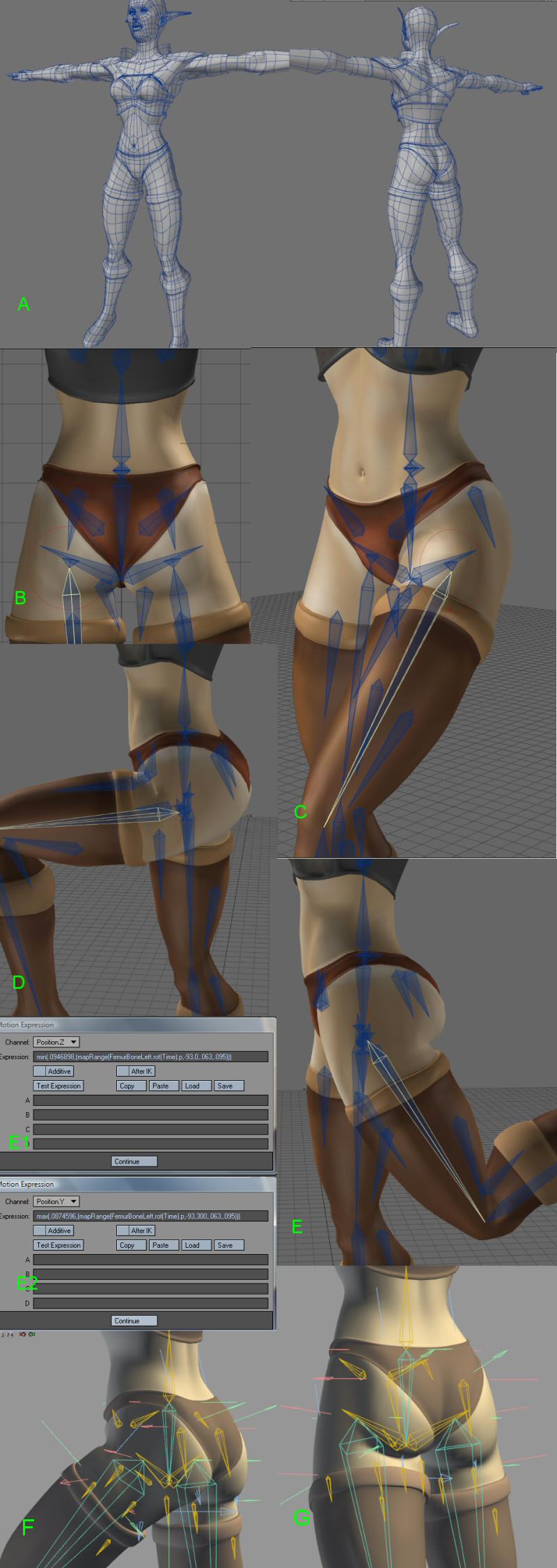
Rigging the human hip is a simple and complicated process. The simple part is that the building is straight-forward; back bone is connected to the hip bone, the thigh bone is connected to the hip bone, ect... The complex part is the fact that those 4 elements, back, hip, and thighs can lead you into deformation hell. This simple junction of bones is probably one of the most watched areas of 3D female human anatomy outside of breasts. By comparison, breasts are easy as they are only tissue and the number of approaches to that problem are many. Simply put, if you get breasts wrong you can always drop the dynamics and keep them stiff. However if you get the hips wrong and all of its moving parts, the entire rig can sometimes fall apart. That is unless you planning to shooting from the waist up and the thigh down. We however know how impractical that approach is. Some of us wanna see that ass.
Over the years of doing 3D I have developed a methodology for rigging this essential part of human body. Some of these rules you already know, others you probably question.
Since this is the lightwave forum I'll focus on that program. I generally use Project Messiah for rigging and I will show the relationships in the rigging process between Lightwave and any other program.
Before we get started in ernest a few things need to be said about the relationship between modeling and animation. A model with bad topology will not deform correctly no matter what you do. Make sure you follow the guide lines when it comes to to modeling for animation. Static models do not have such constraints but models that you plan to animate, it's best to have intersections and good topology. Topology that allows you to more easily predict deformation than guess at it.
A. In the image provided you can see a mediocre model. I'm using this model to show that even a not-so-good model can have good results using my methods. All in all the topology is clean and the lines are easily tracable and the looping is simple.
B. Here we can see the hip rig. The human hip is a bone that uses alot of real-estate. You must add bones where that influence is most effective but not so many bones that you rig yourself into a corner. Allow the bones to work. Manipulate falloff where necessary. There are also hold bones at the thigh, I call them groin bones and bones at the gluts which I use most effectively for contraction, expansion and jiggling if motion dynamics fails.
C. I've been the leg slightly to show how deformation is forming. At this point it should be smooth. Creasing does not generally start until 45 degrees. Crease management is an art better mastered through practical application rather than explained in any one tutorial.
D. Implemented full 90 degree bend with crease. The deformation is robust around the hip, the lines are smooth and the look is acceptable at least.
E. 20 degrees to the rear you can see the gluts come into play using the expressions shown in E1. It may look redundant to use a null to control the glut bone however issues of scaling come into play when using expressions with bones therefore I avoided that but using a null instead. Notice how the gluts have contracted properly. Using this expression I can control how much creasing to have between the gluts and quads. Furthermore I can add jiggling where necessary should motion dynamics fail or results are unpredictable or insufficient.
F. and G. Proabably the two most important images in this piece.
It's the same basic rig, but done in Project Messiah. All of the same principles used in Lightwave have been applied to Messiah. The bone placement is relatively the same. The only difference is falloff which is shown in the size of the bones used. Still the expressions for glut contraction is there and the deformations are relatively the same. With the release of Lightwave 9.6 and the ability to have nulls as part of the rig, I can now export any rig made in Lightwave to messiah and all I would have to deal with is falloff.
Summary:
**
Keep it simple**
Though the rigging is robust, the model is not over-rigged. Bone falloff is allowed to happen and good deformation is achieved through that allowance. It's easy to track the roll that each and every bone is playing in the deformation of the object and adjust as needed.
Keep it in the family
There are no morph-maps, or weight maps in the rig. Only bones, and bones & nulls in the case of Messiah. Using bones allow greater flexibility and much better deformations that morphing. Weighing often makes the model harder to manage when rigging. Unless you have special applications for weight maps when rigging, avoid doing it. It's generally a waste of time. Learn to use expressions to achieve your desired results and automate them. I always have my hips and breast contract and expand with the expressions. It saves time and provides secondary motion that increase the appeal of your animations. It also provides more flexible and robust solutions to problems you often can't anticipate. Should I have problem I need not look beyond the bones and the model itself. No weights, no morph maps.
Be as robust as you need to be
The use of expressions and boning makes for a robust rig. This is the type of rig I export from one model to the next. There's plenty of motion in the hip. Secondary motion has been added through the use of clever boning and expressions. The role of all of the bones are easily tracable and expandible.
Always think beyond the program
This rigging method applys to nearly every program on the market. The problem with morph maps and weights is that they are generally program specific. Sure some features export but it becomes another feature that need to be tweeked and use is often never perfect and requires rescaling of values. Rigging with just bones removes that headace and provides a more universal and complete way of rigging for any program you use. I have just shown that I use the same methodology whether I'm rigging in Lightwave or Project Messiah. Should I go to Maya, chances are I would be using it again as it is a more pure approach to rigging even the most complex parts of a model such as a hip.