
Renderosity Forums / Cinema 4D
Welcome to the Cinema 4D Forum
Forum Moderators: CHMedia Forum Coordinators: Kalypso
Cinema 4D F.A.Q (Last Updated: 2024 Aug 27 11:07 am)

| C4D Gallery | Speed Modeling Sessions | C4D Freestuff |

Subject: Deleting Useless Edges?


I couldn't find a way to do it, so I had to quadrangulate the faces...
I take too much for granted when I'm working on Cinema. If that happened to me in Maya I could simply delete the edge. If I do that in cinema I get a hole on my model XD
nemirc
Renderosity Magazine Staff Writer
https://renderositymagazine.com/users/nemirc
https://about.me/aris3d/
Bingo! ;-)
Yes, I'm watching the Gnomon DVD "Vehicle Modeling for Production" with Paul Schoen - and yes, he does that often. As I'm thinking of my models up to now, there is always a bunch of edges I could just plain delete that are doing nothing for the finished product other than making more polys for C4D to render.
It may just be something C4D can't do, so I just need to plan my cuts better.
-Lew


Just select the offending Edge and go to Structure > Dissolve. You can even select loops of Edges, both a single loop and multiple, and delete them using this command without destroying the mesh. I have the Dissolve command mapped to Shift + Backspace -- very handy!
nemirc: If your whole model gets deleted when you hit Backspace/Delete, make sure your cursor is inside the Editor View! If the cursor hovers inside the Attribute Manager you will delete the selected object, if it's inside the Material Manager you will delete the selected material and so on. It's a sometimes annoying feature of C4D ;)
/Anders
Gallery | Store | dogday-design.se

'Dissolve' is a special feature of the R11, right? I use R10 and I just had a look but couldn't find that command in my structure menu.
To get rid of edgeloops with earlier versions you can also do the following:
1.) Select all the unnecessary edgeloops.
2.) Convert this selection into a point selection (you'll understand the reason why in a second...).
3.) Now switch back to the loop selection and use 'melt'.
4.) Switch once again back to the point selection and just delete all the selected points.
That's a very clean way do delete loops and all of their points without destroying the mesh.
Ooops, you may be right that it's an R11 function, didn't think about that!
If you guys are still on R10 or below you might want to consider a very affordable plugin called SpinPoly. It's only $10 and I still use it with R11 (old habits die slowly ;)
/Anders
Gallery | Store | dogday-design.se

You can remove multiple edges and loops with Melt but it leaves the points. Dissolve will delete the edges as well as the points so there is no clean up (Optimize) needed.
/Anders
Gallery | Store | dogday-design.se
In the example above, only 2 triangles need making into one quad, in which case Melt will suffice, and there will be no extra points.
Adam :)
Adam Benton | www.kromekat.com
Thanks folks!
Yeah - the above example was made last night - just made a cube, gave it basic division, and made an edge to illustrate a "useless edge" - sometimes describing things doesn't quite do it.
And also - yep, and sorry for this - I didn't explain that I'm still using 9.6 - haven't been able to afford the upgrade yet. Thought I was going to last month but that didn't happen (obviously).
The actual general messes I want to clean up are fairly dense sets of edges - sounds like (while still using 9.6) the switching back and forth between points and edges using Melt and deleting the remaining points is my way to go.
Thanks again-
-Lew ;-)
Here is a way to use dissolve in versions previous to r.11. Its great script made by tank from 3Dattack :)
Just copy/paste this in Script manager, assign the hot key and you set :)
if(!instanceof(op, PolygonObject)) return;
var bc = new(BaseContainer);
var dbc = new(BaseContainer);
bc->SetData(MDATA_CONVERTSELECTION_LEFT, 1);
bc->SetData(MDATA_CONVERTSELECTION_RIGHT, 0);
SendModelingCommand(MCOMMAND_CONVERTSELECTION, NULL, op, bc, MODIFY_ALL);
CallCommand(ID_MODELING_MELT_COMMAND);
SendModelingCommand(MCOMMAND_DELETE, NULL, op, dbc, MODIFY_POINTSELECTION);
Open your mind and share the knowledge!

Quote - Ooops, you may be right that it's an R11 function, didn't think about that!
If you guys are still on R10 or below you might want to consider a very affordable plugin called SpinPoly. It's only $10 and I still use it with R11 (old habits die slowly ;)
/Anders
I have R10.5 and it has Dissolve in the structure menu
Steph
Steph
Portfolio

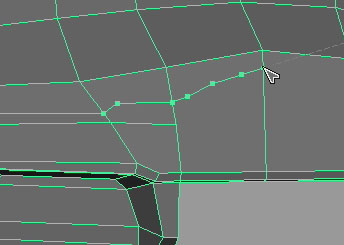
You want to add cuts like that ?
Use knife (line mode), uncheck "single". Cut edges like you draw with pen.
Select those edges and use "Edge cut", add necessary points with it.
Finally use "Slide" to place those points as you want perfectly aligned to surface.
Though it would be nice to be able to add points on surface like that :)
Tihomir
Open your mind and share the knowledge!

Privacy Notice
This site uses cookies to deliver the best experience. Our own cookies make user accounts and other features possible. Third-party cookies are used to display relevant ads and to analyze how Renderosity is used. By using our site, you acknowledge that you have read and understood our Terms of Service, including our Cookie Policy and our Privacy Policy.
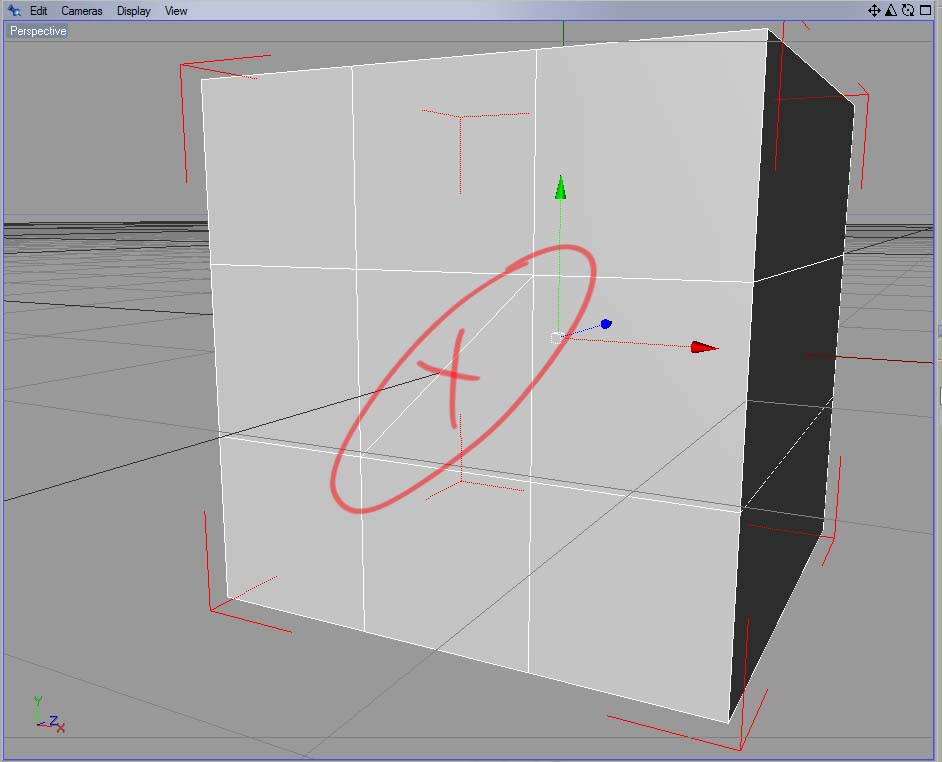
Is there a way to simply delete an edge like this one, or do I need to go through Bridge or something?I'm about to do some fairly complex modeling all over again, and it would help to be able to clean up some edges just to simplify things as I go (my stuff usually ends up being a polygon mess - too many extraneous edges). And when I merely select the edge, and hit delete, it takes away the polygon it's sitting on as well.
Thoughts? Any and all ideas would be appreciated.
-Lew