
Renderosity Forums / Cinema 4D
Welcome to the Cinema 4D Forum
Forum Moderators: CHMedia Forum Coordinators: Kalypso
Cinema 4D F.A.Q (Last Updated: 2024 Aug 27 11:07 am)

| C4D Gallery | Speed Modeling Sessions | C4D Freestuff |

Subject: Making an object transparent in viewport

The best method I could find is enabling the X-Ray and disabling the Sel.: Wireframe in the Viewport settings.
Patrick
www.patrickeischen.com
"Someday, you'll be
cool!"

You can do several things to help with the sort of thing you show.
In the Display menu of your viewport enable backface culling. In the Filter menu disable HN Mesh. Both of these will help you see through to your image.
If you still want transparency create a material with transparency and assign it to the mesh and switch to Gouraud shading.
There is also the X-ray option in the Attributes manager but with a HyperNurbs object in the scene if you are in the habit of switching that off and on it can be a bit of a pain.

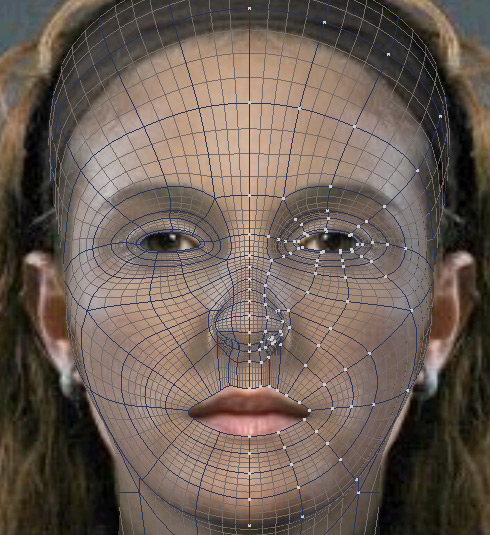

I usually work in X-ray, with Gouraud Shading+Lines, although yeah you can also set the material to be transparent.

Privacy Notice
This site uses cookies to deliver the best experience. Our own cookies make user accounts and other features possible. Third-party cookies are used to display relevant ads and to analyze how Renderosity is used. By using our site, you acknowledge that you have read and understood our Terms of Service, including our Cookie Policy and our Privacy Policy.

Is it possible to make a selected model in the perspective viewport transparent so that you can see the background image on a background object. My image should make clear what I mean. I can't see anything what's going on.Patrick
www.patrickeischen.com
"Someday, you'll be cool!"