
Renderosity Forums / Carrara
Welcome to the Carrara Forum
Forum Coordinators: Kalypso, Anim8dtoon
Carrara F.A.Q (Last Updated: 2026 Sep 09 4:39 am)
Visit the Carrara Gallery here.

Subject: @#$% C6 CAMERAS!


1 - isometric cameras are made for creating game levels or strange renders. It make all algles parallel to the camera, so ou can best see the results using buildings and houses. So to betteruse Isometric cams you dont need to adjust the production frame, just use the Zoom function to getyour subject in the scene, here if you move the camera forward or back it wil cut you subject away.
2 - Swap is a plugin from Inagoni for only 10 bucks:
http://www.inagoni.com/content.php?content.6
Follow me at euQfiz Digital

Quote - OK I thought I had cameras figures out in Carrara 6. But now I just plain give up. If you set up an isometric camera and you center the production frame on your object why does the renderer give me something other than what is in the production frame??? I would like to say that I am happy with C6 but so far it seems like I need to relearn a lot of stuff. What happened to inches? Why change it to feet? (Admitedly I would prefer the metric system) And I'm sorry I guess it was stupid of me to think they might redo the manual and put a little more info in it. Daz also seemed to do away with the quick response time with email questions that was one of the things I thought was so great about Eovia. Anyway if anyone can explain to a simpleton such as myself how to work these @#$#$ cameras. I woul apreciate it. Thanks in advance. Grumble grumble...^%#$ cameras grumble grumble Paul
Go to File, Preferences, General Scene settings and you can switch the measure of units to metric in the top box pulldown.As for the Camera, make double sure you have the correct camera selected on the output tab of the render room menus.

Privacy Notice
This site uses cookies to deliver the best experience. Our own cookies make user accounts and other features possible. Third-party cookies are used to display relevant ads and to analyze how Renderosity is used. By using our site, you acknowledge that you have read and understood our Terms of Service, including our Cookie Policy and our Privacy Policy.
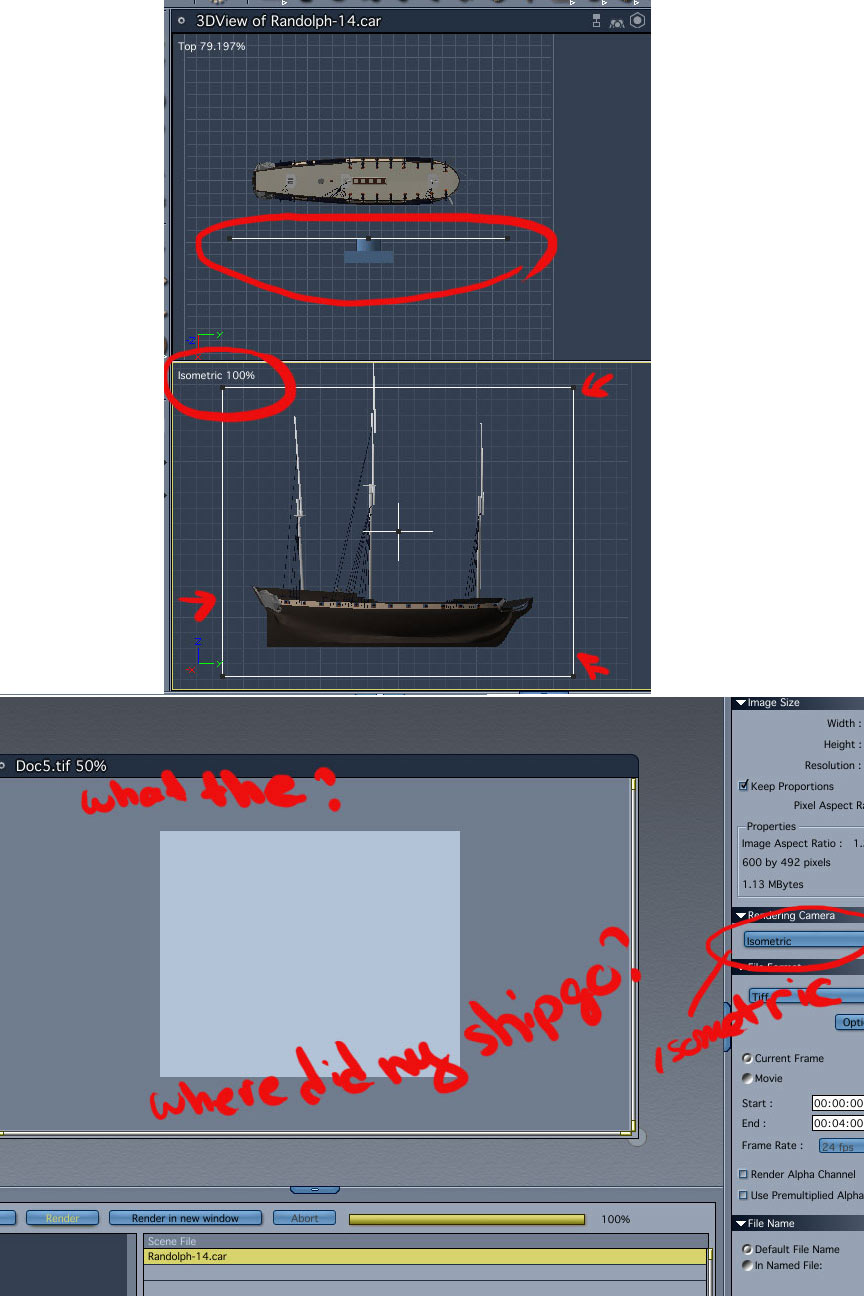
OK I thought I had cameras figures out in Carrara 6. But now I just plain give up. If you set up an isometric camera and you center the production frame on your object why does the renderer give me something other than what is in the production frame??? I would like to say that I am happy with C6 but so far it seems like I need to relearn a lot of stuff. What happened to inches? Why change it to feet? (Admitedly I would prefer the metric system) And I'm sorry I guess it was stupid of me to think they might redo the manual and put a little more info in it. Daz also seemed to do away with the quick response time with email questions that was one of the things I thought was so great about Eovia. Anyway if anyone can explain to a simpleton such as myself how to work these @#$#$ cameras. I woul apreciate it. Thanks in advance. Grumble grumble...^%#$ cameras grumble grumble Paul