
Renderosity Forums / Poser - OFFICIAL
Welcome to the Poser - OFFICIAL Forum
Forum Moderators: RedPhantom Forum Coordinators: Anim8dtoon
Poser - OFFICIAL F.A.Q (Last Updated: 2026 Oct 03 4:20 pm)

Subject: Black and White renders


Not with normal renders. The sketch designer will give you black and white output, but it also modifies the look of the image. If you have a paint program like Photoshop, PSP, or the Gimp, it's a fairly simple matter to convert the images to black and white.
You could go into the shaders for every material in your image and change the colors to gray scale, or gray scale all of your image maps, too.

Attached Link: http://www.renderosity.com/mod/forumpro/showthread.php?thread_id=2539548
It doesn't seem very possible. I asked that question months ago. Anyway here is the thread and the comments to my question."It is good to see ourselves as
others see us. Try as we may, we are never
able to know ourselves fully as we
are, especially the evil side of us.
This we can do only if we are not
angry with our critics but will take in good
heart whatever they might have to
say." - Ghandi

If you're doing a toon type render, you can do various gray tones with that route
Example of gray tone toon render (done with modified elements from the Sixus Toon shader pack)

Best bet though otherwise is take the textures in and desaturate/remove all color in Photoshop (or whatever you have). I did this for a partial effect on a two part render I did...I wanted a bright colorful scene, but one character needed to be the odd person out. So I just converted all the textures to gray scale, futzed with the levels to help control how light or dark it was and then rendered away.

Crazy alien chick FTW! (yeah....right....)
Realm of Savage - Poser
goodies and so much more!
~~

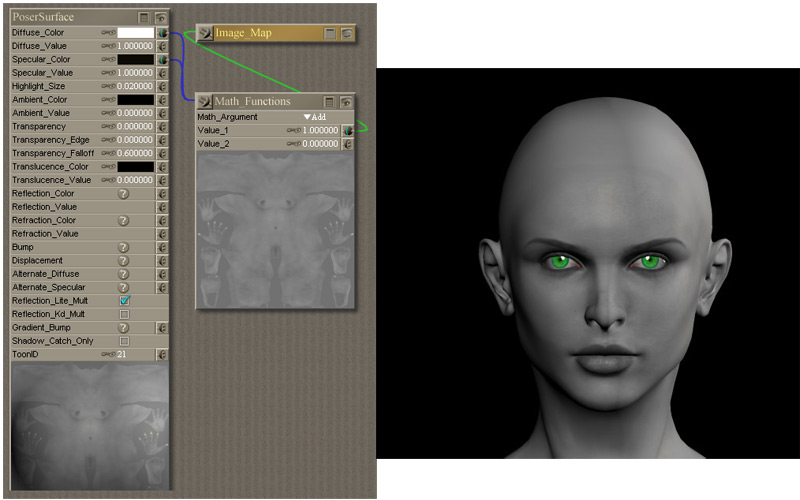
<-insert words of wisdom here->

Interesting. I've always used the HSV node with Saturation set to 0. I'll try using the Add next time. It looks like it requires even less settings :o)
FREEBIES! | My Gallery | My Store | My FB | Tumblr |
You just can't put the words "Poserites" and "happy" in the same sentence - didn't you know that? LaurieA
Using Poser since 2002. Currently at Version 11.1 - Win 10.
I came to this stuff with a background in photography, and getting a greyscale "right" can be tricky. Photographs were routinely adjusted, to correct for the differences between the eye and film, and to show colour differences that were lost. All this is for black-and-white film: The film is more sensitive to blue light, and older films didn't respond to red light (which meant makeup for cinema actors was a bit odd-looking). Photographers routinely used a yellow filter: yellow because it blocks blue light. And green trees reflect red and infra-red light. If you want something that looks right for an old photo, up to about the 1920w, split the render into channels and just use the blue. Unfortunately, filters rarely match the RGB split of a CGI image, or what a digital camera records. Yoo may need to reduce the blue brightness a bit and include a little of the green channel. By the 1940s, film could respond to red light, but you still have the excess blue-sensitivity. If you're using a Clouds shader for your sky, you might do better to use grey instead of blue for the base colour, which would give the chief effect of the yellow filter. Without it, clouds tended to vanish. Incidentally, modern chromogenic films use the dye immages of colour film, but still try to match the behaviour of traditional black and white. It's what photographers expect. There are other differences besides the colour response.
Thanks for those tips, AntoniaTiger :o) I'll definately keep them in mind. I like making B/W pictures out of my renders. Mosttimes it makes them look more real. So far I've just fiddled around with the filters in Photoshop until I got the result I wanted but at least now I'll know what to actually look for :D
An example:

FREEBIES! | My Gallery | My Store | My FB | Tumblr |
You just can't put the words "Poserites" and "happy" in the same sentence - didn't you know that? LaurieA
Using Poser since 2002. Currently at Version 11.1 - Win 10.

Privacy Notice
This site uses cookies to deliver the best experience. Our own cookies make user accounts and other features possible. Third-party cookies are used to display relevant ads and to analyze how Renderosity is used. By using our site, you acknowledge that you have read and understood our Terms of Service, including our Cookie Policy and our Privacy Policy.
Maybe dumb question - but is it possible to render directly in black and white. How?